

More than 10 million accounts opened, and an overwhelming majority of users eager to praise its merits: these figures place Tuta among the sector’s benchmarks when it comes to encrypted messaging. Privacy occupies a central role, backed by end-to-end encryption applied to all exchanges. The question remains: how does the service perform in daily use? We put it to the test.
Born fifteen years ago on the other side of the Rhine, Tuta adopts a philosophy opposite to Proton, which built its success on a multitude of ancillary services. Here, the emphasis is on simplicity: this provider concentrates its efforts on the essentials rather than multiplying features, a stance that largely explains its loyal user base.
- storage1 GB storage
- securityNative encryption by default
- alternate_emailNo custom domain
- smartphoneiOS and Android apps
- push_pinEU jurisdiction
Tuta is a secure messaging service that proves particularly effective in its commitment to user privacy. However, it still lacks a number of features and doesn’t guide users through transitions very well.
- End-to-end message encryption
- Affordable premium options
- U2F-compatible keys for 2FA
- Manual migration (automation in closed beta)
- Very basic calendar
- Significant feature delays
Tuta Mail: Key Points to Remember
- Total privacy by default : end-to-end encryption with a zero-knowledge architecture (AES 128 + RSA 2048), including the message subject, unlike Proton Mail. Tuta has also rolled out TutaCrypt, a protocol resistant to quantum attacks.
- Simple interface, no frills : quick onboarding and instant loading, but limited customization (fixed layout, no mini-calendar, only a basic calendar) after 13 years of existence.
- Migration still artisanal : there is no automatic Gmail bridge as with Proton; imports are manual (EML/MBOX files) from desktop clients, and the IMAP incompatibility is structural, tied to the encryption.
- Very competitive pricing : free plan (1 GB, 1 address) and two paid offerings, Revolutionary (3€/month) and Legend (8€/month), cheaper than Proton Mail for similar mail-focused features.
- Against Proton Mail : Tuta wins on strict privacy and price, but Proton remains more interoperable (OpenPGP standard), better legally positioned (Switzerland) and offers a broader ecosystem (VPN, Drive, Pass).
- Clubic verdict: 7/10. A solid and earnest service for privacy protection, hampered by a slow development pace (about 30 staff versus 400+ at Proton) and limited transition support for new users.
Tuta Mail: Getting Started and Managing Messages
Clutter-free and fast. That’s likely the first impression the web app gives at launch. In the top-right corner sits the main menu for mail, calendar, and address book. Unlike Proton, which can feel slow when loading its web apps, here the loading is instantaneous.
Getting started with Tuta is relatively straightforward. After all, email services don’t come with a myriad of options. To organize messages, you can create rules, but those rules are fairly basic and, to be frank, a bit dated. Until January 2025, Tuta offered only folders, which could deter longtime Gmail users. Tuta has since modernized its mail approach and now combines folders with labels.
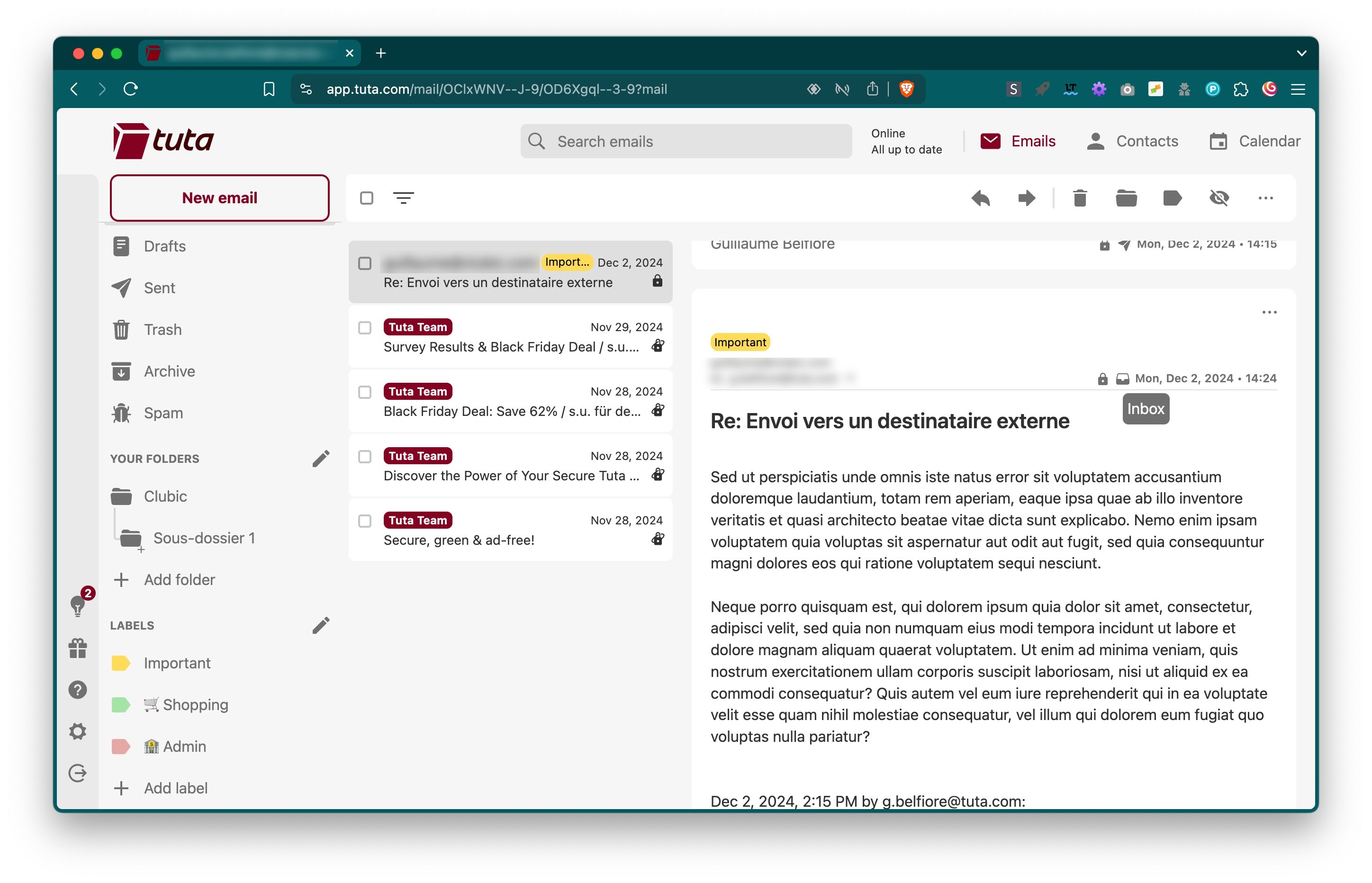
The interface isn’t obsolete, but it isn’t particularly modern either. It isn’t possible to resize the three-pane column layout, nor to hide the folder list to widen the message thread or the preview pane. There’s no mini-calendar beneath the folder list, and there’s no internal notification for upcoming appointments. In short, Tuta feels a bit crude—after thirteen years of development, that’s a little disappointing.
By default, the search engine is disabled. You need to toggle it in the options. Tuta then builds an encrypted index stored locally on the device. Searches are performed locally, similar to Proton Mail, and depending on the index time, this can temporarily affect browser performance if you have a large message base.
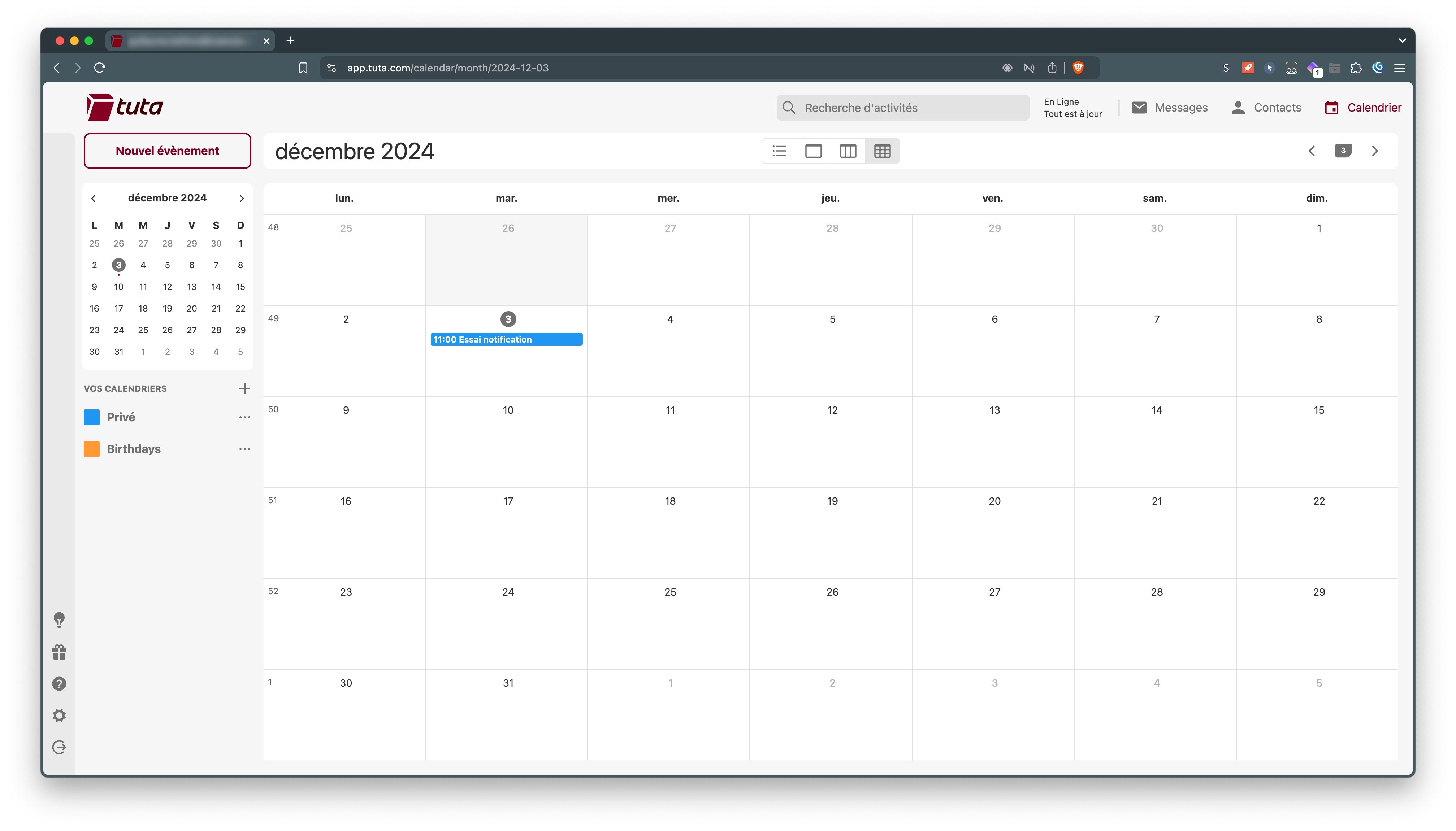
Tuta provides desktop clients for Windows, macOS and Linux, which immediately sets it apart from many competitors that rely solely on a web app. These desktop clients mirror the full web interface and offer some tangible benefits: system notifications, offline access (on paid plans), and better handling of local search than a browser-based experience.
However, the desktop clients don’t allow adding a third-party account via IMAP, nor managing multiple Tuta accounts in the same window. The experience remains that of a dedicated app for a single account, without the integrations a universal client like Thunderbird could provide, even if Tuta now offers an extension for Thunderbird since early 2026.
The mobile apps for iOS and Android don’t offer many features either. Like early Proton Mail versions, they resemble web apps wrapped in a native shell. The experience isn’t as rich as with a dedicated desktop client, and there’s no option to add a second Tuta account or to configure a standard third-party account via IMAP, for instance.
Tuta Mail: Security and Privacy
In terms of security, the software protects messages and attachments by combining AES 128 symmetric encryption with RSA 2048 asymmetric encryption. Since this is a zero-knowledge architecture, Tuta’s team cannot access user message contents. The mailbox is ad-free, and the company does not scan emails. The approach is thus quite healthy: to fully enjoy the service, a user can test it with a free account or opt for a paid subscription to directly support the development team.
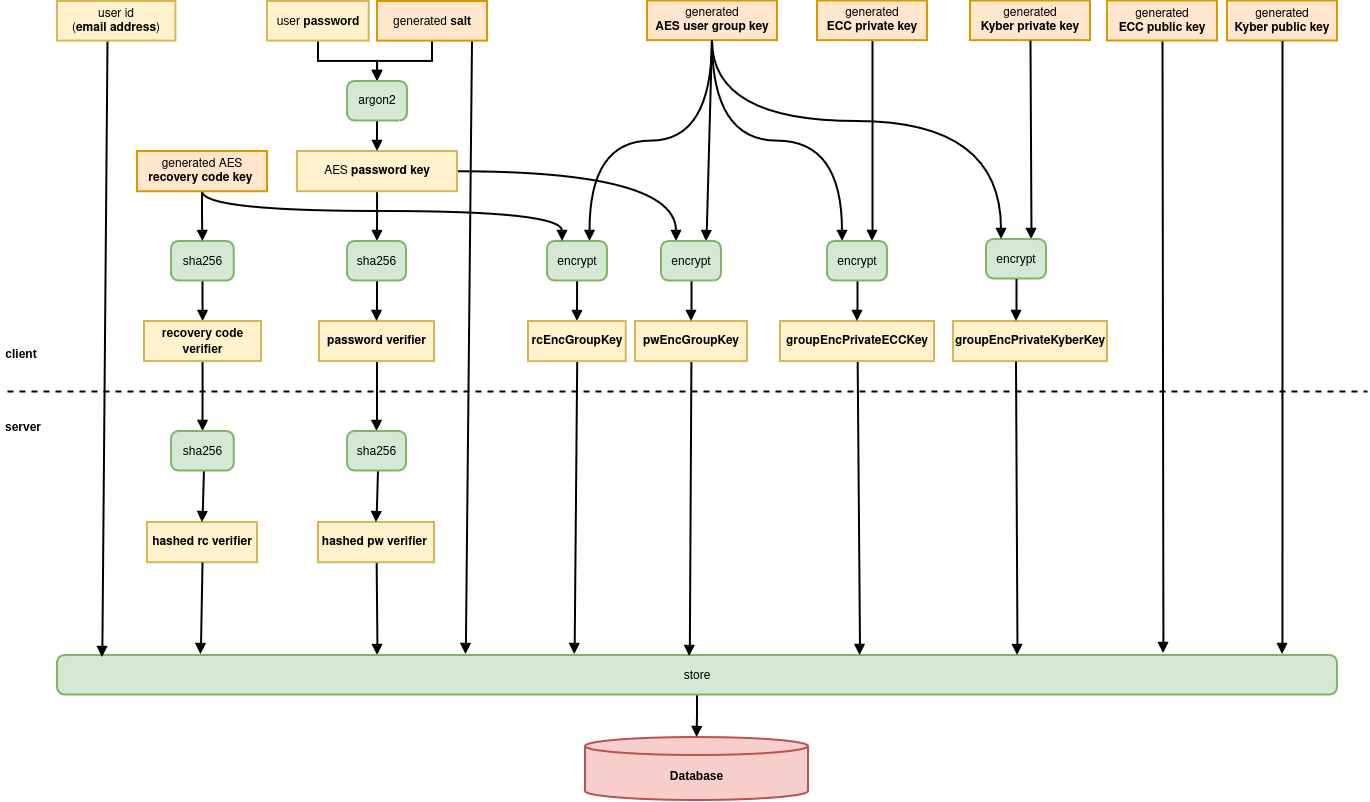
Note that unlike Proton Mail, Tuta Mail also encrypts the subject line of messages. Proton had chosen to omit this to facilitate searching within the inbox. By contrast, while Proton relies on the OpenPGP standard, Tuta uses a proprietary (though open source) encryption approach. This means Tuta Mail isn’t interoperable with other encryption tools or clients for end-to-end encryption. Tuta still uses standard algorithms like AES and RSA, but implements them in a way tailored to its security and privacy needs. It’s likely why Tuta rapidly developed multi-platform clients.
In 2024, Tuta announced the creation of the first email system capable of resisting quantum attacks. The developers indeed created a new protocol dubbed TutaCrypt. For each account, TutaCrypt generates two key pairs, the first on x25519 for conventional encryption, and the second on Kyber-1024 to shield messages against quantum threats.
What does that mean for you in practical terms?
When you receive an email from a Gmail contact on your Tuta inbox, this message is encrypted as soon as it lands on Tuta’s servers. Even if a hacker managed to access the servers, they would only obtain unreadable text. Likewise, if you exchange with another Tuta user, neither the subject nor the body nor attachments pass in the clear, unlike Proton Mail, which does not encrypt the subject of messages in its communications with third-party services.
Quantum resistance prepares for the future: quantum computers could theoretically break current algorithms in a few years. By deploying the TutaCrypt protocol, Tuta protects your communications against attacks that do not yet exist. In practical daily use, you won’t notice any difference, but your message history is protected in the long term.
Tuta Tackles Controversies
In 2020, the Cologne Regional Court ordered the company to place a backdoor in its messaging to allow authorities access to unencrypted copies of emails. Tuta opposed this request.
Three years later, the company denied statements by Cameron Ortis, a former Canadian intelligence official, who claimed Tuta was just a showroom under surveillance. Among other things, the developers publicly released the encryption source code.
Clearly, the encryption practices have drawn some friction with authorities. Ultimately, these conflicts seem to reflect the quality of Tuta’s privacy work rather than undermining it.
Encryption for All
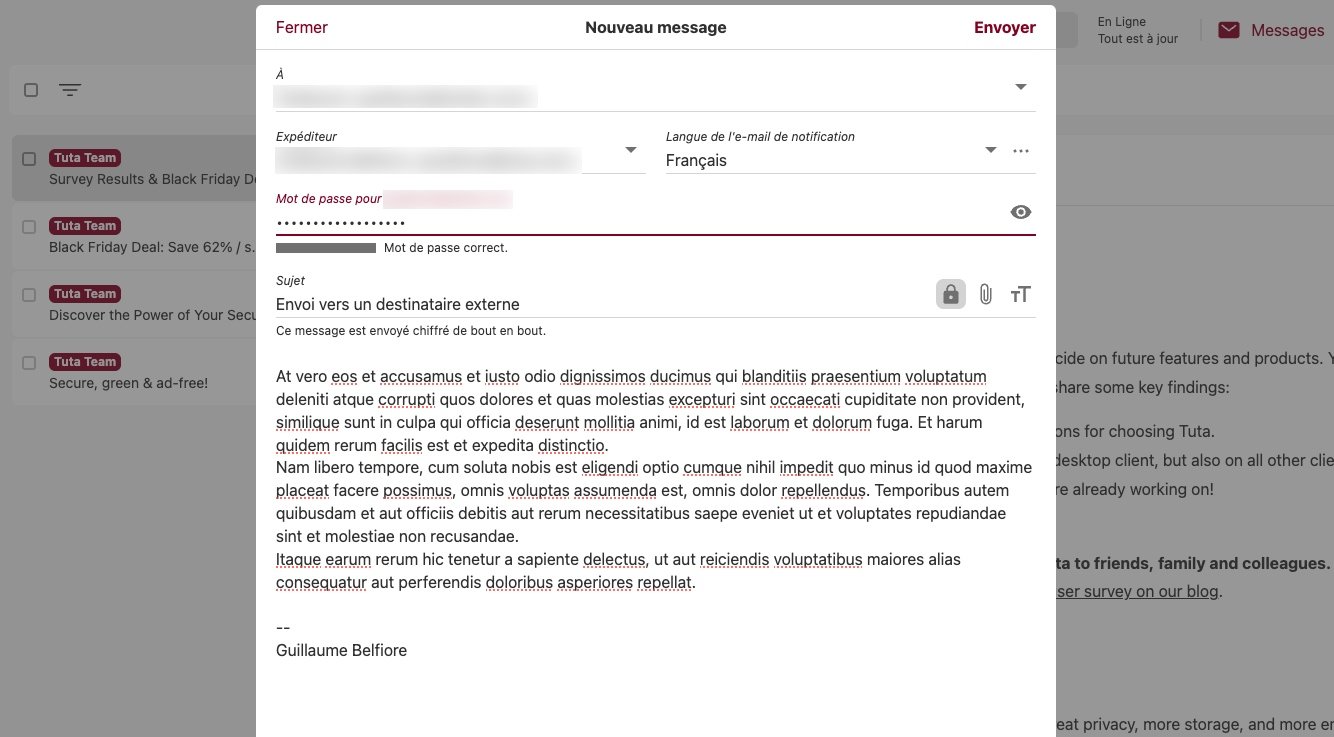
By turning on Privacy (Turn on Privacy), Tuta emphasizes privacy protection. Yet, at account creation, the company does not offer two-factor authentication enabled by default. It’s a bit disappointing, especially since even large tech firms increasingly encourage users to secure accounts with this method beyond a simple password.
There’s also the question of jurisdiction. Unlike Proton Mail or Infomaniak Mail, which are based in Switzerland, Tuta is headquartered in Germany. The company is thus subject to EU law (with local rules that limit cooperation with foreign services). In any case, regardless of jurisdiction, messages are encrypted. If you want even stronger privacy, you might consider masking your IP by connecting through a VPN.
Migration to Tuta Mail
For a long time, migrating to Tuta was one of the service’s most legitimate criticisms: no import tool, no onboarding, and a complete lack of IMAP compatibility. That isn’t entirely true anymore.
Email import: finally available
Since February 2025, Tuta offers an email import feature via its desktop clients (Windows, macOS, Linux). You can now import your old messages in EML or MBOX format directly into your Tuta mailbox. The process remains manual (you first export emails from Gmail or another service using a client like Thunderbird, then import them into Tuta) but it exists. It’s a meaningful step forward, even though the process is far from as seamless as the Gmail bridge Proton Mail offers.
IMAP incompatibility, meanwhile, is structural and accepted: it stems from the end-to-end encryption. A standard IMAP protocol cannot handle client-side encrypted messages. So you won’t be able to connect Tuta to a universal third-party client via these protocols, with the exception, since early 2026, of an integration as a Thunderbird extension.
Contact import: still laborious
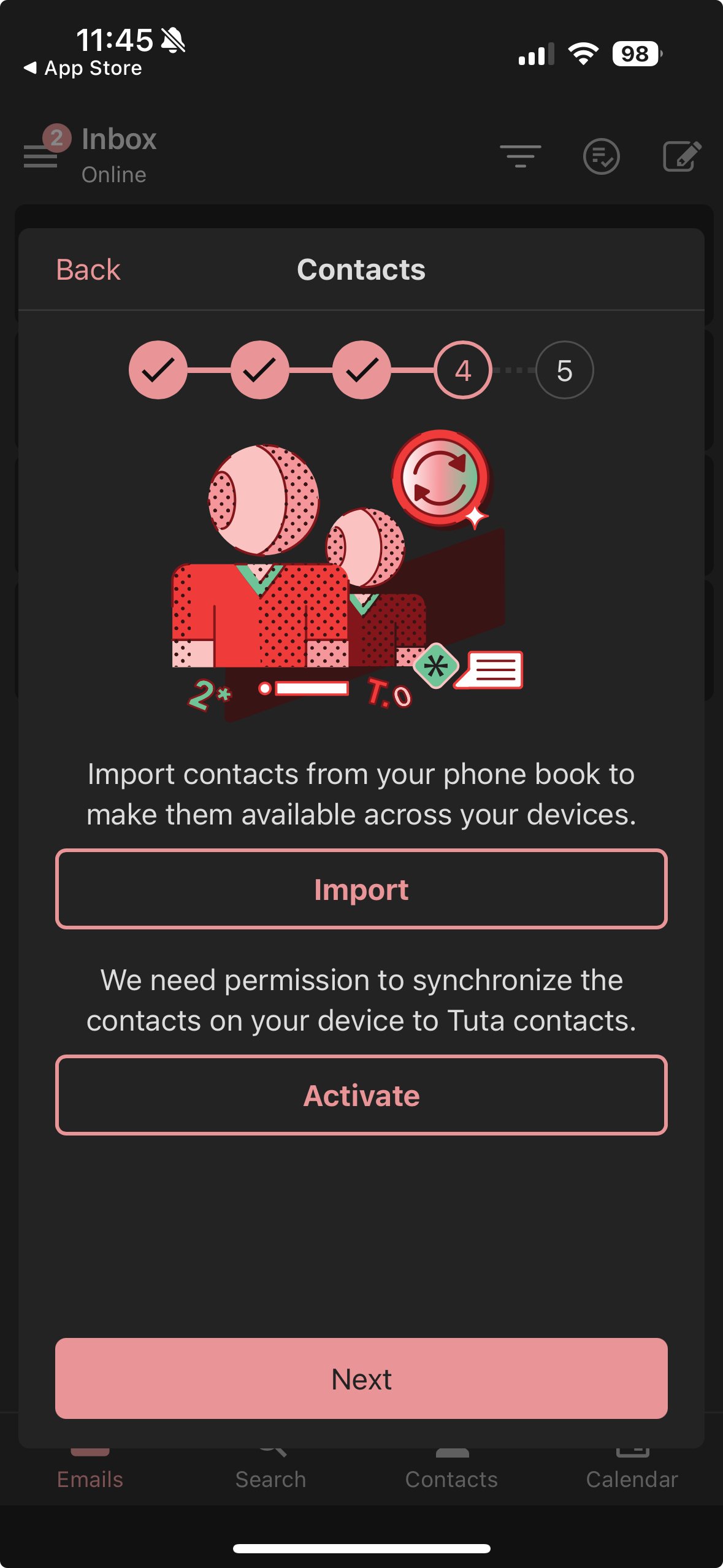
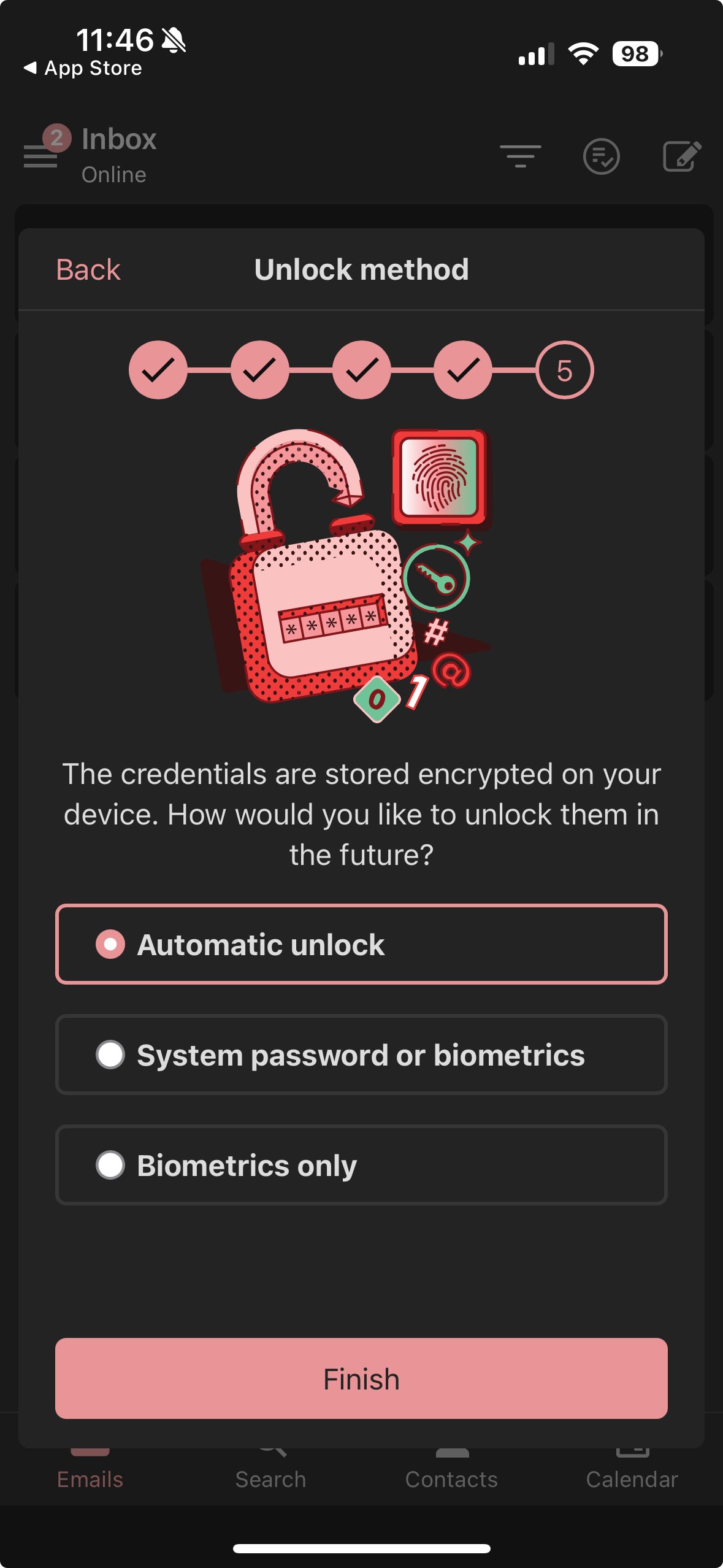
On this point, little has changed. There is no dedicated option in the web app’s settings. The recommended approach remains the manual import of VCF files via the mobile app, which can synchronize with the local address book. The process works but is not ergonomic for large contact volumes.
Features: What’s still missing and what has evolved
Tuta has long suffered from a notable functional lag compared with rivals. The service is making progress, albeit slowly, and these advances are real.
What’s happened since our last test
The feature most requested by the community, scheduled sending, was launched in February 2026. You can now compose an email and schedule its delivery for a specific date and time directly from the Tuta interface. It’s a real win for professional users. The recall/send cancellation feature has also been available since March 2026.
Tuta has also joined the Thunderbird ecosystem: since early 2026, it’s possible to use Tuta Mail and Tuta Calendar as extensions of the open-source client, opening up new integration possibilities.
On the cloud storage front, Tuta Drive has progressed: now in closed beta, the service offers iOS and Android mobile apps, in addition to web and desktop clients. An open beta is announced for the coming months, with no confirmed date. It will be a quantum-resistant encrypted storage service directly integrated into the Tuta ecosystem.
This summer 2026, Tuta launched “One-Click Migration,” a closed-beta feature allowing you to connect an old external mailbox (Gmail, Outlook, or any IMAP account) and automatically migrate all emails to Tuta Mail, preserving the folder tree. A one-way synchronization then continues to feed the Tuta inbox as long as the old account remains active. Data are encrypted on-device before transfer.
Other related updates: Tuta Drive now has standalone apps on Android and iOS (still in closed beta), and Tuta Calendar gains a dedicated settings page with a default view choice and more reliable reminders.
Tuta also announced joining Euro-Office, an initiative with Nextcloud and Ionos (supported by EuroStack) to develop a cloud office suite alternative to Microsoft Office, built on a fork of OnlyOffice.
What remains on the roadmap?
Several features remain on the 2026 roadmap with no fixed release dates:
- Guest availability
- Enhanced search performance
- Time zones in the calendar
Delivery timelines have historically been pushed back. Tuta claims about thirty employees, versus Proton’s more than 500, partly explaining the development pace.
Tuta Subscriptions
In its free version, Tuta offers 1 GB of storage, a single email address, and one calendar. It’s mainly a test bed before opting for a paid plan. Two paid subscriptions are also available.
| Free | Revolutionary | Legend | |
| Price | 0€ | 3 €/month (annual) — 3.60 €/month (monthly) | 8 €/month (annual) — 9.60 €/month (monthly) |
| Storage | 1 GB | 20 GB | 500 GB |
| Email addresses | 1 | 15 aliases | 30 aliases |
| Custom domains | No | Yes | Yes |
| Calendars | 1 | Unlimited | Unlimited |
| Shared calendars | No | Yes | Yes |
| Unlimited search | No | Yes | Yes |
| Offline access | No | Yes | Yes |
| Auto-reply | No | Yes | Yes |
| Family option | — | 3 €/user/month | 8 €/user/month |
For businesses, Tuta offers three distinct plans:
- Essential (6 €/user/month) ;
- Advanced (up to 8 €/user/month) ;
- Unlimited (up to 12 €/user/month), with unlimited custom domains and white-label features.
Which plan should you choose based on your profile?
- You’re starting out and want to test : the Free plan is enough. It’s limited to 1 GB and one address, but there’s no trial period: you can use it indefinitely.
- Regular personal use with privacy concerns : Revolutionary at 3 €/month hits a sweet spot. The 15 aliases allow you to compartmentalize uses (subscriptions, banking, personal), and the 3 custom domains cover the vast majority of individuals.
- Heavy use or solo professional : Legend at 8 €/month is the go-to if you need offline mode, shared calendars, or 500 GB storage. Offline access is particularly useful if you’re using desktop clients on the move.
- For family use : Revolutionary + Family option remains the most economical solution for 2–3 people, provided every member accepts Tuta’s interface and feature level.
Tuta Mail vs Proton Mail: which to choose?
It’s hard to judge Tuta without comparing it to Proton Mail, its main rival in the encrypted mail space. Both services share core values (zero-knowledge, open source, ad-free) but differ on several points.
| Criterion | Tuta Mail | Proton Mail |
| Subject encryption | ✅ Yes | ❌ No |
| Quantum resistance | ✅ TutaCrypt (deployed) | ✅ Available since May 2026 (optional, for new messages) |
| Encryption standard | Proprietary open source | OpenPGP (open standard) |
| End-to-end interoperability | ❌ Limited to Tuta ecosystem | ✅ Compatible with any PGP client |
| Jurisdiction | Germany (EU, 14 Eyes) | Switzerland (outside EU, outside 14 Eyes) |
| Free plan | 1 GB, 1 address | 1 GB, 1 address |
| First paid plan | 3 €/month | 3.99 €/month |
| Ecosystem | Mail + Calendar + (Drive coming) | Mail + Drive + VPN + Docs + Pass |
| Migration tool | EML/MBOX import (desktop) | Gmail bridge built-in |
| Scheduled sending | ✅ Since Feb 2026 | ✅ Available |
Information subject to change. Please consult official sites before making a choice.
Tuta is stricter on privacy (subject encryption, quantum-resistant algorithms deployed) and cheaper. Proton is more interoperable, benefits from a more favorable Swiss jurisdiction, and offers a broader ecosystem if you’re looking to replace the entire Google suite. If your sole goal is a secure email at the best value, Tuta wins. If you want Drive, VPN, and encrypted docs in a single plan, Proton is more relevant.
Who is Tuta Mail for?
Tuta is for you if…
- You want encrypted email without breaking the bank: it’s the most affordable option in the secure-mail segment.
- Absolute privacy is your priority: encryption of the subject, attachments, contacts, and calendar, quantum-resistance already active.
- You are starting from scratch or accept not migrating your history automatically.
- You are a journalist, whistleblower, activist, or simply opposed to data collection by GAFAM.
- You’re comfortable with a minimalist interface and don’t need Gmail’s feature richness.
Tuta isn’t for you if…
- You expect a seamless migration from Gmail with automatic history import.
- You need to send encrypted emails to correspondents on other services without prior configuration: Tuta’s encryption is proprietary and not interoperable with OpenPGP.
- You’re looking for a complete ecosystem (cloud storage, VPN, password manager) under one plan: Proton is more suited in that case.
- You rely on collaboration tools built on third-party IMAP/SMTP integrations.
Is Tuta Mail trustworthy? What users say
What do people who use Tuta daily think? On Google Play, the app carries a 4.6/5 rating from over 17,000 reviews, a solid score for a secure-mail service that is often more demanding to master than a standard webmail.
In the most recent reviews, trust is the common thread. As of July 2026, a user of the free plan praised the fact that Tuta does not read or store emails, while requesting more flexibility (aliases, subfolders) on the free offering. The Tuta team publicly thanked him for the feedback the same day.
Recent reviews mainly applaud the privacy promises, while noting, as our test did, some functional limits on the free offering. Nothing alarming about reliability, just a clear area for improvement that Tuta acknowledges.
On Trustpilot, Tuta’s TrustScore sits at 3.9 out of 5. The most common praise centers on privacy: many users, especially those switching from Gmail, appreciate not being tracked and being able to exchange privately, with easy onboarding and responsive customer support when issues arise. The company’s ethical commitment and open-source stance are often cited as reasons to stay loyal.
Criticisms focus on three specific pain points: first, free-tier sign-up can be slowed by manual anti-spam checks that may take several days, which bothers users lacking clear communication. Second, free accounts that are inactive for six months are automatically deleted, a rule Tuta defends to limit abuse but surprises users who didn’t know about it. Third, switching from a paid plan to the free tier or canceling a domain-associated account can be a hassle, leading to several billing complaints.
There are occasional bug reports (interrupted email reception) and navigation that some find less intuitive, but these do not undermine the overall positive trend.
Conclusion
We won’t challenge the robustness of Tuta’s encryption protocol or its commitment to user privacy. Yet, default password-only protection is a bit perplexing.
By 2026, everyone has an email address. The challenge isn’t so much offering an alternative as implementing features that enable smooth migration for basic tasks. It isn’t just about sending and receiving emails. We’ve already noted several gaps in Proton, notably with the calendar; it’s even more true for Tuta. There is simply no transition assistance.
Sure, the company now counts around thirty employees, which contrasts with Proton’s roughly 400. Yet Nota concentrates solely on mail and calendar… After 13 years, we’re still left wanting more.

- storage1 GB storage
- securityNative encryption by default
- alternate_emailNo custom domains
- smartphoneiOS, Android apps
- push_pinEU jurisdiction
Tuta is a secure messaging service that proves particularly effective in its commitment to user privacy. However, it still lacks many features and doesn’t guide users through transitions very well.
- End-to-end message encryption
- Affordable premium options
- U2F keys for 2FA
- Manual migration (automation in closed beta)
- Very basic calendar
- Major feature delays
Frequently Asked Questions about Tuta Mail
Is Tuta Mail actually free?
Yes, Tuta offers a free plan with no time limit. It includes 1 GB of storage, one email address, and a calendar. However, it is limited: no aliases, no custom domain, and no offline mode. It’s perfectly adequate for testing the service or for light, occasional use.
Can you use Tuta Mail with your own domain?
Yes, but only on paid plans. Revolutionary allows linking up to 3 custom domains, Legend up to 10. The Free plan is limited to Tuta domains (@tuta.com, @tutanota.com, @tutamail.com, etc.).
Is Tuta Mail compatible with IMAP or POP3?
No. By design, Tuta is not compatible with IMAP or POP3: these protocols cannot handle end-to-end encryption on the client side. Therefore you cannot connect Tuta to a universal client like Apple Mail or Outlook via these protocols. Since 2026, an integration is available as a Thunderbird extension.
Is Tuta Mail reliable, or should we beware of negative reviews?
Overall yes: most reviews praise Tuta’s privacy promises. The most common criticisms focus on specific points rather than the reliability of encryption itself: manual validation at signup for the free tier (which can take up to four days in some anti-spam checks), automatic deletion of free accounts after six months of inactivity, and sometimes complicated steps to cancel a paid subscription when a custom domain is involved.
Can you migrate your entire Gmail or Outlook mailbox to Tuta Mail easily?
There isn’t yet a fully automated method for everyone: since 2025, Tuta offers manual import of EML/MBOX files via its desktop clients. A one-click migration capable of directly syncing a Gmail or Outlook mailbox is in closed beta as of July 2026, before a gradual rollout to paid and business accounts.
Frequently Asked Questions — End

Daniel Brooks
I cover everyday products with a practical eye, from kitchen tools and home essentials to smart gadgets and consumer trends. My goal is to help readers understand what is genuinely useful, what is worth the price, and what deserves a second look before buying.