Hostinger Website Builder Review (2026): A Tool Designed for Beginners

September 13, 2026
Tech

The days when building a site required hours of coding are over: by 2026, no-code has captured a significant share of users, and platforms that let you create a site without touching a line of code are blooming. In this jungle of website builders, is Hostinger standing out? We took a close look.

Hostinger Website Builder
  • moodNo trial version
  • settingsHosted / pre-installed
  • storageStorage according to hosting plan
  • extensionAvailable plugins
  • format_paintAvailable themes
  • shopping_bagSuitable for ecommerce sites
9 / 10

Try Hostinger Website Builder now!

Launched in 2004 in Lithuania, Hostinger is one of the leaders in hosting solutions: it counts over 4.6 million users in more than 150 countries among its loyal customers. This provider, whose revenue has quadrupled since 2022, has offered a website builder since 2019. Designed for beginners, whether professionals or individuals, it enables the creation of varied sites in a short time (another tool launched in 2025, Hostinger Horizons, enables more complex web projects).

Based on a drag-and-drop system and offered at attractive rates, Hostinger’s website builder greatly simplifies editing and publishing websites, whether for portfolios, showcases, or ecommerce. Notably, it features over 300 templates, AI-powered image and content generation, marketing integrations, and SEO tools.

Here are the latest features announced by Hostinger for website creation:

  • Horizons now features native AI: AI integration requires no setup. Chatbots, product recommendations, quizzes, and personalized content are generated directly in natural language, with no third-party service required.
  • Stripe Express Checkout: Apple Pay, Google Pay, and Link are now on Horizons and Website Builder payment pages, giving buyers a streamlined, redirect-free checkout experience.
  • AI Website Builder for WordPress enhanced: before generation, users can now review and adjust the site structure, preview rendering on desktop, tablet, and mobile, and benefit from more brand-aligned visual suggestions.

After testing, here is our take on this service.

What kinds of sites can I build with Hostinger’s Website Builder?

The builder offered by Hostinger was designed to fit the needs of everyone who lacks programming knowledge: everything runs on a drag-and-drop system. Aiming to be affordable and intuitive, it suits individuals, small businesses, content creators, and more. In short, anyone looking to boost their online presence without breaking the bank. For this audience, this assistant makes it easy to establish an online presence without pulling their hair out along the way.

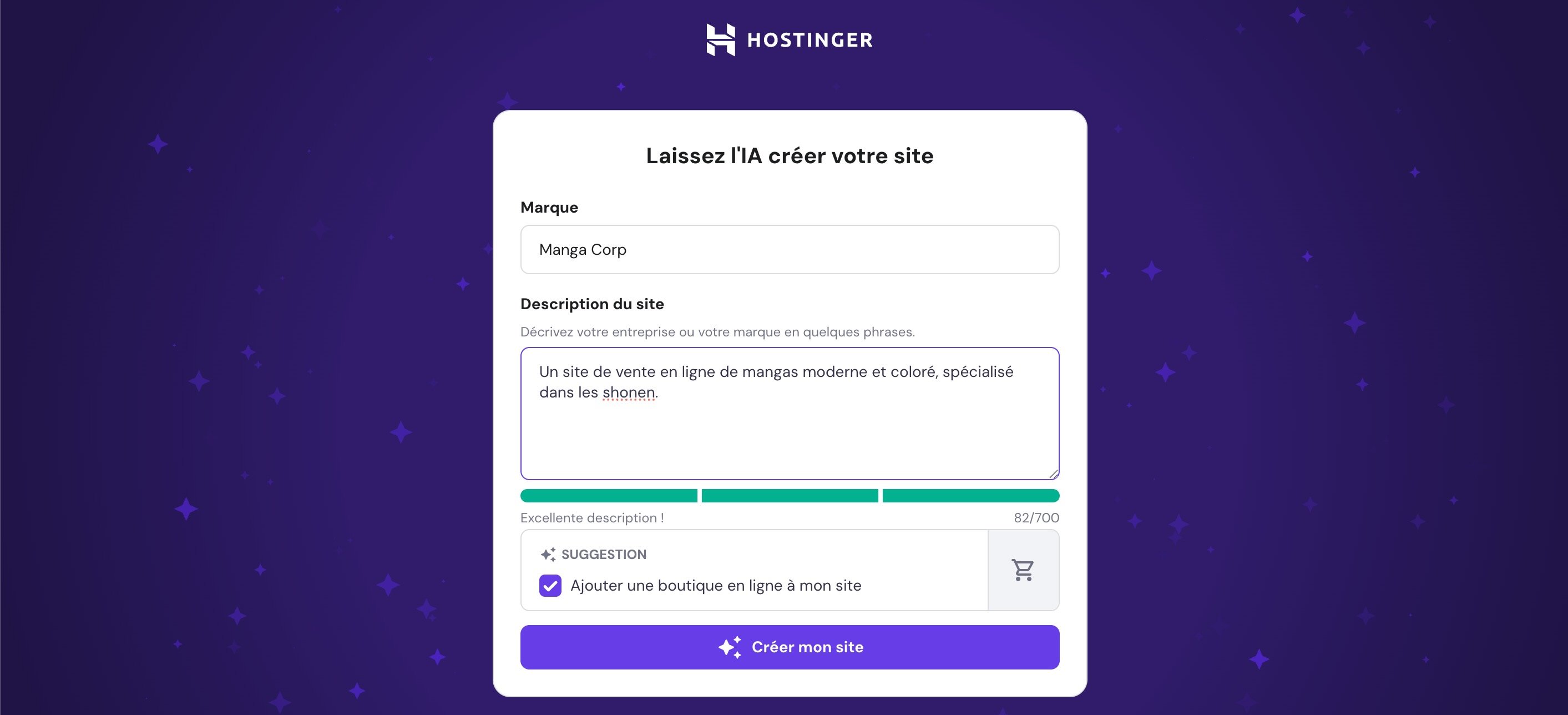
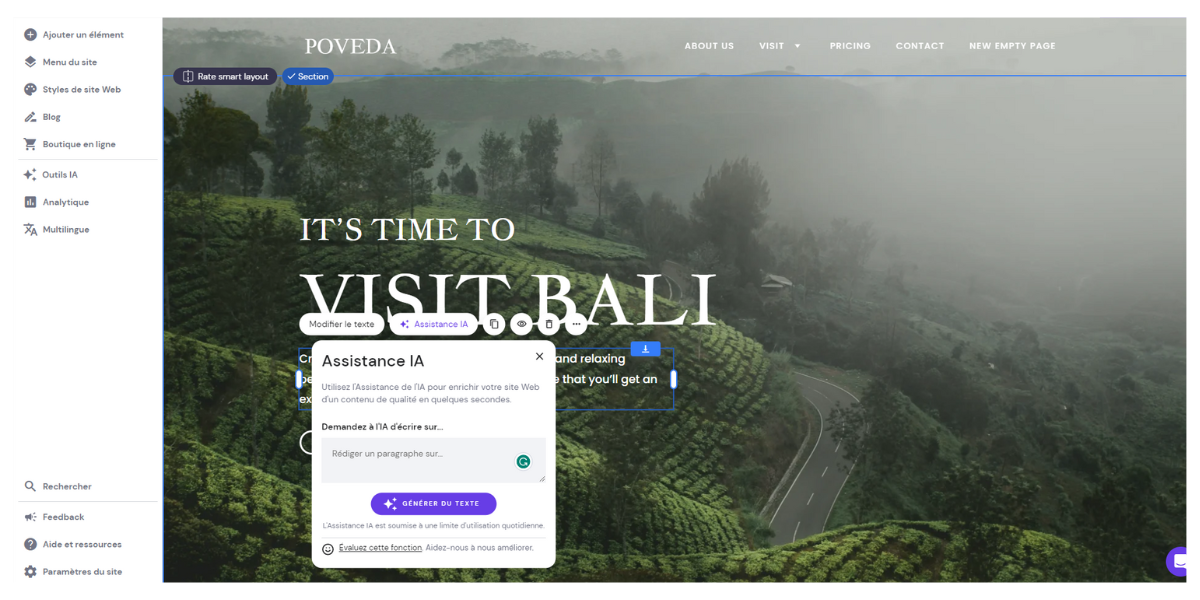
Un générateur de texte IA intégré à l'outil. © Hostinger

Hostinger Website Builder – AI text generator built into the tool. © Hostinger

These tools work as supplements to the editorial workflow, not as a replacement for it. For professional use, generated texts require proofreading and customization. But for a beginner starting from scratch, they truly shift the landscape: where building a presentation page used to take hours, the AI generator can produce a complete structure in minutes, which you then refine with the drag-and-drop editor.

Note: the AI Heatmap deserves special attention. Unlike a traditional tracking tool like Hotjar (which records real visitor behavior after publication), Hostinger’s heatmap is predictive: it analyzes a screenshot of your page and identifies in advance the areas most likely to capture attention. This is especially useful for placing a call-to-action button or validating a layout before publishing. The tool offers a limited number of free uses; beyond that, additional credits are required.

Also note that Hostinger offers a separate tool, Hostinger Horizons, for more ambitious web projects (web apps, complex projects) also based on generative AI.

Pre-configured templates by Hostinger’s website builder

Like WordPress, the Hostinger builder is translated into French and offers a wide selection of themes. Those seeking a professional appearance with minimal effort will be delighted.

More than 300 themes available

Hostinger Website Builder - Template selection. ©Hostinger

Hostinger Website Builder – Template selection. ©Hostinger

In total, there are over 300 themes, all created by designers. By comparison, Wix offers more than 800, but the selection remains substantial. The aesthetics are on point, even if some templates can feel a bit minimalist. The results look polished and professional.

To select a template in the tool, users have two options:

  • Type keywords into a search bar.
  • Browse templates and use the suggested categories.

You can also preview and view the template in desktop or mobile mode, which is convenient.

Hostinger Website Builder - AI Designer. ©Hostinger

Hostinger Website Builder – AI Designer. ©Hostinger

An artificial intelligence enables the creation of tailored sites. Just describe a site project and then fine-tune the tool’s proposal.

Diverse categories

Templates are categorized as follows:

  • E-commerce;
  • Portfolio;
  • Business;
  • Blog;
  • Other (landing pages, fashion, photography, CV, wedding, tech, marketing, etc.).

Some categories offer just five options, while others, with ecommerce at the forefront, are more generous and deliver up to 30 templates. You can also sort templates by popularity.

You can choose from a blank template (business, service, podcast, portfolio, etc.) or start from a completely empty site. In any case, once you pick a model, you cannot switch to another without deleting everything.

Hostinger’s Creation Assistant

Exceptionally user-friendly, the assistant saves considerable time. It provides a clear, intuitive interface for immediate onboarding. In our test, we didn’t encounter any bugs. Only a few slowdowns during saves are noted.

Getting started and editing content

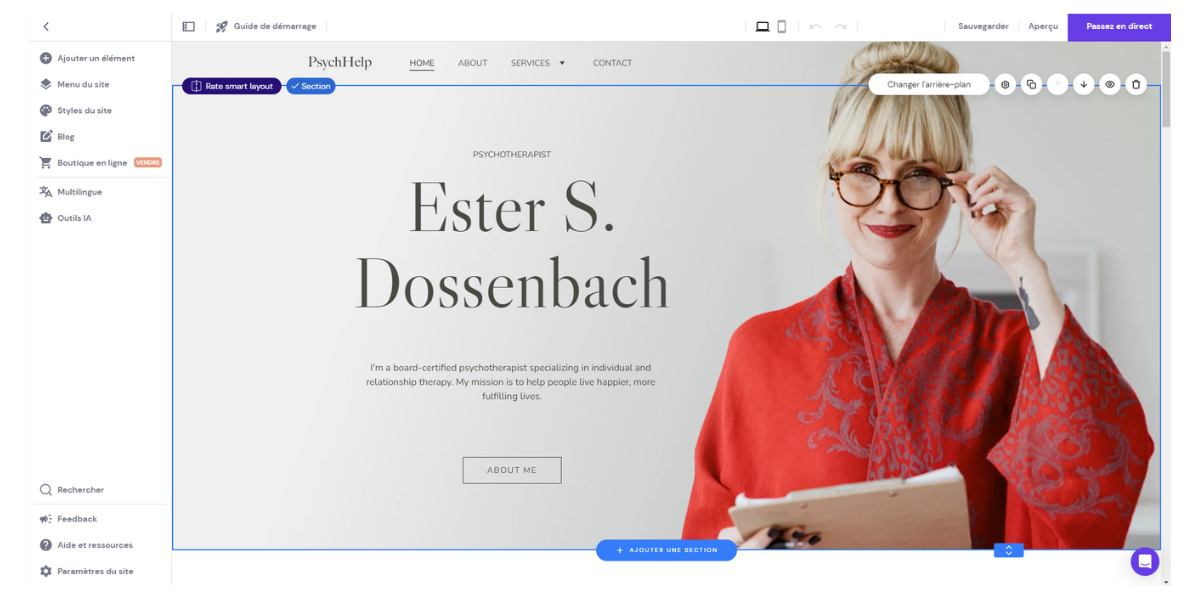
Hostinger Website Builder - Modification of a template within the editor. ©Hostinger

Hostinger Website Builder – Modifying a template within the editor. ©Hostinger

The software comprises two parts:

  • On the left, a column lets you add elements, edit the site menu, add pages, change colors, adjust text and button styles, manage blog posts, your online store, or create a multilingual version of the site.
  • To the right of this column, you can preview the future site divided into sections. A floating menu on the right lets you make changes. You can, for example, adjust the background or layout, add anchors, duplicate sections, move them, or delete them. A preview is available in mobile or desktop view.

Hostinger’s builder is easy to pick up, especially for those who have previously used site-design software (such as Elementor on WordPress). Ergonomic and drag-and-drop-based, click an element to reveal a modification menu and select what you need. No coding is required.

Page creation

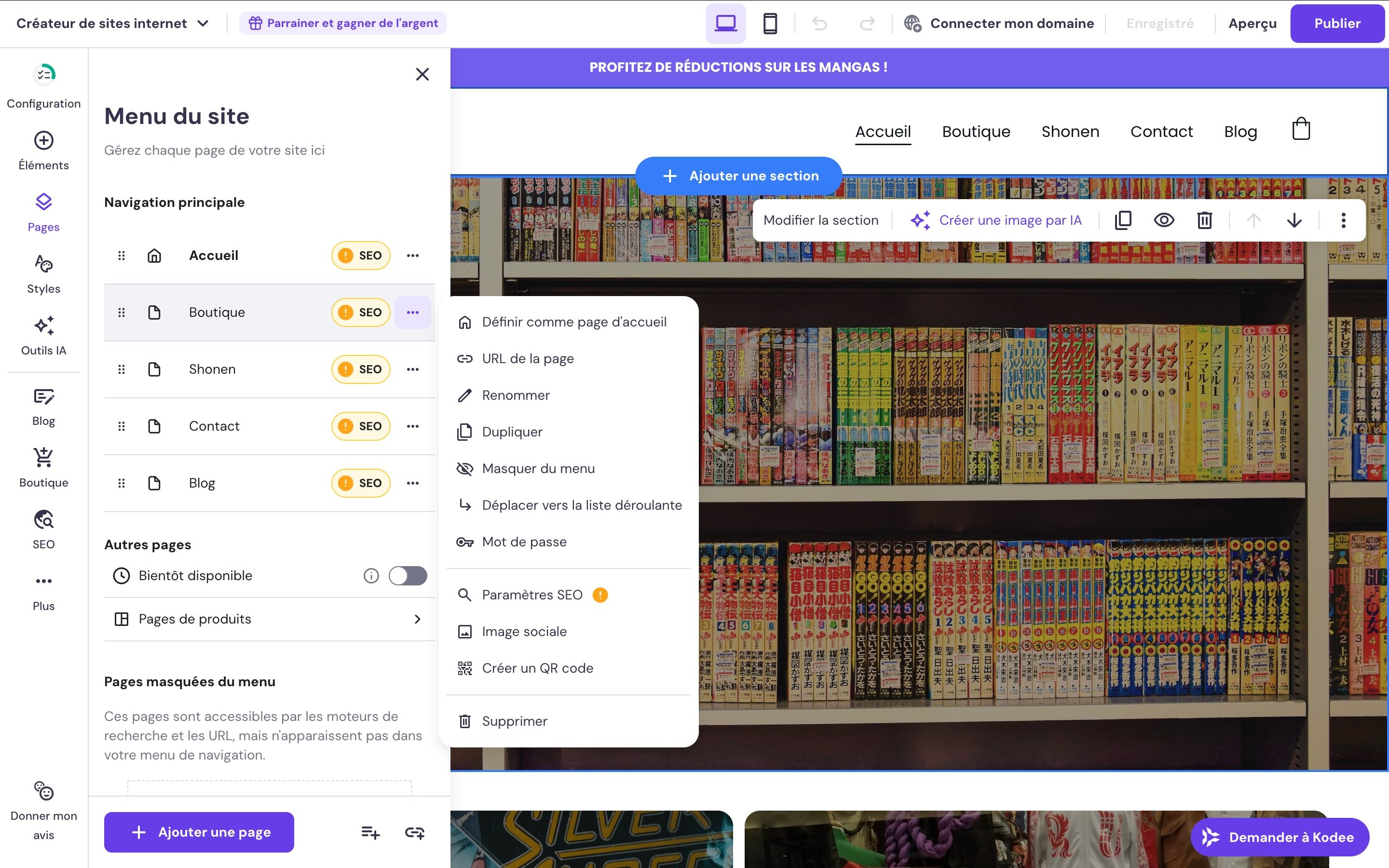
Hostinger Website Builder - Editing page web parameters. ©Hostinger

Hostinger Website Builder – Editing a web page’s parameters. ©Hostinger

You can create pages via the “Site menu” section available in the left column. We regret there isn’t faster access, for example through an “Add element” section. When you click the add button, you must specify:

  • The chosen name.
  • The URL (without this, a garbled string is used, which is bad for SEO).

It’s also possible to easily modify the SEO title and meta description, which is a plus (an AI SEO assistant is offered). Users can also choose not to index or to hide the item. Once created, this item is automatically added to the menu and to the future site’s preview.

Adding elements

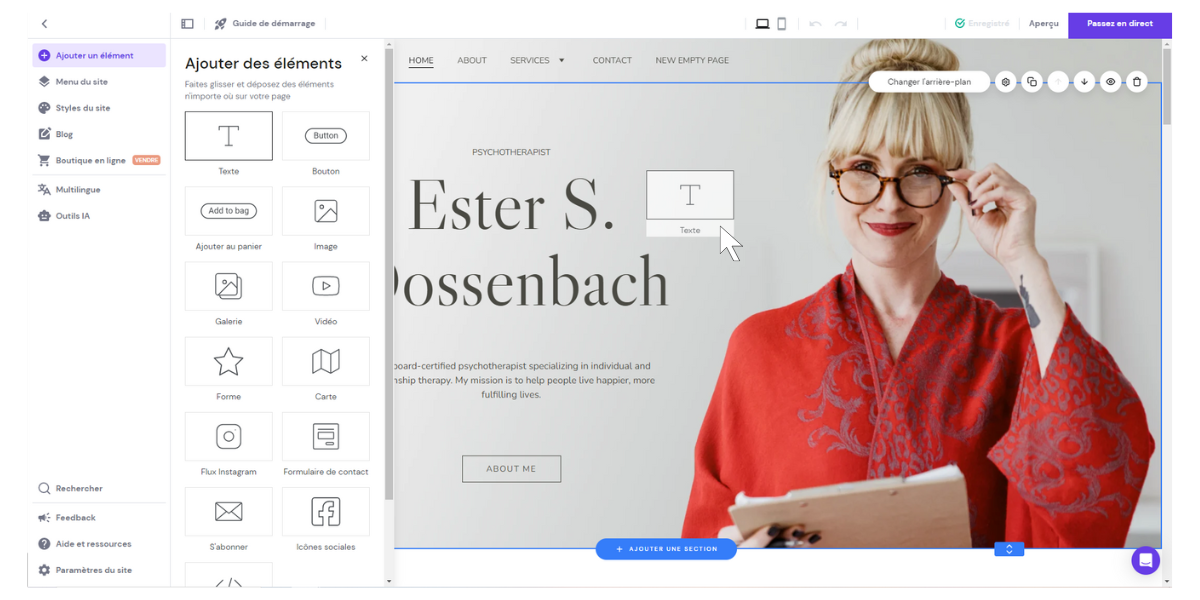
Hostinger Website Builder - Adding elements to a site. ©Hostinger

Hostinger Website Builder – Adding elements within a site. ©Hostinger

This is mainly done through the “Add an element” menu. You can choose to add:

  • A text block.
  • A code block.
  • A button.
  • An add-to-cart button for ecommerce.
  • An image (Unsplash free image library is available).
  • A gallery.
  • A video.
  • A form.
  • A map.
  • An Instagram feed.
  • A contact or subscription form.
  • Social icons.

Users place elements on the preview by dragging and dropping. You can position an element anywhere on the page, which may feel odd at first. Yet this flexibility is a real pleasant surprise, and you quickly learn to use the grid guides on the page. These guides are inspired by Bootstrap’s design grids.

In short, everything you need to simplify site creation and guide beginners is there.

Online store

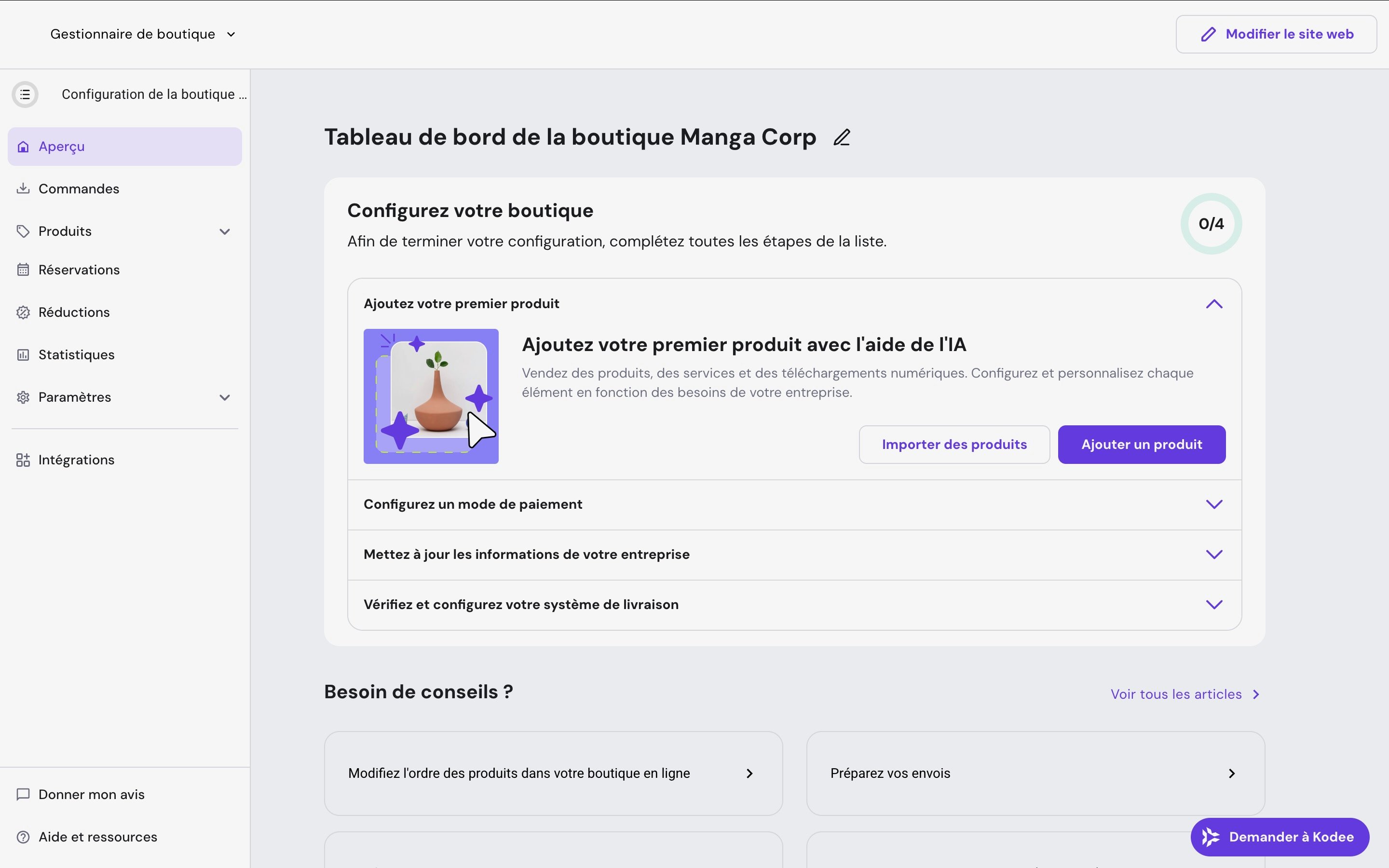
Creating an ecommerce store is accessible from the main dashboard. Once you enter basic details (store name, country, currency), you access a dedicated interface for managing products, orders, and stock. In 2025, capacity was raised to 1,000 products (up from 600), opening the builder to mid-sized shops. More than 100 payment methods are supported, and stock-out alerts have been integrated.

A decisive advantage over some competitors: Hostinger charges no transaction fees on sales through the Business plan. Concretely, if you take in €1,000 in a given month, you keep the full amount (except for payment processor fees like Stripe or PayPal, which are external to the platform). This is a notable difference from Shopify, whose basic plan charges up to 2% transaction fees if you do not use Shopify Payments.

That said, there are a few limits: delivery options are basic, and some advanced features (abandoned-cart recovery, complex promotions, automated emailing) are only available via third-party integrations. For a small storefront, the tool is more than sufficient; for a growing shop, a migration to WooCommerce or Shopify may be worth considering.

Hostinger Website Builder - Dashboard for managing an ecommerce site. ©Hostinger

Hostinger Website Builder – Dashboard for managing an ecommerce store. ©Hostinger

The blog

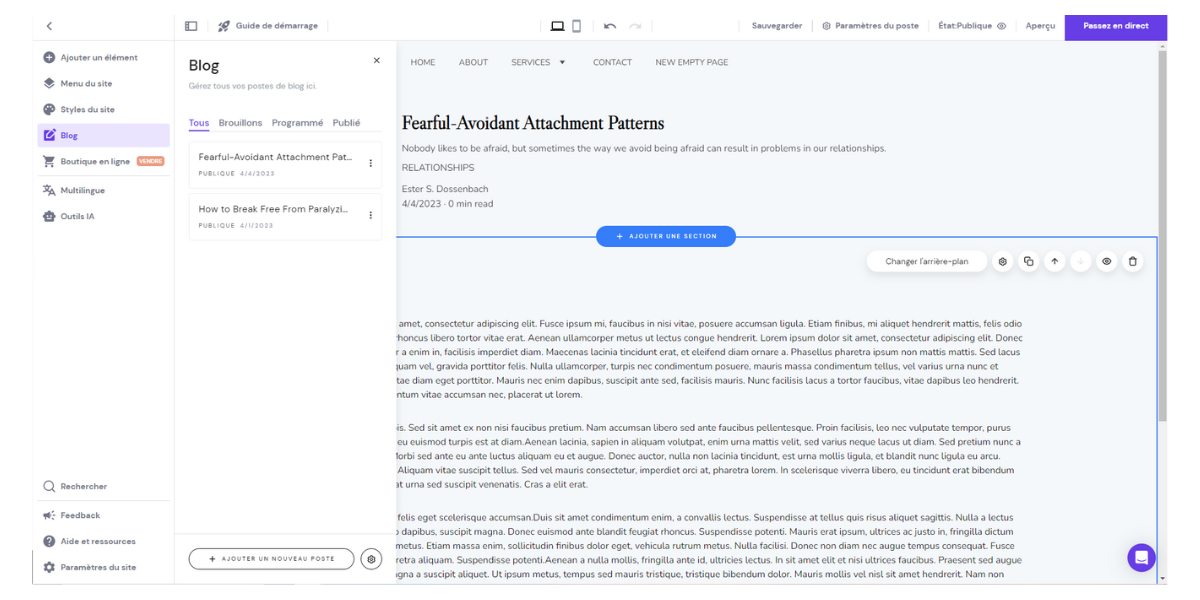
Regarding blog posts, there is a dedicated section. It is somewhat basic and presented as a narrow column. You access several tabs:

  • All posts.
  • Drafts.
  • Scheduled.
  • Published.

After adding a new post, you simply type your text and format it with the WYSIWYG editor. You can also integrate your own font or choose from fifty Google Fonts options. You can then adjust the post’s settings, including description, category, URL, and publication date for scheduling.

Hostinger Website Builder - Editing a blog post. ©Hostinger

Hostinger Website Builder – Editing a blog post. ©Hostinger

The blog section meets essential needs: create and schedule posts, manage by category, a WYSIWYG editor, and the ability to customize URLs and meta descriptions. However, it has notable gaps compared to dedicated CMSs: you cannot add tags to posts, readers cannot leave comments, and there is no built-in monetization capability (Google AdSense only via manual integration). The display options for blog posts on the blog page are limited to a few predefined layouts. For a substantive blog, these limitations will quickly become constraining.

Note also that if the service previously offered templates for legal pages (privacy policy, refund policy, terms and conditions), that feature is no longer available.

What are Hostinger’s plugins and extensions?

It’s possible to connect third-party services to enhance a client site’s SEO or to integrate chat tools.

Application integrations

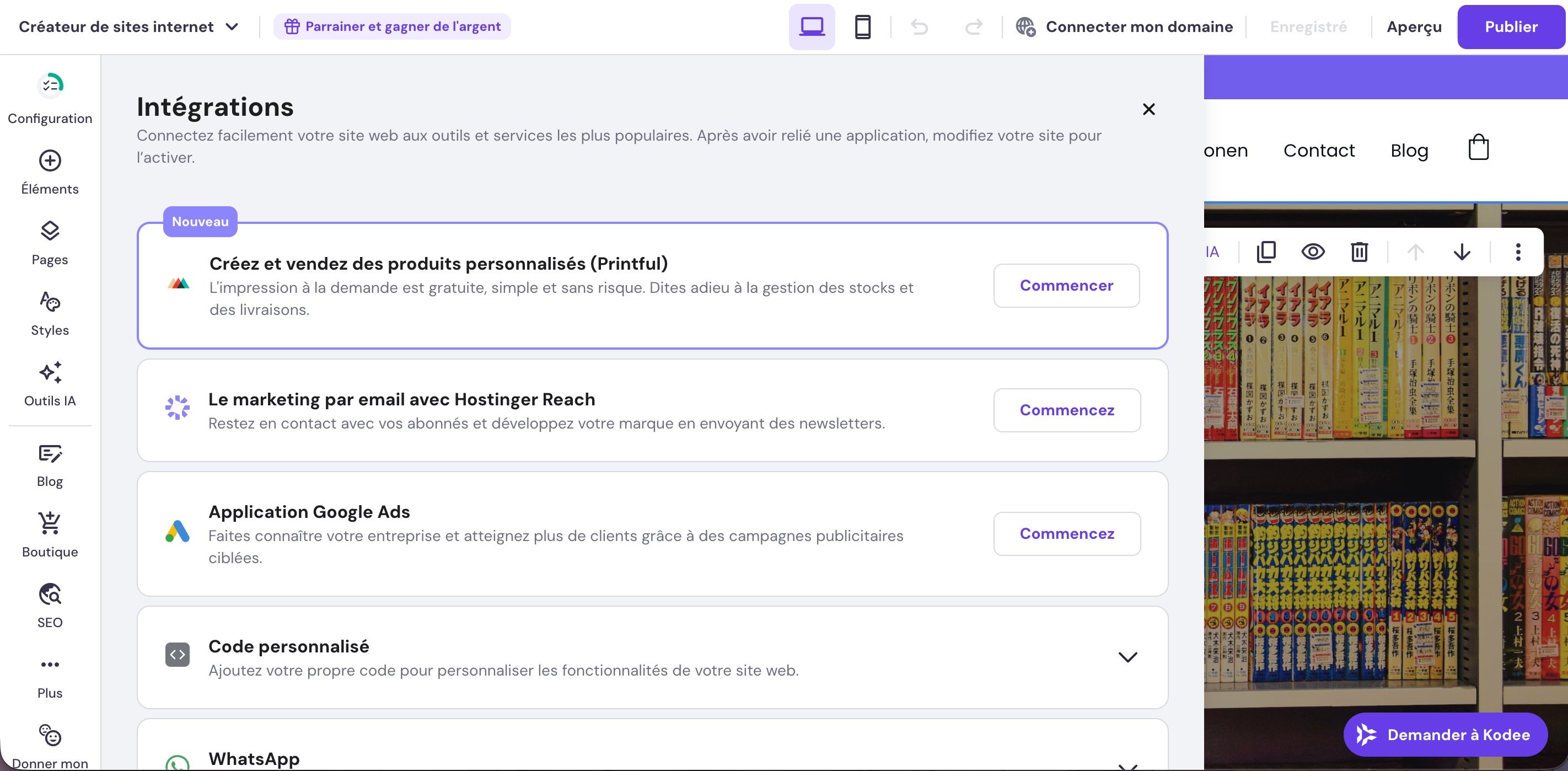
Hostinger Website Builder - Adding custom code within the editor. ©Hostinger

Hostinger Website Builder – Adding custom code within the editor. ©Hostinger

Unlike many site builders, there are no plugins in the traditional sense. Through the global settings, however, you can connect some apps such as:

  • Google tools: Analytics, Tag Manager, AdMob and AdSense, Ads.
  • Hotjar.
  • Facebook Pixel.
  • WhatsApp.
  • Printful on-demand print service.
  • Hostinger Reach email marketing service.

Clients can also insert code into the site’s <head> tag to integrate other services.

SEO / Marketing / Analytics tools

The provided themes are optimized for SEO.

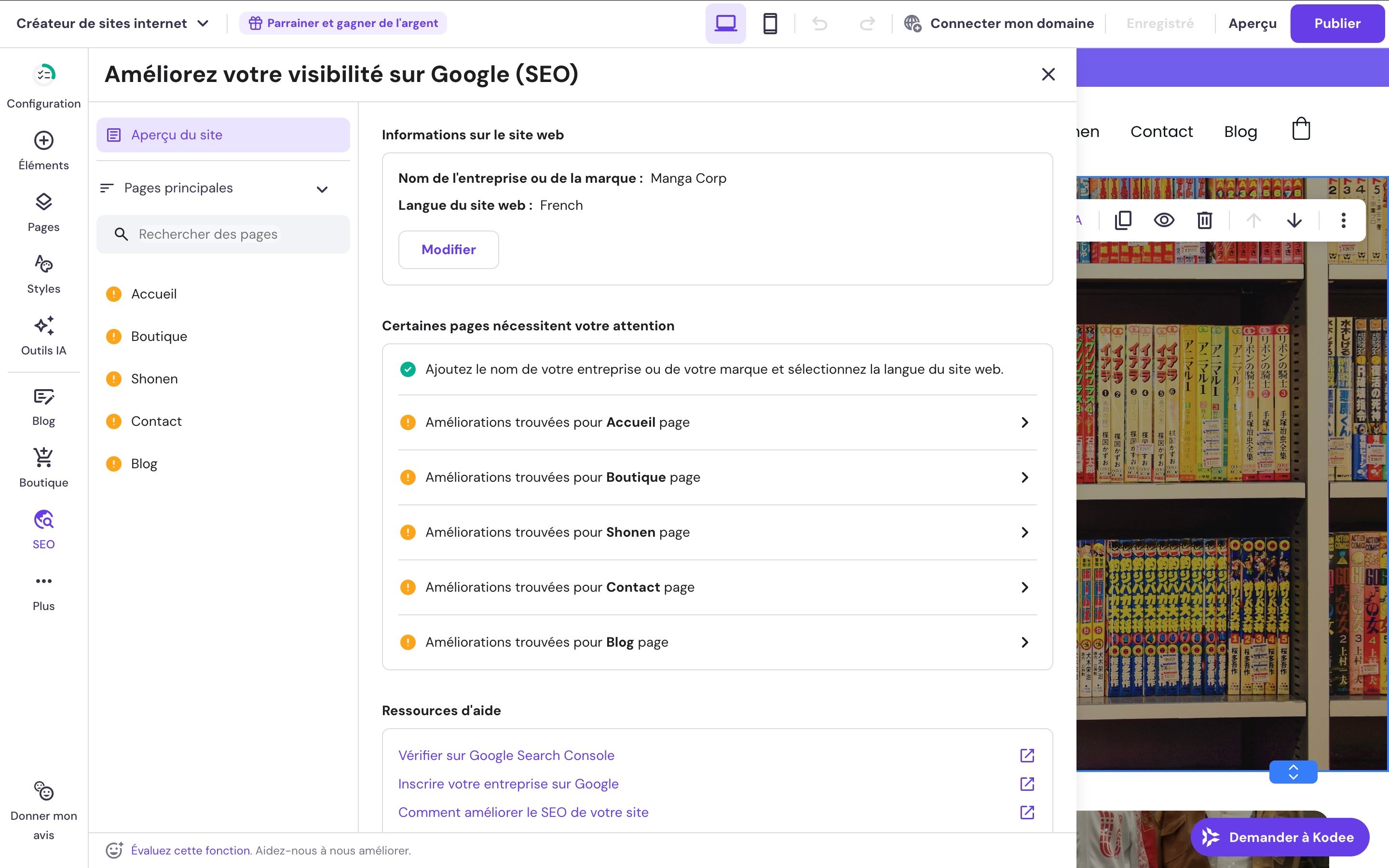
Hostinger Website Builder - SEO parameter modifications. ©Hostinger

Hostinger Website Builder – Modifying SEO settings. ©Hostinger

In addition to integrating SEO tools, this platform offers options to improve traffic via either the Pages section or a dedicated SEO area.

Specifically, you can:

  • Edit the title and description.
  • Modify the URL.
  • Request indexing or no indexing of the element.

If essential, these optimizations remain basic in terms of SEO. For deeper optimization, you need to connect Google Analytics to the platform. It’s a pity that more dedicated SEO plugins aren’t available.

Hostinger also notes on its site that it guarantees 99.9% uptime. Page speed and security are considered, too. All of this is essential for good SEO performance.

What Hostinger’s Website Builder does not offer yet

While integrations with Google, Facebook Pixel and Hotjar cover essential analytics and tracking needs, Hostinger’s Builder lags behind competitors like Wix or Squarespace in certain marketing aspects: Hostinger Reach (integrated via extension) handles sign-up forms and some sends, but remains somewhat limited compared to a dedicated tool like Mailchimp.

Performance and hosting: how do sites created with Hostinger perform?

One of the advantages of Hostinger’s Website Builder versus more specialized website-building rivals lies in the underlying infrastructure. Hostinger has been a web host for twenty years, and you can feel it in the performance of sites built with its builder.

  • Uptime: most of the time 100%.
  • LiteSpeed servers: the builder relies on LiteSpeed technology known for fast response times.
  • Integrated CDN: a content delivery network is included, improving load times for visitors far from the main server.
  • Free and unlimited SSL: each published site is automatically secured with a lifetime SSL certificate, with no setup or renewal costs. This is essential for Google indexing (HTTPS signal).
  • Mobile optimization: all templates are responsive. The editor allows viewing and adjusting desktop and mobile versions separately.

These technical characteristics make Hostinger’s Website Builder a solid option for small to mid-sized sites. For projects requiring advanced server features (complex databases, SEO plugins like Yoast, custom caching), a traditional WordPress hosting setup may be more appropriate.

Hostinger Website Builder: tutorials and user support

A French-speaking support team is available 24/7. A built-in chat is present in the builder: you can chat with Kodee, Hostinger’s AI, as a first port of call. A “Help and Resources” section is also available.

Right from the launch, a quick tour is offered. There is also a “Help and Resources” section with:

  • Tutorials.
  • Keyboard shortcuts.
  • Access to a quick tour.

Users also get a quick-start guide listing the essential steps to publish effectively: change the logo, boost visibility on Google, connect the domain, publish the site.

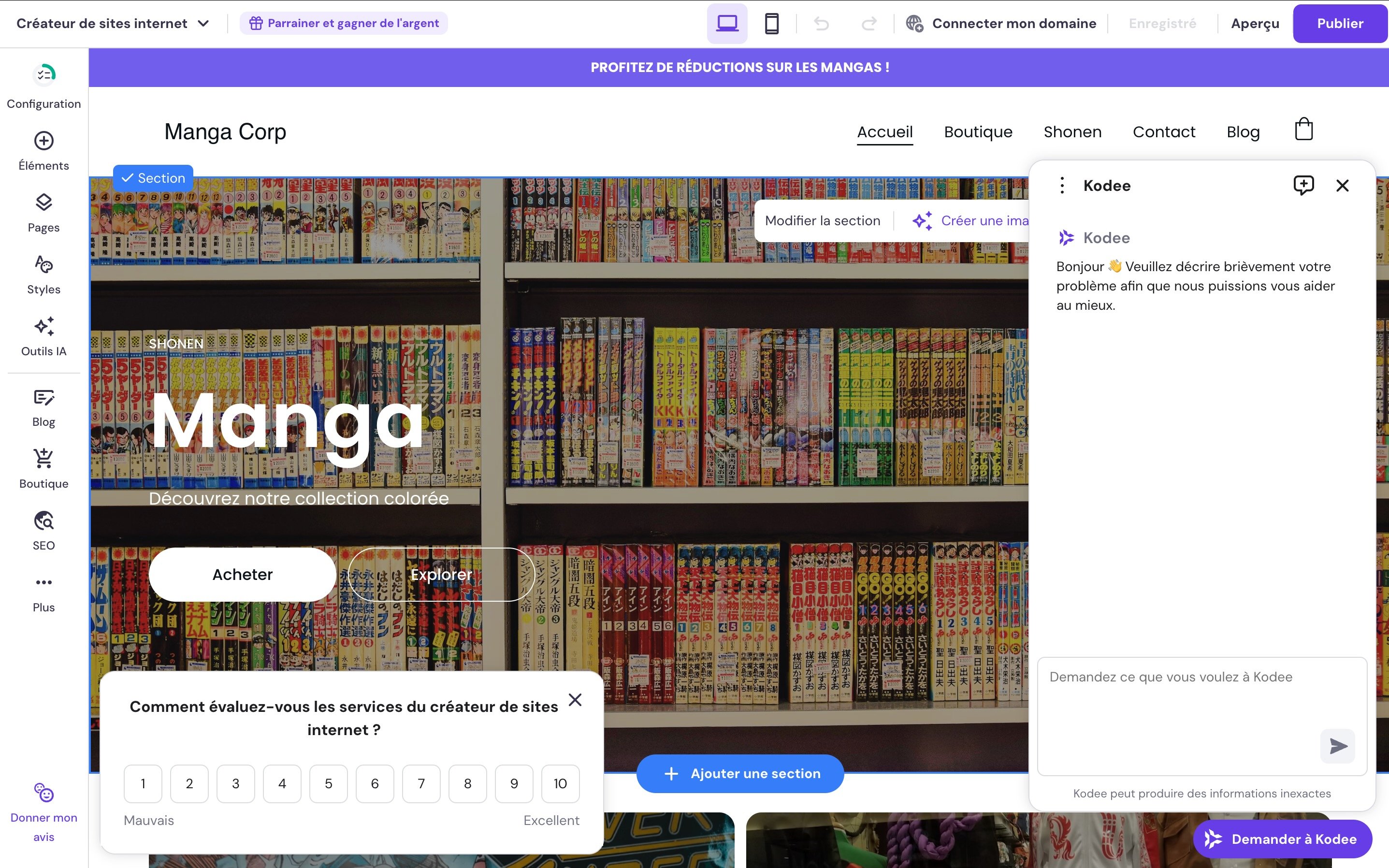
Hostinger Website Builder - Support and user experience evaluation. ©Hostinger

Hostinger Website Builder – Support and user experience evaluation. ©Hostinger

The developers have clearly focused on help. It’s evident they want a tool that is as easy to use as possible and that customer support is a priority. Indeed, most features include a small poll at the bottom of the page, giving users a chance to rate their experience with the tool, which is somewhat rare among competitors.

Hostinger Website Builder offers and pricing

Is there a free plan for Hostinger’s Website Builder?

Hostinger’s Website Builder is not free. You must subscribe to a hosting plan (Premium or Business), have a domain, and set up the app. It’s also possible to access a demo.

Paid plans

Two paid plans are offered (note renewal prices are noticeably higher):

  • Premium plan at €2.99 per month, includes 3 websites, 20 GB storage, a free domain for 1 year, and 2 free mailboxes for 1 year;
  • Business plan at €3.99 per month, includes up to 50 websites, 50 GB storage, a free domain for 1 year, and 5 free mailboxes for 1 year.

The Hostinger Website Builder pricing in 2026. ©Hostinger

The Hostinger Website Builder pricing in 2026. ©Hostinger

As with many hosting providers and site builders, promotional discounts are regularly offered on plans, so keep an eye out to seize better prices.

Hostinger’s Website Builder versus the competition

Hostinger isn’t the sole player in this market. If you’re deciding between several options, here’s a concise comparison focusing on the most important criteria.

Criterion Hostinger Builder Wix Squarespace WordPress (hosted)
Starting price €2.99/mo* ~€16.80/mo ~€12/mo free but with add-on costs
Templates 300+ 800+ 180+ Thousands (themes)
Ease of use ⭐⭐⭐⭐⭐ ⭐⭐⭐⭐ ⭐⭐⭐⭐ ⭐⭐⭐
Integrated SEO tools Basic (AI SEO) Advanced Advanced Comprehensive (Yoast, etc.)
E-commerce Up to 1,000 products Unlimited (high plans) Unlimited Unlimited (WooCommerce)
AI integrated Yes (full generator) Yes Partial Via third-party plugins
Free version No (demo available) Yes (limited) No (14-day trial) Yes (software)
French support 24/7 Yes Partial No (email) Community

* Prices are subject to change; please check the official site before purchasing.

Hostinger positions itself as the most affordable option with a strong level of ergonomics. Wix leads in template richness and advanced marketing tools. Squarespace stands out for the aesthetic quality of its designs. WordPress dominates when SEO or functionality demands become complex.

Hostinger Website Builder or WordPress: which one to choose?

This is probably the question most readers ask. Hostinger itself offers both solutions: its built-in builder and one-click WordPress installation, which forces a choice upfront. The two tools target different profiles and projects.

Criterion Hostinger Builder WordPress
Ease of use Immediate, no technical knowledge required A real learning curve
Flexibility / customization Limited to editor options Nearly unlimited (themes + plugins)
Built-in SEO tools Basic, plus AI SEO Advanced via plugins (Yoast, Rank Math…)
E-commerce Up to 1,000 products (Business plan) Unlimited via WooCommerce
Maintenance None (everything managed by Hostinger) Plugin/theme updates to handle
Starting cost Hosting + builder included in a single subscription Hosting + theme + plugins (variable costs)
Migration Export to WordPress possible (not automated) Not applicable

Is Hostinger’s Website Builder right for you?

Hostinger’s Website Builder is not a universal solution. Here’s a quick read to help you decide if it fits your project.

[+] Recommend if you are… [-] Avoid if you’re seeking…
A complete beginner with no technical skills A blog with tags, comments, and monetization
A self-employed person or small business Advanced marketing tools (native emailing, coupons)
A creative looking for a quick portfolio Total design freedom (Wix may be better)
A retailer with fewer than 1,000 products Advanced SEO tools (Yoast, Rank Math…)
Someone on a tight budget A complex site with databases or APIs
Someone who wants 24/7 French support A 100% free solution with no commitment

Conclusion

Hostinger’s Website Builder is accessible to beginners. Its large set of templates is aesthetically pleasing and easy to customize. The editor includes everything you need to give projects an elegant, professional look. The AI tools also significantly facilitate the process.

This service is also designed to simplify page SEO. Although the tools remain basic in this area, they still allow newcomers to take the essential steps to start generating traffic. Site security is well covered thanks to free SSL certificates. The possibility to easily create a multilingual version of the site or a storefront is another plus.

However, blogging remains the service’s weak point. It could benefit from better ergonomics and a more capable dashboard. Nevertheless, the platform proves convincing and will appeal to anyone who wants to start online quickly and efficiently.

Conclusion
Overall note
9 / 10

Hostinger offers a website builder that is easy to pick up and recently enhanced with AI features. Designed for beginners, it presents a wide range of modern, customizable templates. Although there isn’t a free version, the tool is offered at an attractive price. Built with SEO in mind, it can also be used to create an online store or a multilingual site.

Pros
  • Intuitive and ergonomic tool
  • Attractive pricing
  • More than 300 themes available
  • AI tools that are well designed
Cons
  • Blog section is fairly brief
  • No free plan
  • No quick theme change without losing content
  • No free version
Try Hostinger Website Builder now!

Can Hostinger’s Website Builder be used for free?

No, Hostinger’s Website Builder isn’t free. It requires subscribing to a hosting plan (Premium or Business). However, Hostinger offers a demo accessible without registration at builder.hostinger.com/demo to test the interface before any commitment. A 30-day money-back guarantee is included with all plans.

Can we create an online shop with Hostinger’s Website Builder?

Yes, building an ecommerce shop is possible with the Business plan. In 2025, capacity was expanded to 1,000 products (up from 600). The ecommerce dashboard handles products, stock, orders, and stock alerts. Over 100 payment methods are supported. For larger stores or more complex ecommerce projects, a solution like WooCommerce (via WordPress) will offer more flexibility.

What’s the difference between Hostinger’s Builder and WordPress?

Hostinger’s Website Builder is an all-in-one solution designed for beginners, requiring no technical skills. WordPress is a powerful, open-source CMS that’s far more flexible but demands a steeper learning curve and ongoing management of plugins, themes, and updates. Hostinger covers both routes: its native builder for newcomers, and managed WordPress hosting for users who want more control. Both are accessible from the same hPanel dashboard.

How long does it take to build a site with Hostinger’s Builder?

It depends on the starting point you choose. Using the AI generator, which creates a complete site structure (pages, sections, text, and images) from a mere description, you can obtain a publishable base in under an hour.

Starting from a template and manually adjusting each section with the drag-and-drop editor typically takes roughly half a day to a full day for a five-page showcase site, depending on the amount of content (texts, images, logo). More time is needed for larger projects.

Setting up the basic SEO (titles, meta descriptions, URLs) and linking the domain are also to be planned, but the interface guides you through the process step by step.

Read our reviews of the best website builders:

  • Hostinger Website Builder
  • Wix
  • Squarespace
  • Jimdo
  • Webself
  • Webnode
  • HostGator
  • Weebly
  • GoDaddy Website Builder

Daniel Brooks

I cover everyday products with a practical eye, from kitchen tools and home essentials to smart gadgets and consumer trends. My goal is to help readers understand what is genuinely useful, what is worth the price, and what deserves a second look before buying.