
Secure, open-source, available on all platforms, and with a generous free version, Bitwarden has everything needed to be considered one of the best password managers. To determine if it’s the right fit for you, here is our Bitwarden review in 2026.
- moodLimited free version
- databaseUnlimited storage
- browse_activityLeak alerts
- lockAES-256 encryption
- Impeccable security policy
- NAS hosting
- Budget-friendly Premium plan
- Multiple syncing
- Basic desktop app
- No live chat
- No French documentation
The years 2023 and 2024 saw Bitwarden embark on the passwordless journey, making access keys easier to use for both end users and developers. Now, all users can sign in with an access key, without having to enter their email address. Those using a browser with an access key compatible with the WebAuthn PRF extension—which enables passkeys to be used for both encryption and decryption—can even use the technology to access their vault, eliminating the master password. For others, the master password remains required for decryption. At present, the feature is limited to logging into the web app, with rollout to other platforms planned soon.
The Offer
For personal use, you can rely on the free version which does not limit the number of secured items or device synchronization. It supports two-factor authentication via Google Authenticator or an equivalent. It’s also possible to receive 2FA codes by email, but using the app is far more convenient. If you’re seeking extra features, upgrading to the Premium version (under $1/month) is worthwhile: you get advanced two-factor authentication options, a storage for authentication keys for multi-auth apps, and 1 GB of encrypted storage.
Sharing is supported as well, though with limits. Free-tier users can share with only one other user, while Family plan subscribers ($3.33/month) can share with up to five other users. If you need more users, you’ll have to opt for the Pro plan—even for personal use.
Interface and Usability
The desktop version is fairly straightforward, focusing on the essentials, though it does have a menu that links to download pages for other software versions. Across other platforms, Bitwarden presents a clean interface where the basic information is easily accessible. However, you’ll need to get used to a few service quirks, especially if you’re coming from another password manager, and you should explore the options to enable the features you want.
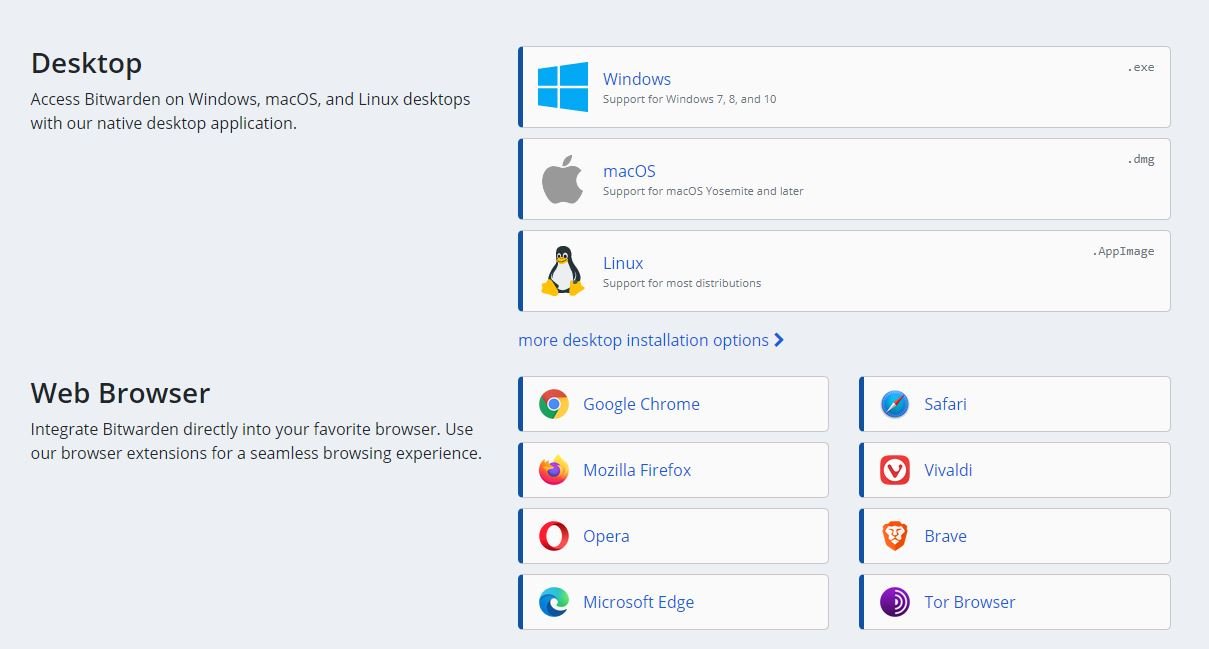
Bitwarden is available on virtually every platform imaginable. You can download it for Windows PC, Mac, Linux, or mobile by installing the app from Google and Apple stores, or opt for the web extension, no matter which browser you prefer since it supports most of them (Firefox, Google Chrome, Safari, Edge, Opera, Brave, etc.).
Security
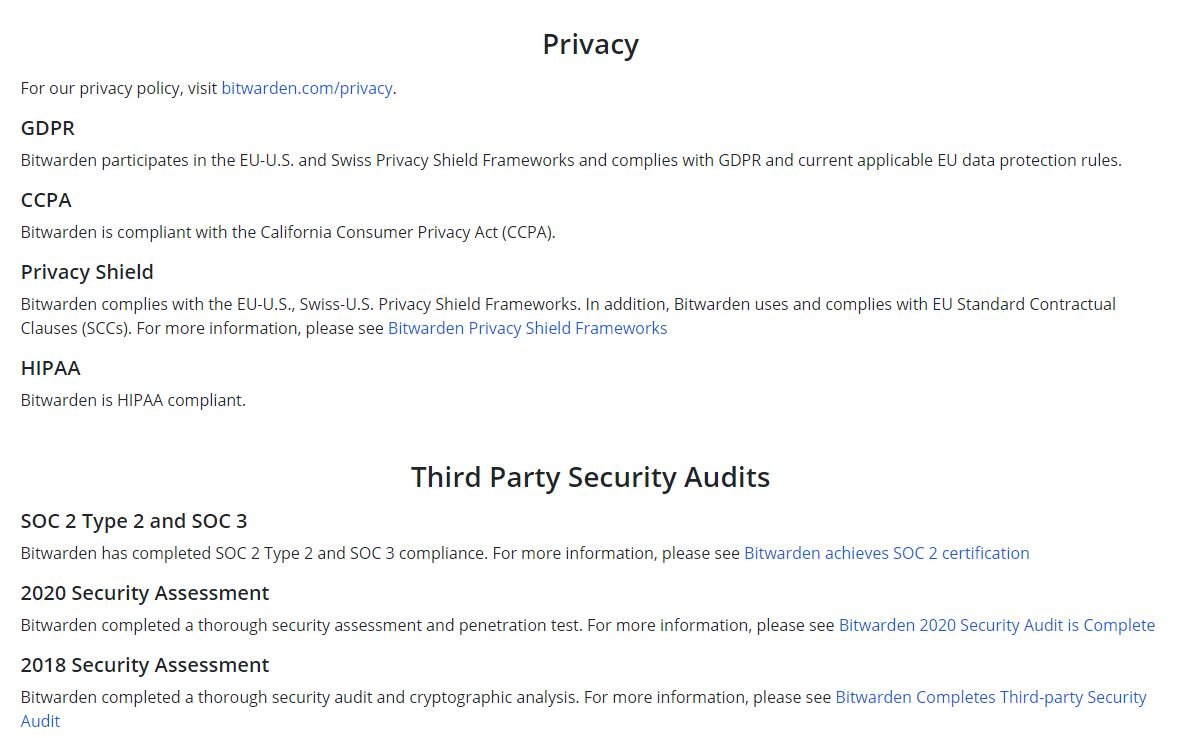
This is the strongest suit of this solution. Being open source makes Bitwarden not only more flexible but also more secure. Anyone can inspect the source code on GitHub, meaning experts can review, audit, or contribute to the code. In addition, the development team invites researchers to conduct security analyses. From the online installer to the mobile app and the server infrastructure, everything is made transparent. Bitwarden has also been audited by Cure53 (a German cybersecurity firm) and runs a Bug Bounty program via HackerOne. Naturally, the vault is encrypted with AES-256, end-to-end, with hashing and a PBKDF2 key derivation function.
Premium users gain access to Vault Health reports indicating breaches of your data. This isn’t automated; you must enter the username or email you want checked. If one is particular, one may wonder why the team uses Microsoft Azure instead of a more open-source and legitimate cloud solution…
Additional Features
Bitwarden makes it easy to host your own passwords on a NAS or via Docker. With Docker, you can host Bitwarden’s infrastructure stack on Linux, macOS, or Windows. A comprehensive (English) setup guide is available, detailing both the automated Docker-based process and the manual installation. Two options to take control of your data security yourself. With the risk of making mistakes in backups and security… best reserved for those who master Docker or local hosting.
In short, Bitwarden brings solid advantages. The main one is its security policy, which emphasizes efficiency and transparency. Its features are well-tuned (except for the import function, which can be a bit nerve-wracking). And if anything goes wrong, you’ll quickly find an answer (in English) thanks to its very responsive community on the forum.
Conclusion
Bitwarden is easy to use, compatible with Android and iOS, and its pricing is genuinely affordable. It is also one of the most secure password managers, thanks to its open-source code. The free version provides the core features you need, including unlimited password synchronization across devices, support for multi-factor authentication (via an app or a physical “Universal 2nd Factor” like a YubiKey or Duo), and sharing. It’s a pity that the Premium version does not include a “trusted person” option.
Bitwarden is easy to use, compatible with Android and iOS, and its pricing is genuinely affordable. It’s also among the most secure password managers, thanks to its open-source code. The free version provides the essential features you need, including unlimited synchronization of passwords across devices, support for multi-factor authentication (via an app or a physical key like a Universal 2nd Factor, YubiKey, or Duo), and sharing. It’s a pity that the Premium version does not include a “trusted person” option.
- Impeccable security policy
- Hosting on a NAS
- Affordable Premium option
- Multi-device synchronization
- Light desktop app
- No live chat
- No French documentation
Our other password manager reviews:
- NordPass review: a promising young password manager
- pCloud Pass review – The storage specialist for your passwords
- 1Password review: the family solution
- Dashlane review: the most complete solution
- KeePass review: the “local” solution
- Proton Pass review: a promising password manager, but limited
- Enpass review: a modern and local password manager
- Dropbox Passwords review: a fairly simple password manager
- RoboForm review: a cheap password manager, but sometimes confusing
- LastPass review: can it forget its dark year?

Daniel Brooks
I cover everyday products with a practical eye, from kitchen tools and home essentials to smart gadgets and consumer trends. My goal is to help readers understand what is genuinely useful, what is worth the price, and what deserves a second look before buying.