
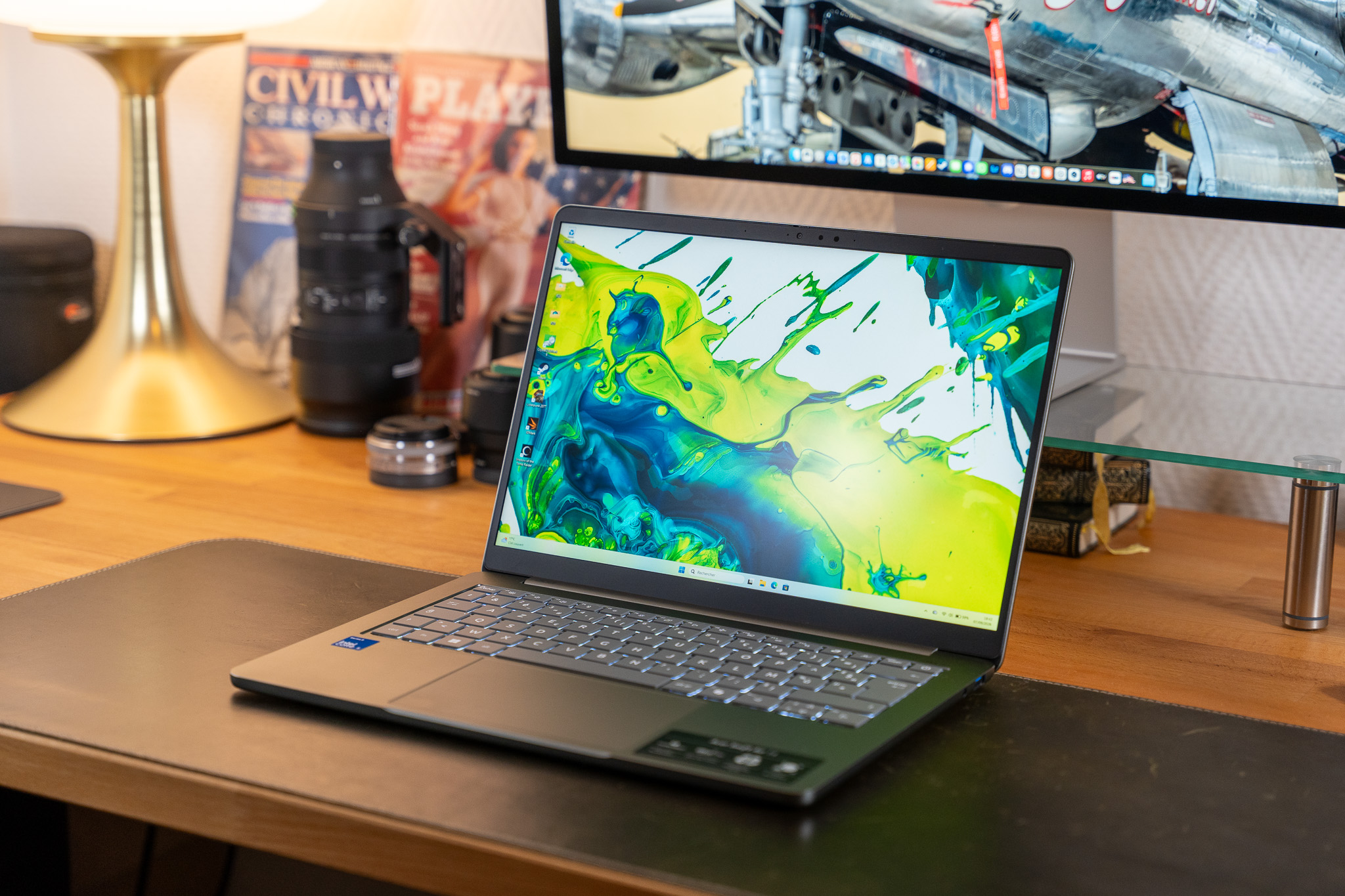
Presented at Computex 2026, the Acer Swift Air 14 forms, with a handful of others, the first wave of “premium entry-level” PCs launched in direct response to the MacBook Neo. With its aluminum chassis, an appealing spec sheet, and a very reasonable price, the small Acer ultraportable feels, indeed, like the brand’s pride. Quite appropriately, it’s also a device that, in practice, offers a compelling value.
The launch, in March, of the MacBook Neo served as a direct uppercut to a Windows entry-level market that had been limping along for years, usually revolving around sad plastic models, poorly sequenced retailing, sometimes awful displays, and exhausted hardware specs. It was a blow that the main suppliers of affordable laptops did not simply absorb, choosing to respond rather than flinch: three months later, Acer’s reply materialized in the form of a stylish ultrabook priced around 800 euros, featuring an aluminum chassis and a latest-generation Intel processor.
Best prices
The Swift Air 14 was announced in France at a price of 799.99 euros in this review’s context. The machine starts at 699.99 euros at Boulanger at the time of writing.
Pros
– Lightweight and elegant device
– The handsome Full HD+ / 120 Hz display, doing its job well
– Runs relatively cool, remains quiet
– Solid battery life within this class
– Comfortable keyboard and backlighting, modern I/O, facial recognition…
Cons
– Chassis rigidity could be better
– Not as powerful as a MacBook Neo
– Windows 11 with only 8 GB of RAM can feel tight
– Trackpad and speaker quality are only adequate
Read the conclusion
Sa nature entrée de gamme ne saute pas aux yeux : il fait premium !
It’s the very device we’re looking at today: the compact Swift Air 14. Let’s delve into what this new “entry-level premium” laptop from Acer is really worth in practical terms, and we’ll begin with Acer France’s loaned technical sheet for the model.
Fiche technique Acer Swift Air 14
Summary
– Processor: Intel Core i5-320 “Wildcat Lake” (6 cores / 6 threads, up to 4.6 GHz, 6 MB cache, 15 W TDP, built on a 18A process) with Intel Graphics (2 Xe cores up to 2.5 GHz, up to 20 TOPS) and an NPU (up to 16 TOPS)
– Memory: 8 GB LPDDR5
– Storage: 512 GB M.2 SSD
– Connectivity: Wi‑Fi 6E and Bluetooth 5.3
– OS: Windows 11
OS
– Operating System: Windows 11
Processor
– Processor: Intel Core i5 320
– Processor Type: 6 cores / 6 threads
– Processor Frequency: Up to 4.6 GHz
– Process Node: 1.8 nm
– NVIDIA RTX Spark: No
Memory
– Memory Size: 8 GB
– Memory Type: DDR5
Graphics
– Graphics Card: Intel Graphics
– Max-Q: No
– VR Ready: No
Display
– Screen Size: 14 inches
– Refresh Rate: 120 Hz
– Display Type: IPS LCD
– Screen Type: LED
– Resolution: Full HD+
– Screen Format: 16:10
– Matte / Anti-Reflective: Yes
– G-SYNC: No
– Touch Screen: No
Storage
– Storage Configuration: SSD
– Primary Drive: 512 GB
– M.2 Slot: M.2 (occupied)
– Card Reader: None
Connectivity
– Available Ports: Thunderbolt 4/USB-C, USB 3.2, 3.5 mm audio jack
Display details
– Screen Size: 14″
– Refresh Rate: 120 Hz
– Panel Type: IPS
– Screen Type: LED
– Resolution: Full HD+
– Aspect Ratio: 16:10
– Matte / Anti-glare: Yes
– NVIDIA G-SYNC: No
– Touch Screen: No
Physical
– Length: 31.39 cm
– Width: 22.26 cm
– Thickness: 1.29 cm
– Weight: 1.19 kg
Design: a very pretty chassis, but all soft
Like its rival, the MacBook Neo, the new Swift Air 14 is an affordable model that’s pleasing to look at. It’s a restrained and elegant device, the epitome of a Windows entry-level refresh that looks new even if the chassis metal isn’t anything extraordinary. The aluminum chassis stands out for once in this price range from Acer, recalling the Apple-like approach seen with the earlier Swift 1, which offered a similar aesthetic but with a far more constrained overall spec sheet than the Swift Air 14 we’re examining here. In that sense, Acer has made progress. The Taiwanese brand demonstrates here that it is willing to play the game, even in France, pricing this model at the same level as Apple’s compact notebook—unlike some rivals that have only half-committed (we think of the Dell XPS 13 2026, for instance).
C’est lui qui nous intéresse aujourd’hui, le petit Swift Air 14. We’re focusing on this little Swift Air 14 today to see what it’s really worth, and to that end Acer France supplied a loaner unit with the following specs.
Écran: a display that delivers what you expect in this segment
Acer’s decision to keep the Swift Air 14 in the affordable tier sensibly does not lead to a “cheap” screen. The device sports a 14″ IPS LCD Full HD+ (1920 x 1200) panel in a 16:10 aspect ratio. In a rarity for this price point, the screen features a dynamic refresh rate that can vary between 30 and 120 Hz. It claims 100% of the sRGB color gamut, and Acer states a maximum brightness of 350 cd/m². We checked the reality behind these numbers.
The display is among the main strengths of the Swift Air 14. The measured peak brightness hit 353 cd/m², just a touch above Acer’s claimed 350 cd/m², which is good for this price class and more than adequate for indoor use or typical bright environments, especially with a matte anti-glare treatment. Outdoor use should still be avoided, as expected.
Contrast ratio sits around 1172:1, which is solid for IPS technology. In terms of color accuracy, the display is a real success thanks to careful factory calibration and 100% sRGB coverage, as Acer promised. The measured color temperature is 6584 K, close to the target 6500 K, and the Delta E score is 1.17, which is excellent (ideally <= 3). So right out of the box, colors are accurate and pleasing, with strong contrast and ample brightness for daily tasks. Color coverage - sRGB: 101.3% of the sRGB color space, fully covered - DCI-P3: 71.8% In short, the Swift Air 14’s screen does everything you’d expect at this price level: solid contrast, vibrant colors, and brightness sufficient for everyday use with good anti-glare, though it won’t compete with OLED displays. Performance: Windows 11 is not up to the RAM challenge The Swift Air 14 sits at the intersection of Acer’s renewed approach to better-looking and better-built lower-cost laptops and the well-known constraint of the current “budget” RAM scarcity. The tested configuration ships with 8 GB of RAM, the same as many competing devices and the minimum recommended by many for Windows 11. Windows 11 does not handle 8 GB of RAM particularly gracefully, and the Swift Air 14 feels the strain in real use. A quick recap of the test configuration: - Processor: Intel Core i5-320 “Wildcat Lake” (6 cores / 6 threads, up to 4.6 GHz, 6 MB cache, 15 W TDP) with Intel Graphics (2 Xe cores at 2.5 GHz, up to 20 TOPS) and an NPU up to 16 TOPS - Memory: 8 GB LPDDR5 - SSD: 512 GB M.2 - Connectivity: Wi-Fi 6E and Bluetooth 5.3 Geekbench 6 results reveal that the Core i5 320 sits behind Apple’s M-series in single-core performance and trails notably in multicore performance as well. Specifically, the 320 scores about 41% lower in single-core tasks compared with the A18 Pro in the MacBook Neo and around 22% slower in multi-core calculations on the same test. Graphically, both chips are limited, with only modest integrated graphics in play. The problem for the Swift Air 14 isn’t raw speed so much as RAM management and Windows 11’s appetite for memory. RAM limitations are noticeable in practice. With idle OS usage alone, the system often occupies between 5 and 6 GB of RAM, leaving only 2–3 GB free for active workloads. That’s a real constraint for multitasking or more demanding software. The overall result? You won’t do editing, heavy photo work, or gaming on this device without adjusting expectations. What about thermals and acoustics? The Swift Air 14 remains fairly quiet and fairly cool during normal use. It has two adjacent fans and two small heat pipes to keep the Core i5 320 in check. It’s far from Apple’s fanless design, and the Windows platform’s legacy limits the machine’s outright performance. Nonetheless, during a week of testing, the fans rarely activated, and surface temperatures stayed within comfortable ranges, with the hottest hotspots near the hinge (around 37–38 degrees Celsius). No major discomfort here. On the software side, the Swift Air 14’s performance is good for everyday tasks: office productivity, web browsing, and light multimedia. But for more demanding activities—video editing, photo retouching, or gaming after school—the limitations are clear. It’s not a machine you would choose for heavy tasks. Storage performance remains solid but not class-leading. The 512 GB M.2 SSD delivers around 4460 MB/s read and 3086 MB/s write in our tests. It’s fast enough for its target users, even if PCIe Gen 4 speeds aren’t fully realized here. Compared to the MacBook Neo, the Swift Air 14 has faster storage in some respects yet falls short in raw capacity and real-world sustained throughput. Speaker and webcam performance: a plus for the price In the audio and camera department, the Swift Air 14 performs well for its category. The 2 MP webcam above the screen offers a reasonable image in dim lighting—though low light performance remains a mixed bag. Windows Hello facial recognition uses infrared sensors and works reliably, which is noteworthy given the price. The speakers situated under the chassis are adequate for occasional YouTube videos or video calls without headphones, though they won’t rival dedicated laptop speaker systems. On balance, this is a solid result for a budget-focused machine. The Swift Air 14’s serviceability is modest: you can replace the battery and the SSD (M.2 2280) if needed, but the RAM and Wi-Fi module sit on the motherboard, so upgrades are limited. Access to other components requires removing the bottom panel, which is typical for this class of laptop. Battery life and charging Thanks to a sizable 70 Wh battery, the Swift Air 14 holds its own in endurance. With a dynamic refresh rate ranging from 30 to 120 Hz, the system can scale power use to save battery when possible. In real-world mixed-use scenarios—productivity, light multimedia, web browsing—the device typically delivers between 8 and 10 hours of use. The MacBook Neo often outperforms it slightly with up to 11 hours in certain tests, but Acer’s device remains competitive in this class by delivering solid all-day endurance without a dramatic drop-off. Charging requires a USB-C charger, and Acer, like many, no longer includes a wall charger in the box to comply with European regulations. A 65 W USB-C charger is recommended by Acer for the Swift Air 14. Conclusion: Acer Swift Air 14—design and value, challenged by RAM and Windows 11 On paper, the Acer Swift Air 14 appears to outperform its main competitor, the MacBook Neo, in several respects: a 120 Hz screen, a slightly more generous chassis, a newer generation of processor, faster and more numerous I/O options, a quicker SSD, and a larger battery. In daily use, however, it proves less powerful, less well built, and while it offers respectable battery life, not as enduring as Apple’s best. If the chassis rigidity is indeed Acer’s fault, the performance and stability issues of this elegant Swift Air 14 are primarily a Microsoft and Windows 11 problem—an OS that struggles with a mere 8 GB of RAM. In a time of RAM shortages, Redmond needs to do better. Until then, Windows suffers in the affordable segment, whereas macOS handles the same RAM with far greater efficiency. Apple proved the point with its MacBook Neo. Pros - Light, elegant device - The Full HD+ / 120 Hz display is robust and well calibrated - Keeps thermals under control, with minimal fan noise - Decent endurance for the class - Strong keyboard and modern ports, plus facial recognition Cons - The chassis could be stiffer - Slightly less capable than the MacBook Neo - Windows 11 with 8 GB RAM is pushing its luck - Trackpad and speakers are not outstanding at this price point On the screen and color performance, the device delivers. The screen covers 101.3% of the sRGB color space, with a strong precision that makes the display among the best in its price class. The DCI-P3 space is limited at 71.8%, which is expected for this class and won’t hamper the average user much. The Swift Air 14 offers good contrast, vibrant colors, and sufficient brightness for daily indoor use, though it cannot match the more advanced color and brightness performance of higher-end devices like the MacBook Neo. In practical terms, the Swift Air 14’s graphics and CPU performance are not enough for enthusiast tasks. It’s ideal for typical productivity tasks and light multimedia, but avoid ambitious editing tasks or gaming after class. RAM constraints and Windows 11’s resource demands are the main stumbling blocks to peak performance here. The machine’s acoustic and thermal behavior remains well within normal ranges for a fan-assisted ultrabook in this segment. The conclusion is that Acer has done well in raising the standard for an entry-level premium laptop, providing a design that looks premium and features a solid display, confident battery life, and robust connectivity. However, those who need sustained performance for intense workloads or who wish to maximize efficiency under Windows 11 with limited RAM will likely prefer systems that offer more memory by default or an OS that runs more efficiently with 8 GB. The final verdict remains that the Swift Air 14 is a stylish and appealing option at its price, offering a strong blend of aesthetics and features. Its main shortcoming—the RAM ceiling and Windows 11 efficiency with 8 GB—limits its capability for heavier multitasking and demanding software. In this sense, the Swift Air 14 is a solid, attractive choice for everyday use and light productivity, but it is not the most capable all-rounder in its class, particularly when compared to macOS-powered rivals. The Acer Swift Air 14 is not just a looker; it’s a well-rounded machine for its market segment, provided you keep expectations aligned with its RAM and OS constraints.
