
Based in the United States and within the Five Eyes perimeter, Private Internet Access does not address privacy with the most reassuring profile on paper. Still, it remains a solid VPN, well-equipped and surprisingly constant in its performance, which partly offsets this starting point with a tangible no-logs history and network settings that remain quite present.
What is Private Internet Access (PIA)?
Private Internet Access, or PIA for friends, is one of the veteran players in the field. The provider was launched in 2010 and belongs to the batch of VPNs that appeared well before the market’s big wave of popularization. At the time, the service already leaned on a clearly privacy-focused approach, more technical than flashy, which has earned it a loyal following, especially among users who like to keep control over the settings. Today, PIA positions itself as a service based in Denver, Colorado, thus under US jurisdiction. A detail that typically fuels insinuations. The matter does, however, deserve a bit more nuance.
Because if there is one area where Private Internet Access has built its reputation, it is its no-logs policy. The service has been subpoenaed several times in US court cases. In 2016, and again in 2018, court documents and coverage published at the time showed the same thing. Authorities asked for information, but the VPN provider could not hand over connection logs or activity data that could identify targeted users.
PIA VPN Technical Sheet
Summary
| Servers | 10000 |
| Countries Covered | 90 |
| Simultaneous Connections | Unlimited simultaneous connections |
| Free Trial | 30-day free trial |
| Advantages | Advantage: advanced settings |
Features
| Servers | 10000 |
| Countries Covered | 90 |
| Simultaneous Connections | Unlimited simultaneous connections |
| Free Trial | 30-day free trial |
| Data Logs | No data logs |
| Advantages | Advantage: advanced settings |
| Jurisdiction | United States |
| Emergency Kill Switch | Yes |
| Split Tunneling | Yes |
| Protocols | OpenVPN, IPSec, WireGuard, PPTP |
| Platforms | Windows, macOS, Linux, Android, iOS, Google Chrome, Mozilla Firefox, Xbox, PlayStation |
| Client Support | Yes |
| Price (€/mo) | €1.99 |
| Commitment | 36 months |
| Payment | Credit card, PayPal, Crypto |
Specifications
| Operating System | Web |
| License | Proprietary software |
| Publisher | London Trust Media, Inc |
| Language | English |
| Category | VPN |
That debate around Private Internet Access has not vanished. In November 2019, the provider announced its acquisition by Kape Technologies, finalized in December of the same year. This takeover immediately revived old concerns about the buyer group, already well known in the VPN ecosystem. Since then, PIA has continued to play on two fronts. On one hand, a technically dense service, open to part of its code, able to present tangible privacy arguments. On the other, a corporate ownership that still leads part of the public to scrutinize the product a bit more closely than average.
Private Internet Access (PIA) infrastructure
Active in 90 countries and boasting over 10,000 servers, Private Internet Access has a notably dense network. The entire setup rests on a 10 Gb/s infrastructure designed to absorb load and minimize slowdowns when some locations are busier than others.
All the fleet runs on RAM-based servers. In plain terms, nothing is supposed to be stored on persistent storage—the memory is wiped on reboot. This architecture limits lingering traces on machines, though it is not by itself sufficient to prove the absence of logs, since everything also depends on how the servers are configured and managed.
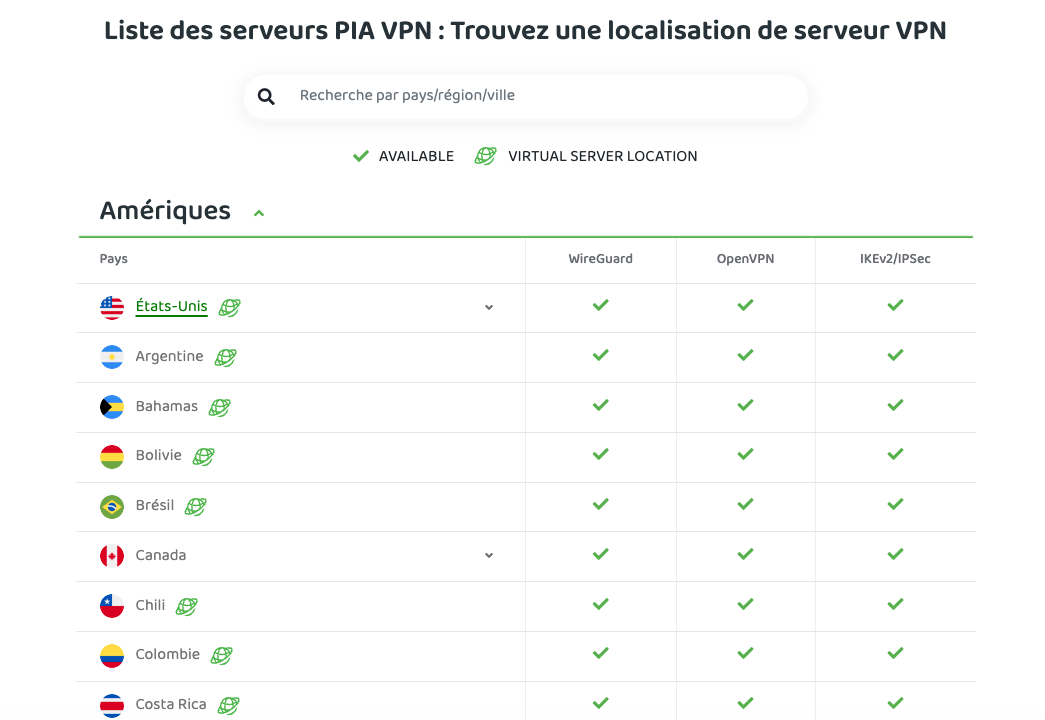
PIA also distinguishes physical locations from virtual ones, and does so rather cleanly. On the servers page, virtual locations are explicitly indicated, avoiding ambiguity. It should be noted, though, that using virtual locations is not inherently problematic. In some regions, it can even be the only way to ensure a local VPN presence without overburdening the infrastructure with technical, regulatory, or security constraints.
Is Private Internet Access (PIA) free?
PIA is not a free VPN, and you must subscribe to use the service. The provider, however, offers two ways to try it with limited risk. The first is a 7-day free trial on iOS and Android, available only for subscriptions purchased through mobile stores. The second, more traditional option, relies on a 30-day refund guarantee, applicable to all subscriptions.
What pricing does Private Internet Access (PIA) offer?
Private Internet Access offers three plans:
- €10.59 per month for 1 month, billed as a one-time payment of €10.59
- €6.79 per month for 6 months, billed €40.74 upfront
- €1.85 per month for 2 years + 4 months free, billed €51.74 upfront
All subscriptions include the same features, a 30-day refund policy, and a unlimited number of simultaneous devices.
However, watch out for automatic renewal, enabled by default. Remember to disable it from your online account settings or set a reminder before the due date.
Download and Install Private Internet Access (PIA)
To use Private Internet Access, you must first subscribe and create an account. Once that step is complete, you only need to download the app appropriate for your device, sign in with your credentials, then let the installation wizard handle the rest.
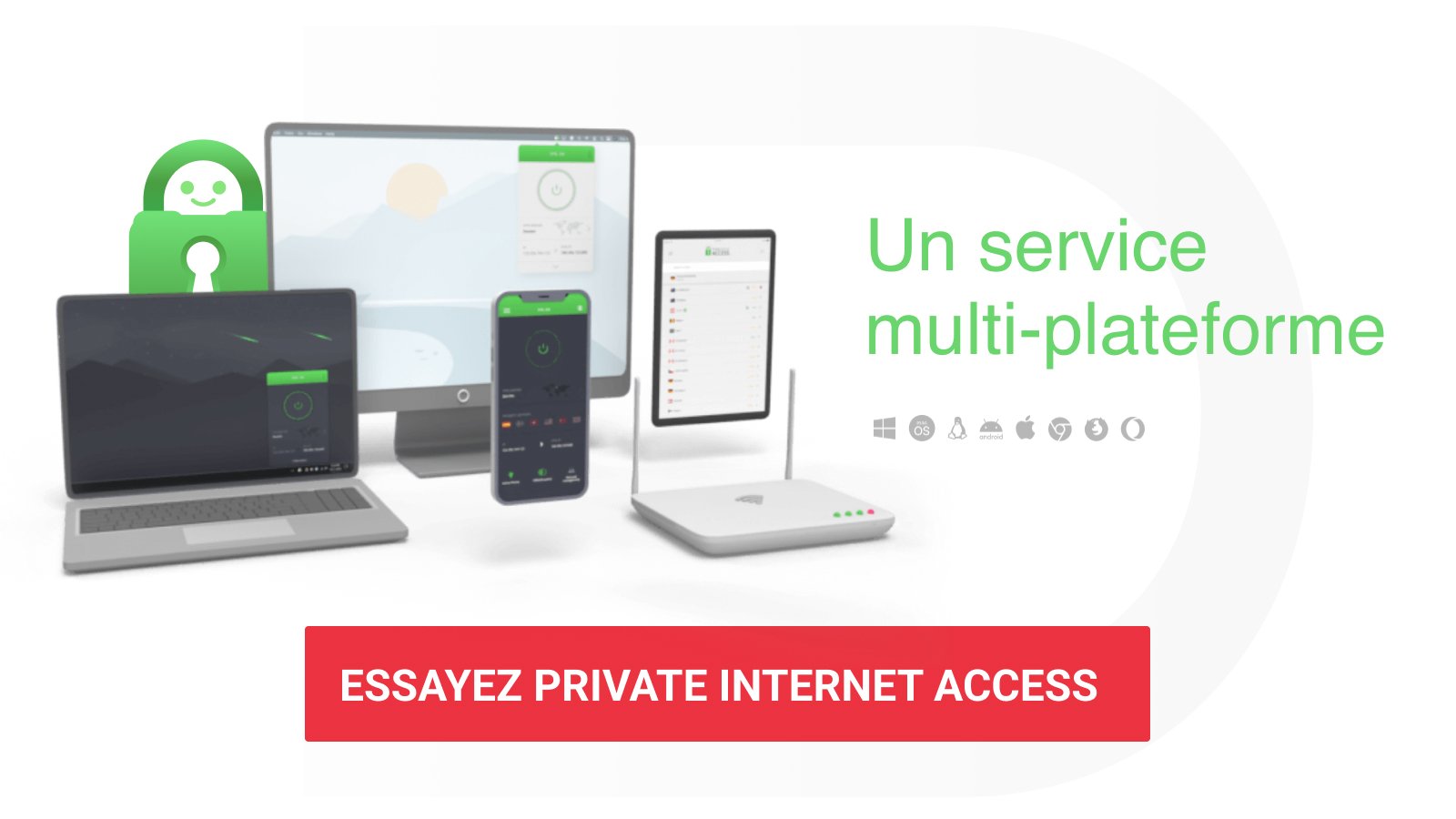
PIA offers apps for Windows, macOS, Linux, Android and iOS, as well as extensions for Chrome, Firefox and, more broadly, Chromium-based browsers. The service is also available on Fire TV, Android TV and Apple TV.
For devices that do not natively support the app (Smart TVs, Xbox and PlayStation consoles), you’ll need to use Smart DNS, VPN on the router, a tethered connection, or, depending on the case, an Ethernet link from a computer.
Interface and features of Private Internet Access (PIA)
VPN client and web console organization
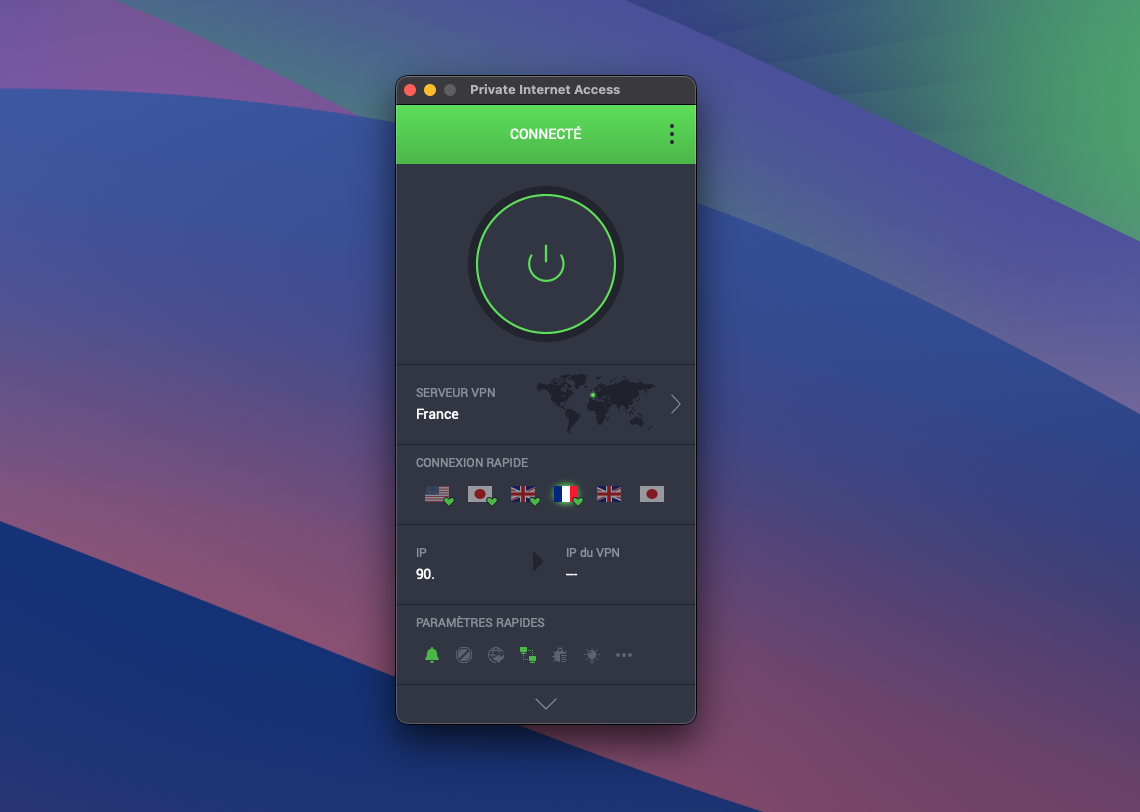
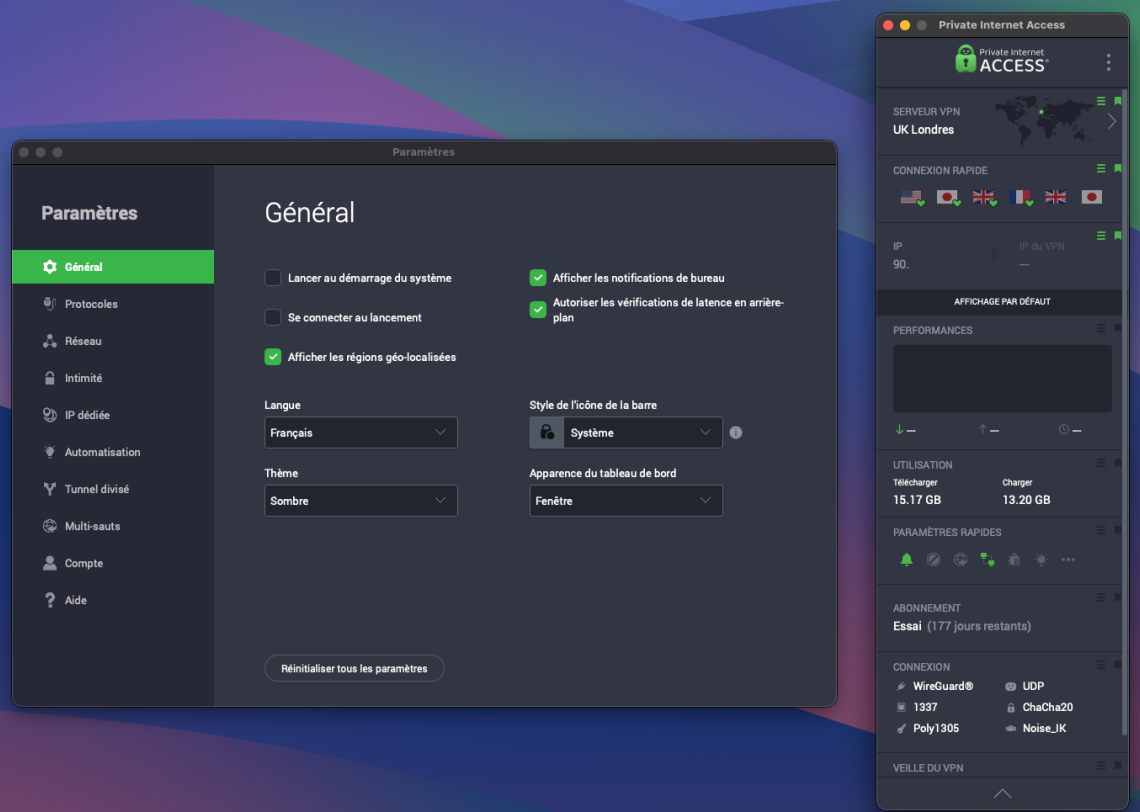
This is perhaps one of the biggest weaknesses of Private Internet Access, and it isn’t a new concern. The client’s design shows its age. The main window, tall, narrow and non-resizable, gives the software a dated look that stands out. In principle, a modular dashboard isn’t a bad idea. In reduced mode, it actually works quite well, with a compact interface you can customize to keep handy only the functions you use daily. It’s when it expands into the full-length layout that things really degrade. The column-based layout compresses the display, crowds modules, and ends up hindering readability.
That’s all the more regrettable because PIA is not short on options. The client is packed with settings, indicators and useful modules, such as quick connect, throughput statistics, usage tracking, access to locations, or a technical summary of the connection with protocol, port, and encryption used.
The contrast with the settings window is telling. Here, Private Internet Access returns to something much more conventional and, above all, better suited. The presentation is wide, readable, and structured around a straightforward side navigation. Rubrics are easier to spot, the options feel more breathable, and the whole thing instantly looks clearer.
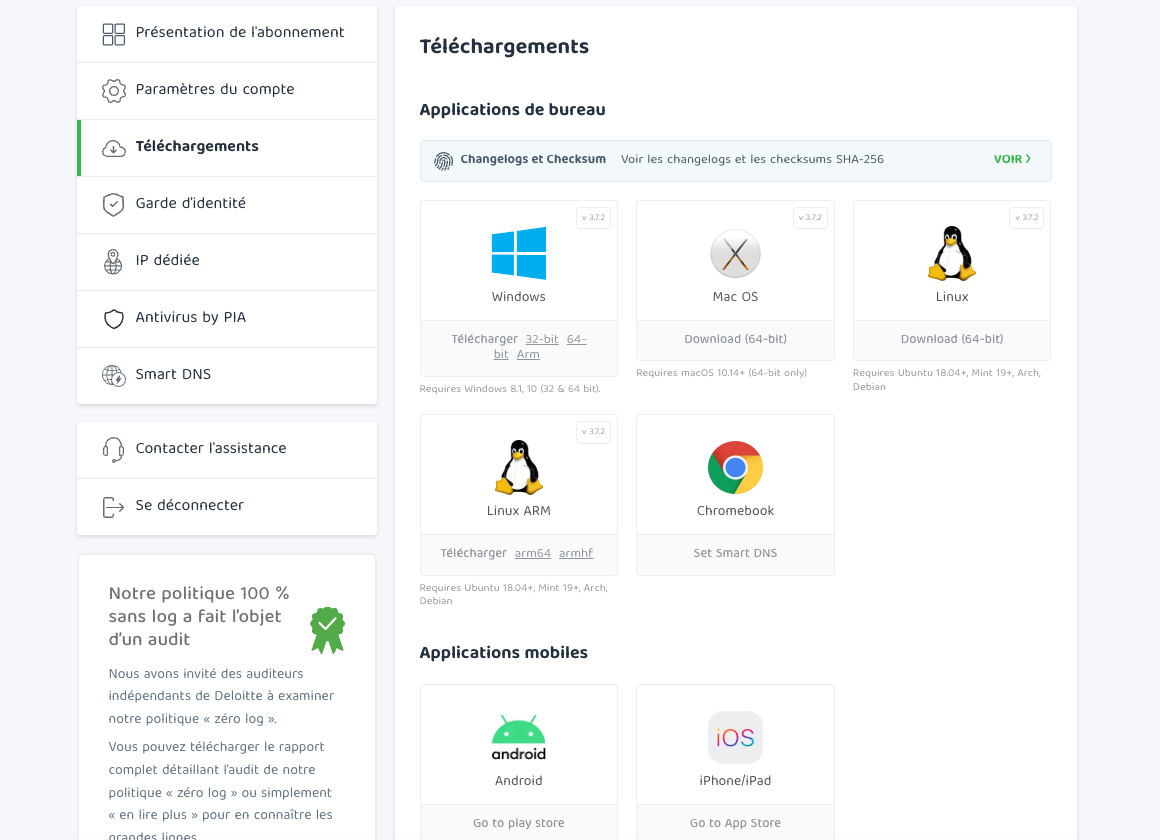
The PIA web console adopts a classic yet well-kept presentation. The subscription summary, account settings, downloads, Smart DNS configuration options, and support links are neatly organized in a side panel that’s easy to navigate.
Location choices
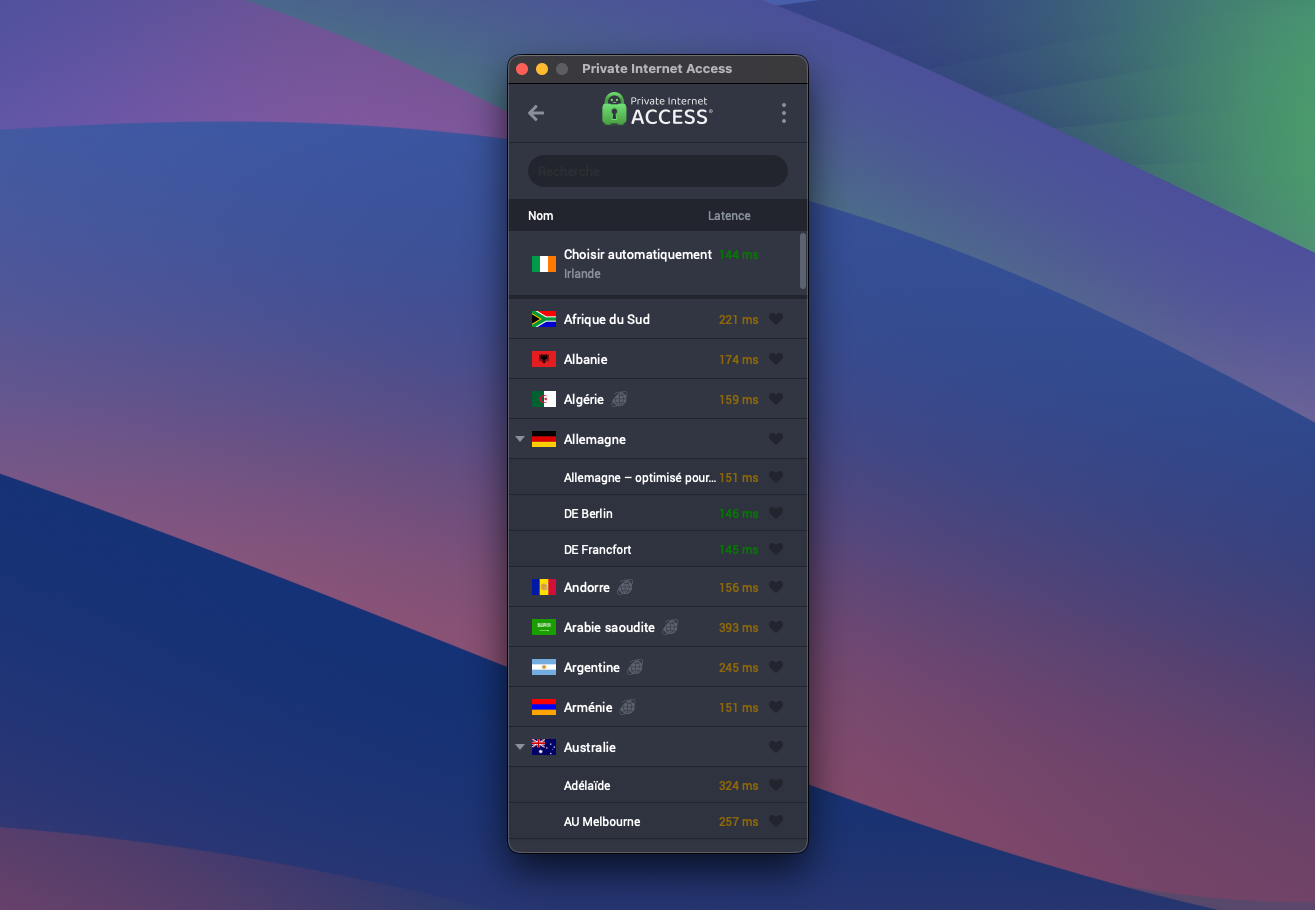
PIA offers a remarkably straightforward location picker, with the ability to sort servers by name or latency, search, add to favorites, clearly identify virtual locations, and, when a country has several access points, choose the desired city.
However, the client lacks a bit of automation. When a country covers several cities, it doesn’t automatically select the fastest server for the country. You must first pick a city, then connect to the fastest available server in that location.
Protocols and encryption
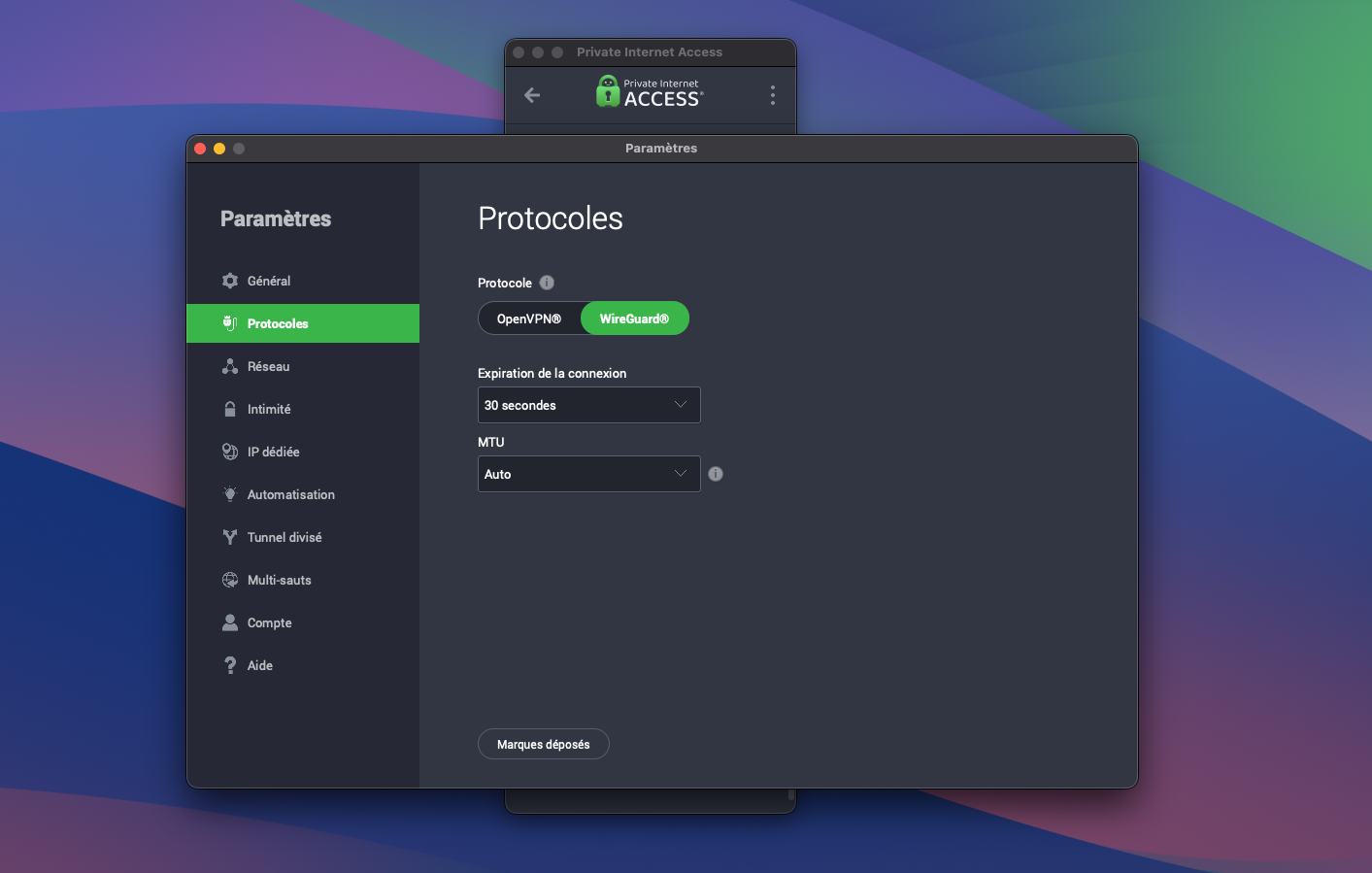
PIA remains among VPNs that still allow some network-level tuning. The client lets you choose between WireGuard and OpenVPN.
With OpenVPN, you can then fine-tune several parameters, selecting UDP or TCP, the remote port, the MTU (packet size transmitted over the network), and the data encryption algorithm (AES-128-GCM or AES-256-GCM).
With WireGuard, the setup is leaner, which fits pretty well with the protocol’s philosophy. There is, however, a connection expiration setting, configurable over several durations. The label remains somewhat vague, and Private Internet Access doesn’t really help explain what exactly this option covers. We understand it as a setting related to keeping the session alive over time, though the interface doesn’t clearly show what you are adjusting.
PIA also offers a form of obfuscation, but not as a standalone Global setting in the protocol options. You must go through the Multi-hop feature, which routes VPN traffic via a Shadowsocks or SOCKS5 proxy.
Technical Support
PIA offers fairly comprehensive technical support, in French, built around a help center (with extensive documentation), a ticketing system, a 24/7 live chat, and email assistance.
Speed test
For the purposes of this review, our speed tests were conducted on a MacBook Air (M1, 2020) with a fiber-connected desktop link (advertised download speed: 1 Gb/s; upload: 700 Mb/s).
To achieve as neutral results as possible, we conducted measurements on the nPerf site three times a day (9am, 1pm, 6pm) for three days, with and without VPN, for WireGuard. For the VPN measurements, we tested the servers automatically assigned by Private Internet Access in France, the United States, the United Kingdom and Japan.
- Let us remind you that PING measures (in milliseconds) the time it takes for data packets to travel to and from the Internet. As for download and upload speeds, the higher the better for fast connectivity.
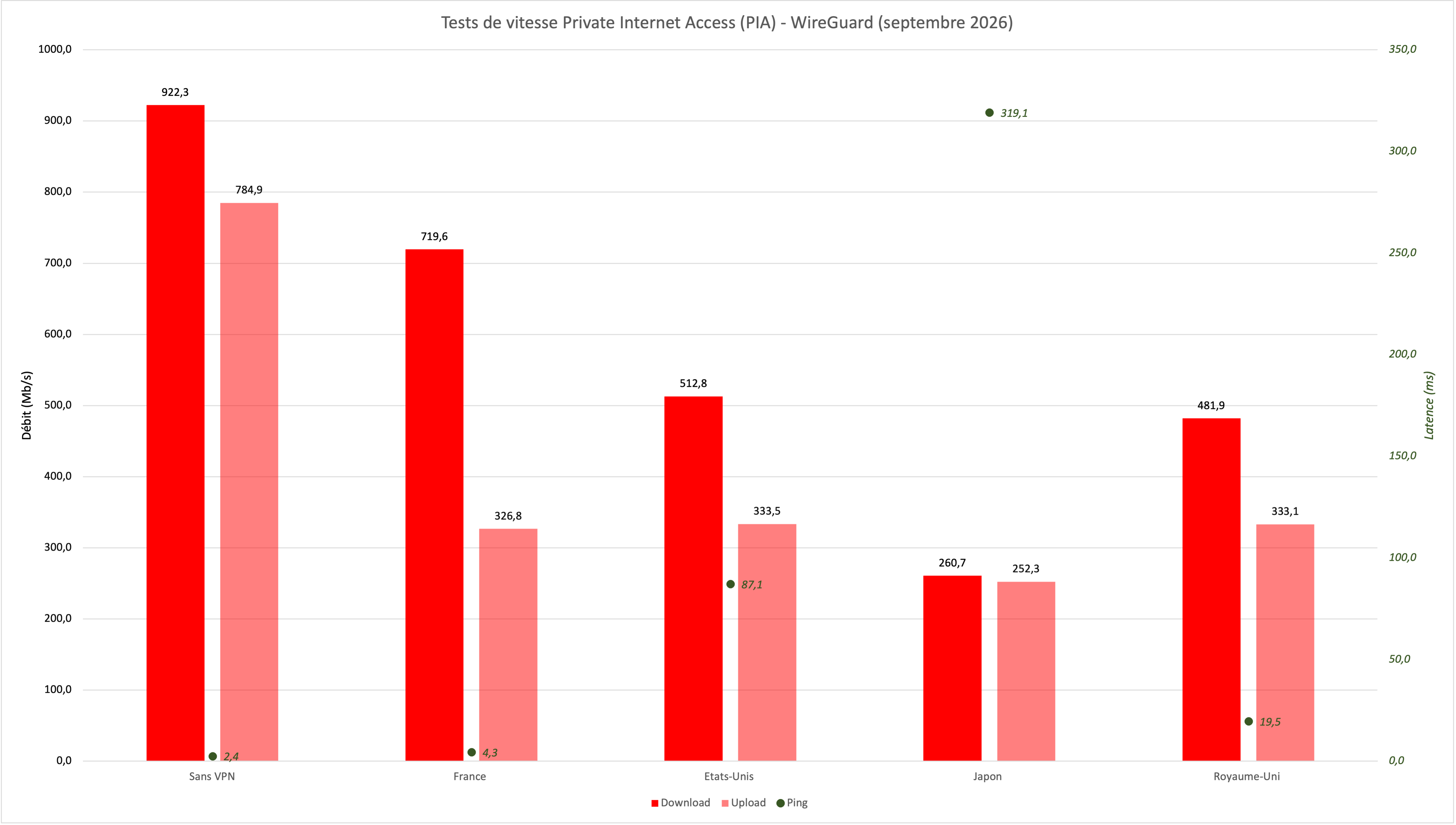
In September 2026, Private Internet Access achieves solid results near the top, though it does not quite match the fastest VPNs in our selection. In France, WireGuard delivers 719.6 Mbps download, compared to 922.3 Mbps without VPN, about 78% of the baseline. Upload retreats more, to 326.8 Mbps against 784.9 Mbps. Latency remains excellent, at only 4.3 ms. The nine French measurements range from 621.8 to 804.1 Mbps in reception: PIA thus leaves a comfortable margin for all uses, even if speed varies more than the top performers this month.
The ranking becomes more unusual once you cross borders. The United States proves to be notably faster than the United Kingdom, with 512.8 Mbps download versus 481.9 Mbps in the UK. Upload speeds are almost identical, at 333.5 and 333.1 Mbps respectively. Ping follows geography more closely: 19.5 ms to the UK and 87.1 ms to the United States. This gap between distance and throughput shows that proximity to the server is not enough to predict performance. For these two destinations, results remain fairly steady across the three days.
Japan is more demanding, but PIA still maintains an interesting profile there. Download falls to an average of 260.7 Mbps, with wide swings between 162.4 and 429.8 Mbps depending on time and day. Upload is much steadier and even reaches 252.3 Mbps, nearly as high as download, a relatively rare balance in our September readings. Latency climbs to 319.1 ms and will be the main drawback for interactive use. Overall, Private Internet Access delivers a solid verdict: fast in France, decent internationally and fairly stable for upload, but slower and more variable in download than the top VPNs in this September round.
Security test
DNS, WebRTC and IPv6 leaks
We checked DNS, WebRTC and IPv6 leaks using DNS Leak Test, BrowserLeaks and IPv6 Leak, repeating tests over several days at random times. Nothing to report; PIA is reliable.
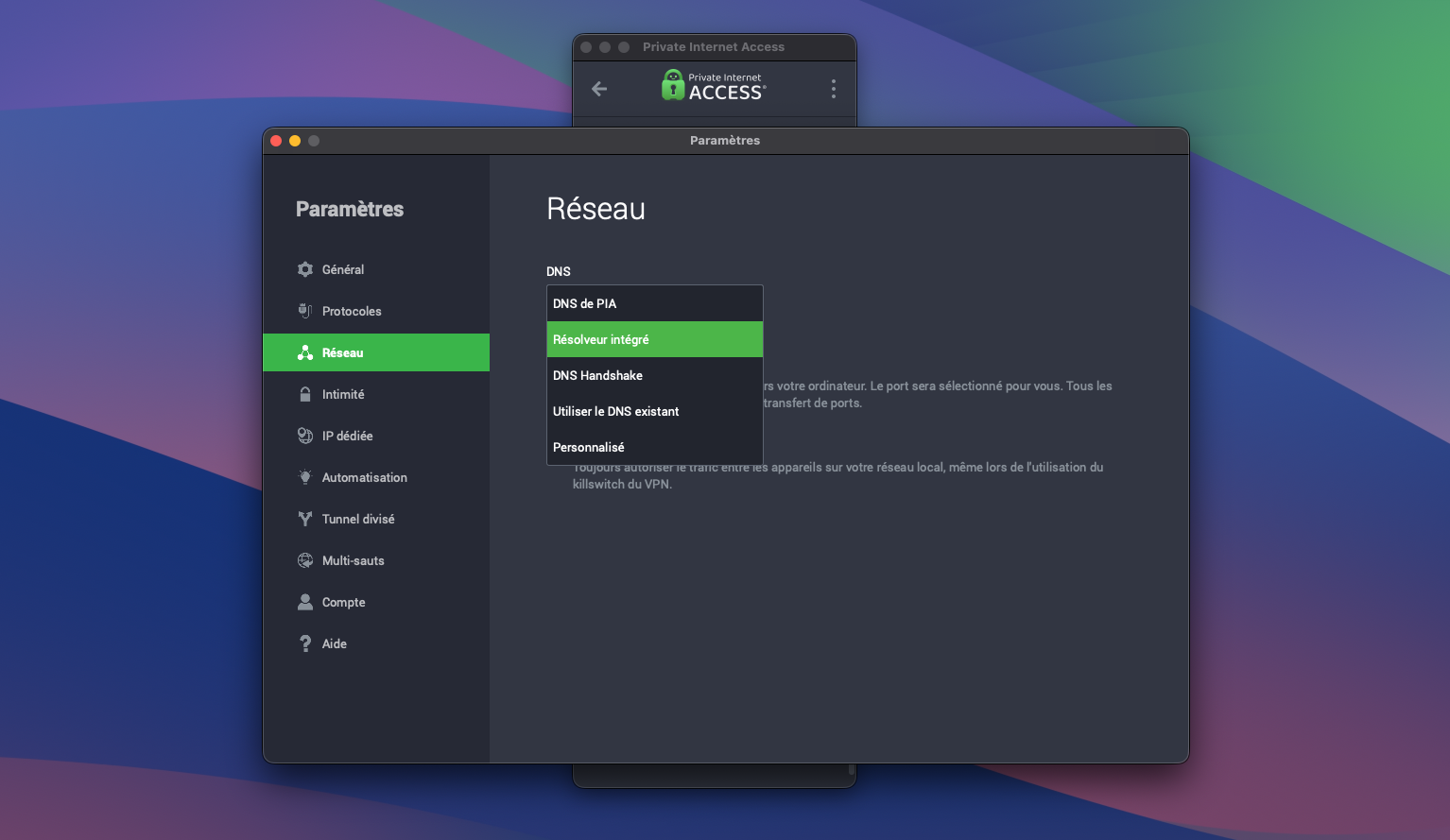
The client also gives control over DNS management—the servers that translate domain names into IP addresses. Several options are offered in the network settings. It’s possible to use PIA’s DNS, which flows directly through the VPN tunnel, or to go through an integrated resolver, processed locally by the app. The DNS handshake mode corresponds to encrypted DNS resolution, designed to limit interception on the network. Conversely, using existing DNS relies on the system’s or the ISP’s DNS, while the custom mode allows you to define your own DNS servers. All of this provides flexibility, though the default setting remains best to avoid leaks.
Logging, privacy policy and audits
Privacy inevitably becomes a focal point for PIA, especially since the service is US-based and falls under the Five Eyes. The provider, however, has a tangible track record. In several cases, requests for login data were made, but it was not possible to produce actionable logs due to the absence of logs being kept.
This background does not settle the question, and PIA has supported its stance with published audits. In 2024, Deloitte inspected system configuration and operational handling in relation to the no-logs policy, and conducted new checks in early 2026 focused on VPN infrastructure and certain management components. The whole does not constitute a blanket validation of the entire technical environment, but it does shed light on how the service implements its no-log policy.
The privacy policy is clear: Private Internet Access states it collects only what is necessary to manage the account, i.e., email address and payment details, which may be supplemented by information transmitted during interactions with support. At the same time, the VPN provider claims not to keep browsing history, DNS requests, connection timestamps, source IP addresses or bandwidth logs, with a clear separation between account data and VPN activity.
Kape, the owner of PIA since 2019, remains a factor in the overall evaluation. The group carries a reputation from its past activities, but since its repositioning in the VPN space, nothing concrete has emerged to challenge the operation or practices of its services, including PIA.
Private Internet Access (PIA) for streaming
On streaming, PIA shows no particular obstacles. Tests with Netflix, Prime Video, BBC iPlayer, Hulu, Disney+ and HBO ran without blocks, with accessible content that starts without perceptible delay.
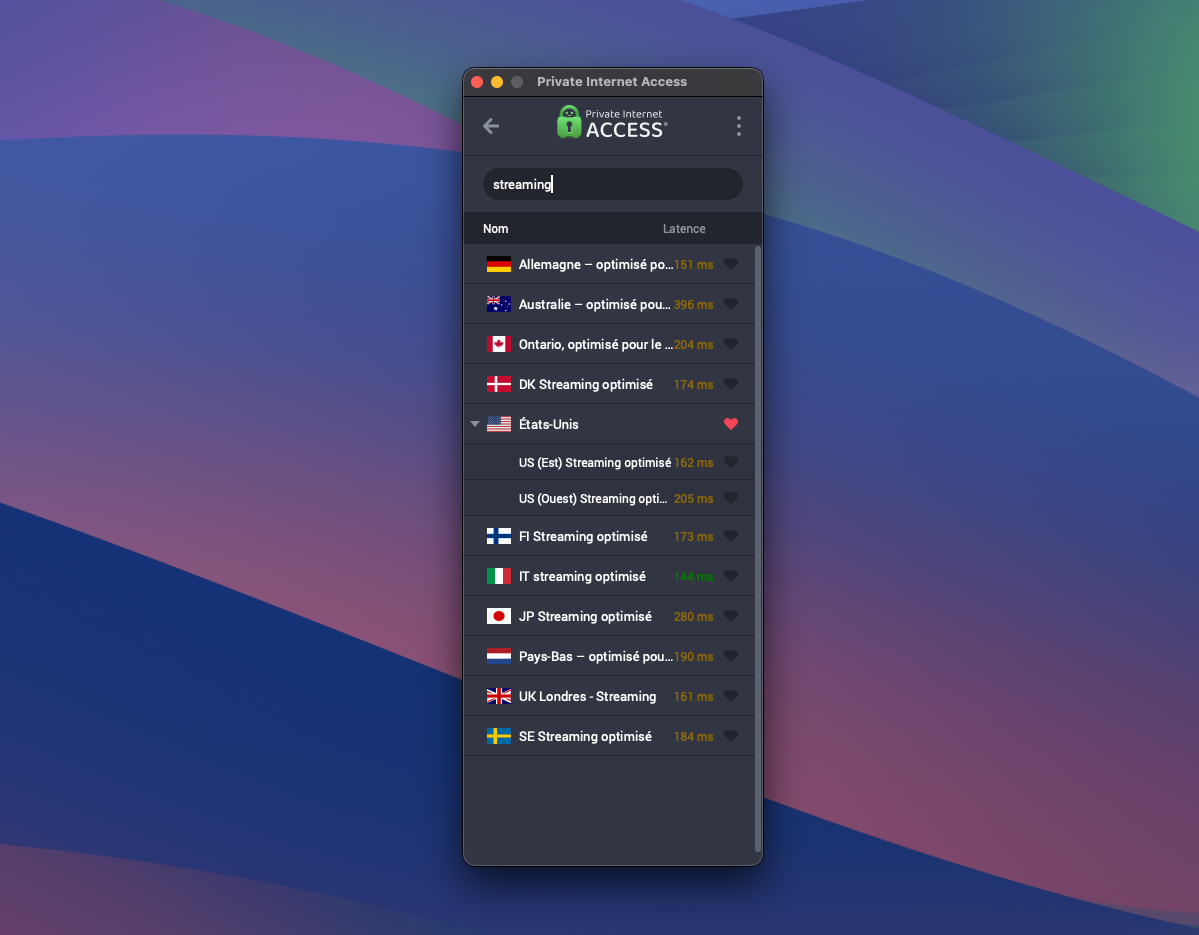
The service also offers streaming-optimized servers in several countries, easily identifiable by searching for “streaming” in the location list, which helps orient users toward configurations suited to this use.
Over sessions, the whole setup remains steady. Videos start quickly, playback is smooth, and there’s no buffering, even over longer viewing periods.
Private Internet Access (PIA) for torrenting
PIA supports P2P traffic without particular restrictions, and its use remains smooth in this context. Tests with legitimate files, such as Linux distributions, proceeded without issue, with stable transfers and speeds that do not collapse during download. That performance is in line with what we observe elsewhere, with solid connections and reasonably timely file retrieval.
The client also makes it easier to pick the right location. Pings are shown, latency can serve as a sorting criterion in the server list, which helps quickly identify the most responsive locations to optimize download speeds.
Private Internet Access (PIA) on iPhone or Android
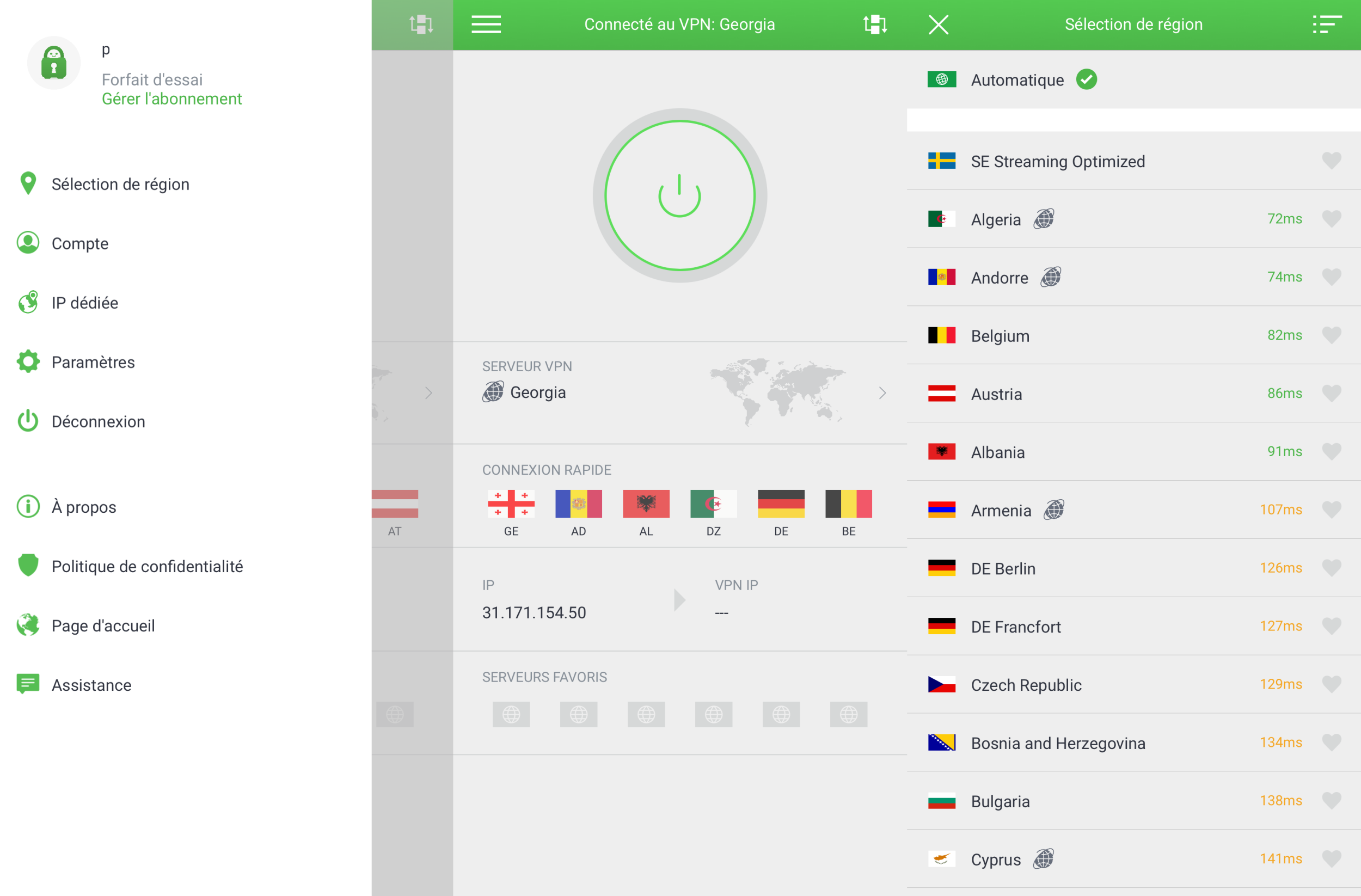
On mobile, Private Internet Access looks noticeably different. The interface is more polished, better thought out, and significantly more pleasant to use than on desktop. The home screen sticks to essentials, with a connect button, quick access to the optimal location, and information about the IP address, first public and then VPN once connected. It is also possible to set favorite locations to speed up daily connections.
Automation options let you configure automatic connections depending on the network you’re on, the kill switch can be toggled with a single tap, and the choice of protocol, between WireGuard and OpenVPN, remains accessible directly from the main interface. An icon at the top of the screen also opens access to additional modules, which you can pin to the home screen as needed.
Advanced settings then cover the expected options, including the ability to use a dedicated IP, DNS choices, or the activation of an ad blocker.
Other Private Internet Access (PIA) features
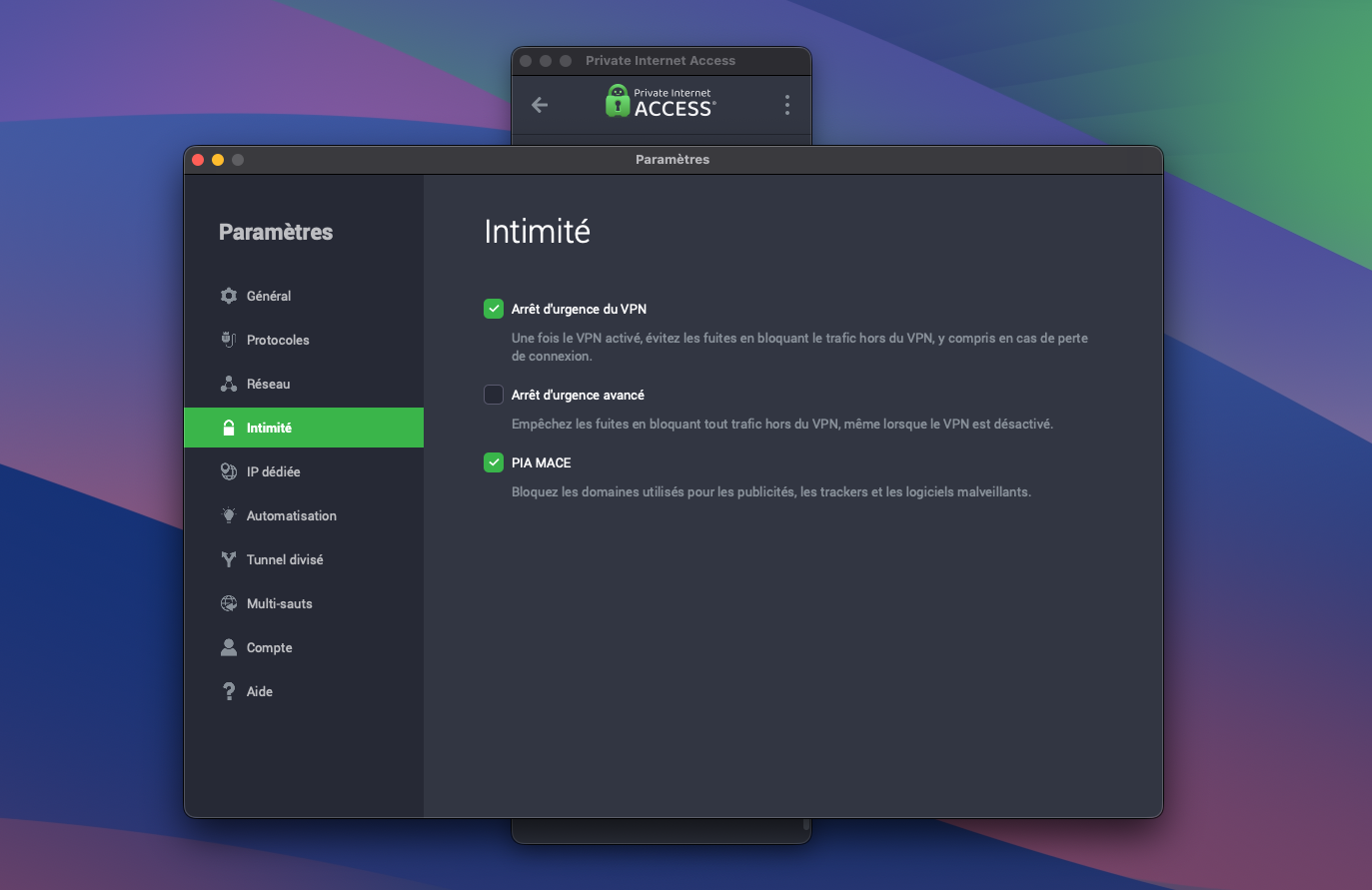
PIA sticks to the essentials but covers typical use cases without leaving gaps. The client includes a kill switch enabled by default, offered in two modes. The first is the classic behavior, which cuts the connection if the VPN tunnel is broken. The second, stricter mode, blocks all traffic outside the VPN, even when the VPN is disabled, preventing any leaks.
The service also includes PIA MACE, an ad and malware domain blocker directly integrated into the client. In addition, automation options can automatically trigger connection based on the network type—for example on an open Wi‑Fi network, a secure network, or a wired connection—so you don’t have to intervene manually.
Split tunneling is available, including on macOS, which remains fairly rare. It allows you to precisely define which apps or which IP addresses pass through the VPN, which ones bypass it, or to apply rules such as using only the VPN’s DNS. It takes a bit of getting used to, but provides a fairly fine level of control to tailor the client’s behavior for different use cases.
PIA also offers dedicated IP support as a paid option, plus a sleep mode that temporarily suspends the VPN connection and automatically restores it after a defined delay. Without overloading on gadgets, the service presents a coherent and sufficient set of features to cover both everyday needs and more advanced uses.
Editorial opinion
- Reviews CyberGhost
- Review NordVPN
- Review Proton VPN
- Review ExpressVPN
- Review Surfshark VPN

Staff review
Without being the most captivating VPN on the market, Private Internet Access still carries strong arguments. The service rests on a solid technical base, a well-documented no-logs policy, good stability, and convincing cross-platform coverage, with a notably more polished mobile experience than on desktop. The performance isn’t the fastest in the sector, but remains consistently reliable for everyday use, from streaming to P2P to everyday browsing.
This more technical positioning comes at the cost of other aspects. The desktop client, in particular, clearly shows its age, with a rigid interface that doesn’t always showcase the service’s richness. Location selection could be more flexible, while the shorter-term plans struggle to compete. Added to this, US domiciliation continues to cast a principled caveat, even if PIA’s history and the published audits provide credible elements.
Discover the best Private Internet Access offer
- storage10000 servers
- language90 countries
- lanUnlimited simultaneous connections
- mood30-day free trial
- thumb_upAdvanced settings
PIA prioritizes technical solidity and stability, with a well-liked mobile app despite an aging desktop interface. The US domicile remains a caveat, but the service offers long-term plans that are quite advantageous for covering essential uses.
- Audited, well-documented no-logs policy
- Extensive network settings / advanced features
- Good stability
- Polished and pleasant mobile app
- Unlimited connections
- US domicile (Five Eyes)
- Outdated desktop client (full mode)
- Location selection could be more flexible
Nos autres avis sur les VPN :
- Reviews CyberGhost
- Reviews NordVPN
- Reviews Proton VPN
- Reviews ExpressVPN
- Reviews Surfshark VPN
