Alienware AW2726DM Review: A High-Performance, Affordable OLED Monitor for GTA VI

November 14, 2026
Tech

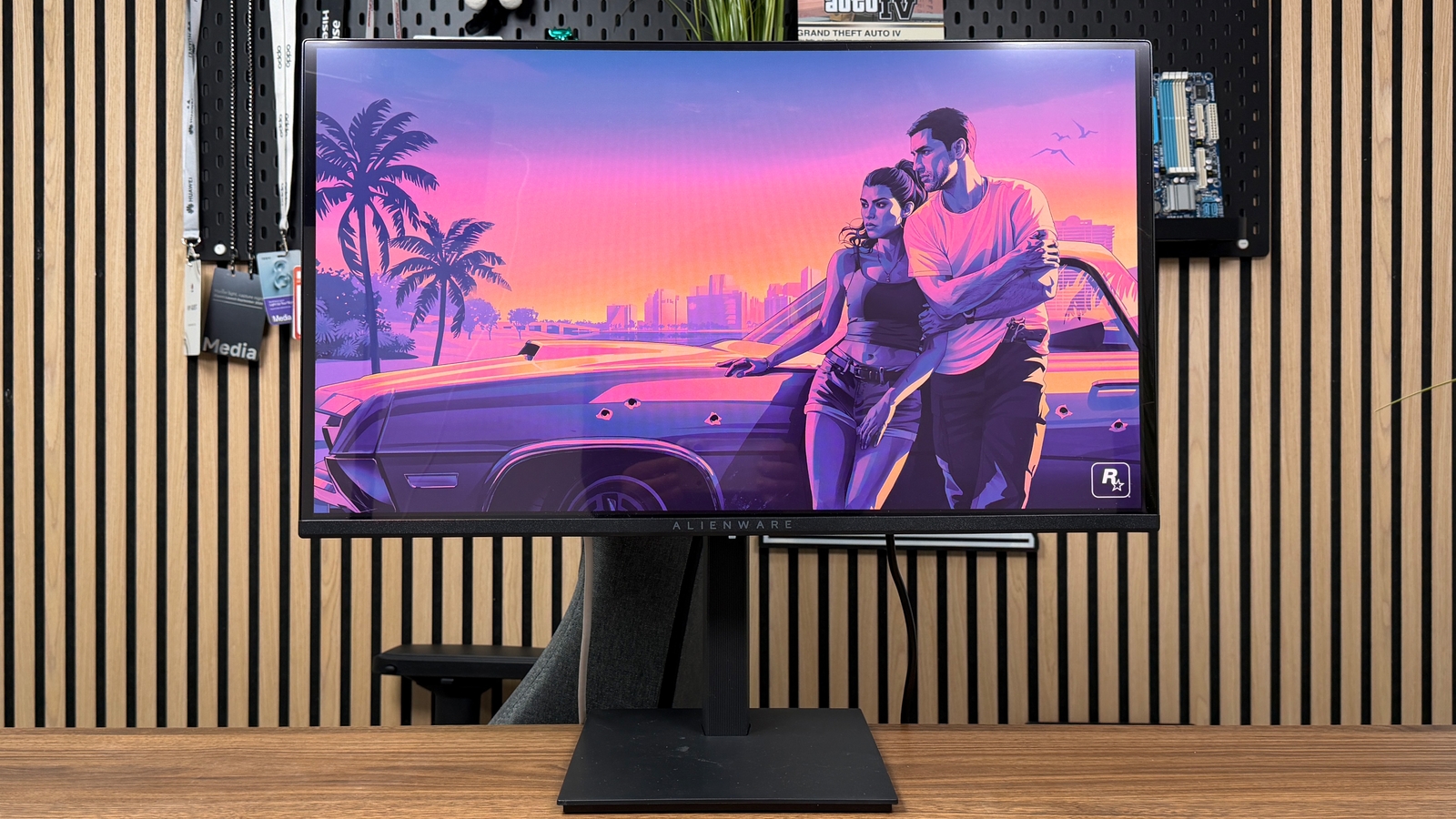
With its AW2726DM, Alienware presents a 27-inch QD-OLED gaming monitor, delivering QHD resolution and a 240 Hz refresh rate. It leans on the responsiveness of its panel, its deep blacks and its broad color coverage to attract gamers. But its limited HDR brightness and its coating that is particularly prone to reflections temper the overall picture.

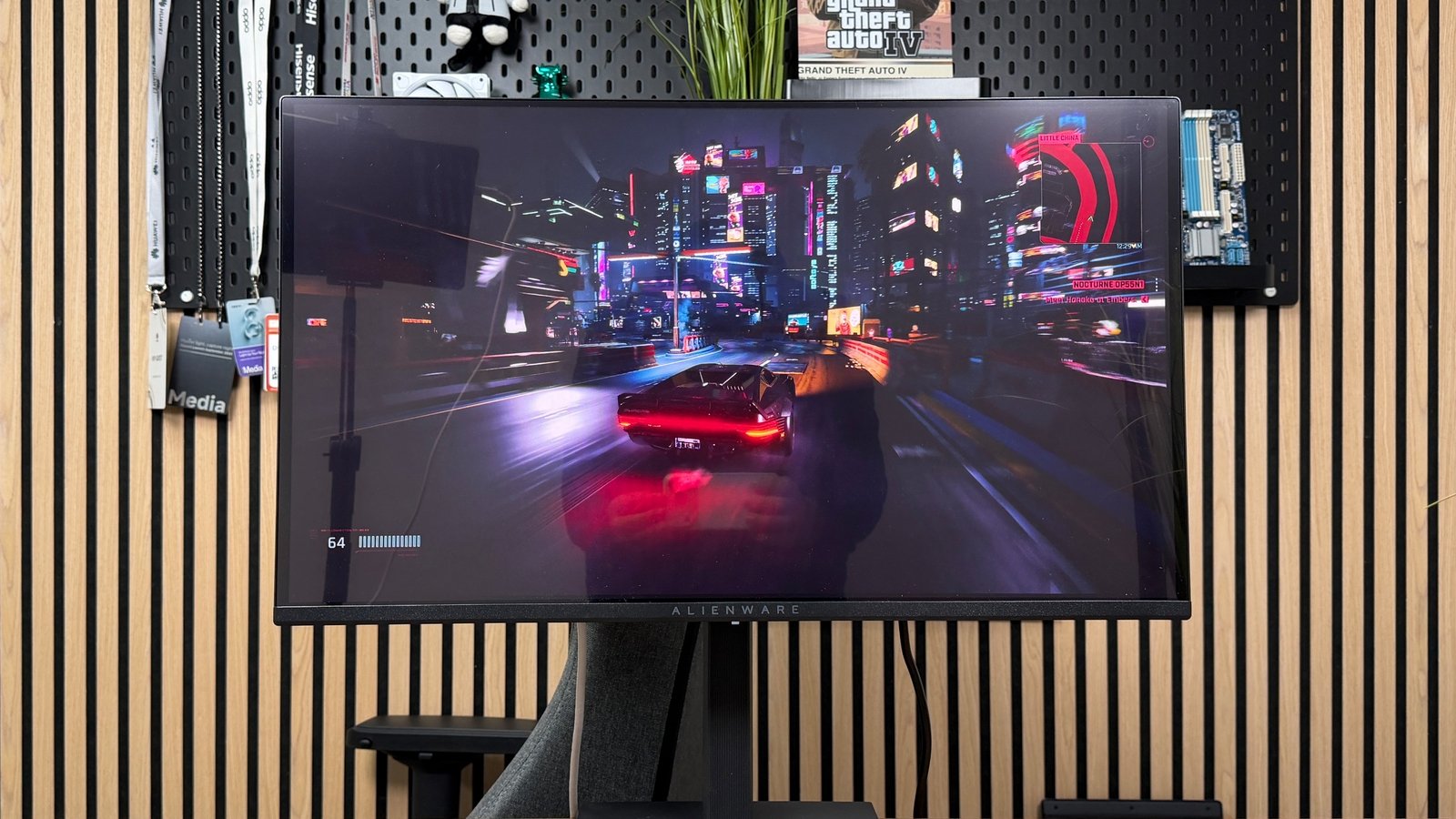
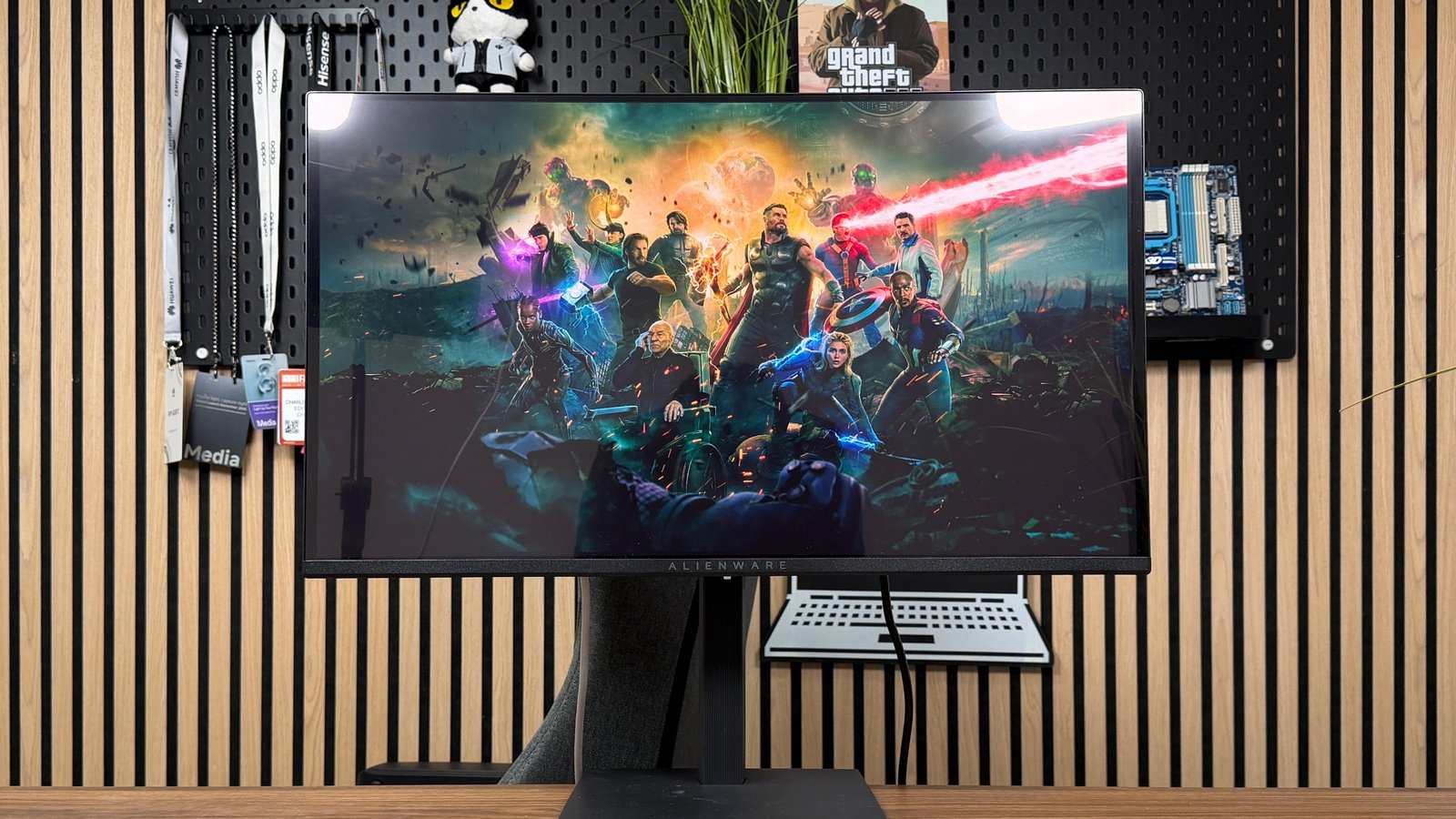
The AW2726DM adopts a sober look. ©Charles Gouin-Peyrot for Clubic

With its AW2726DM, Alienware intends to make QD-OLED technology more accessible without compromising the performance expected from a gaming monitor. Its 27-inch QHD panel at 240 Hz targets gamers who want excellent responsiveness and high contrast without stepping up to 4K.

Alienware AW2726DM

7  / 10

Alienware AW2726DM

Best prices

amazon.fr

€388.00

Dell

€429.00

PC Components

€440.74
The best
  • Excellent 240 Hz responsiveness
  • Deep blacks and OLED contrast
  • Excellent DCI-P3 coverage
  • In-game smoothness
  • Reasonable price for a QD-OLED
The cons
  • Limited SDR brightness
  • Un HDR peu convaincant
  • Very bright panel
  • Limited connectivity
Read the conclusion

Priced at €429 on the manufacturer’s site, it faces aggressive rivals such as the AOC Q27G4ZD, which touts a higher refresh rate of 280 Hz. We tested it for two weeks; our verdict is mixed.

Performance and image quality

Our measurements on the Alienware AW2726DM

We evaluated the latency of the Alienware AW2726DM in QHD (2560 × 1440) at 60 and 240 Hz. According to our protocol, the latency related to the display itself drops from 15.4 ms at 60 Hz to just 2.5 ms at 240 Hz, confirming the benefit of taking full advantage of the monitor’s maximum refresh rate.

The AW2726DM input lag

Input lag Value at 1440p / 60 Hz Value at 1440p / 240 Hz
Average* 33.4 ms 8.2 ms
Minimum 18.6 ms 4.8 ms
Maximum 49.6 ms 11.5 ms
Display only 15.4 ms 2.5 ms

*Averages calculated over 200 measurements.

The click-to-photon measurements, which take into account the entire latency chain of the tested system, also show clear progression. The average goes from 33.4 ms at 60 Hz to 8.2 ms at 240 Hz, while the minimum and maximum values move from 18.6 and 49.6 ms to 4.8 and 11.5 ms. The results are also less dispersed at 240 Hz, although this improved consistency cannot be attributed solely to the monitor.

Beyond this reduction in latency, the measurements are also noticeably tighter at 240 Hz, indicating more consistent behavior.

GTG Measurement Value at 1440p / 60 Hz Value at 1440p / 240 Hz
Average response time 0.1 ms 0.1 ms
Maximum response time 0.6 ms 0.5 ms
Average overshoot 0.4 % 0.2 %
Maximum overshoot 3.4 % 1.5 %
Transitions < 1 ms 100 % 100 %

Regarding response time, our LDAT measurements highlight the key strengths of QD-OLED technology. At 60 Hz and 240 Hz, the average GtG response time remains at 0.1 ms, with a maximum of 0.6 ms at 60 Hz and 0.5 ms at 240 Hz.

As for the overshoot, the results are equally convincing. The average sits at only 0.4% at 60 Hz, with a maximum of 3.4%. At 240 Hz, it drops to 0.2%, while the maximum overshoot remains at 1.5%. These exceptionally low values indicate excellent control of transitions, with no significant overshoot likely to cause reverse ghosting. The panel thus combines very high speed with unusually clean switching, without resorting to the overdrive compromises typical of LCD displays.

All measured transitions stay below 1 ms, at both 60 and 240 Hz. A result that confirms the excellent responsiveness of this QD-OLED panel.

Click here to see our SDR measurements

With this Alienware AW2726DM, Dell leans toward a 27-inch QD-OLED panel, with a 16:9 aspect ratio, a very classic format. This panel can reach 240 Hz, offering smoothness, but also deep blacks.
Test Alienware AW2726DM

In SDR, with the default screen settings, the color accuracy of the Alienware AW2726DM is lacking right out of the box. We measured an average Delta E 2000 of 4.24, with a maximum of 7.01. These deviations are accompanied by sometimes excessive saturation, particularly on SDR content.

In our measurements, however, we noted the absence of a dedicated sRGB mode. The absence of a dedicated sRGB mode is a real limitation here: without proper color management, the panel’s wide gamut leads to overly saturated colors for content designed for the sRGB space. While this rendering can be pleasing in games, it lacks fidelity for users seeking precise colors.

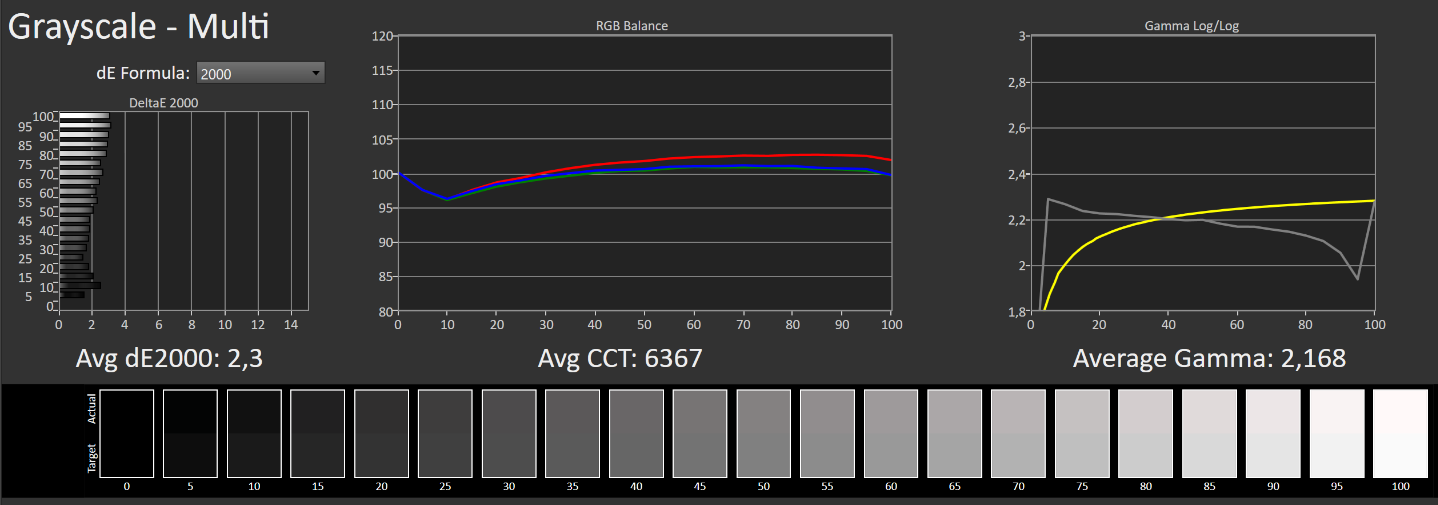
The grayscale scale yields more convincing results. The average Delta E drops to 2.3, while the color temperature sits at 6,367 K. The image thus appears slightly warmer than the reference of 6,500 K. The average gamma is measured at 2.168, a value very close to the 2.2 target. The SDR balance is therefore mixed. The AW2726DM benefits from the intrinsic strengths of its QD-OLED panel, notably its deep blacks and near-infinite contrast, but its colorimetry lacks accuracy. On the brightness side, we measured around 210 cd/m² in SDR.

HDR measurements follow-up

In HDR, the Alienware AW2726DM delivers more convincing color accuracy, with notably generous color space coverage. Above all, the QD-OLED panel maintains a major advantage with its self-emissive pixels, able to produce perfect blacks and manage contrasts at the pixel level, without the halo effects seen with MiniLED backlighting.

Test Alienware AW2726DM

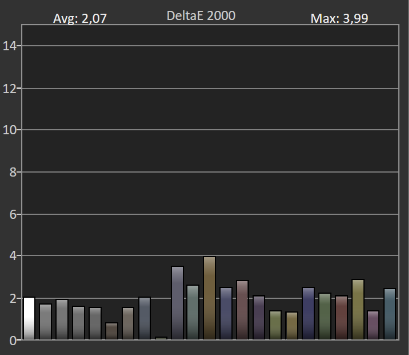
Colorimetry-wise, we measured an average Delta E 2000 of 2.07, with a maximum of 3.99. The result is clearly better than in SDR. Some nuances still show visible differences compared to the reference, but the reproduction remains generally precise and coherent in HDR content.

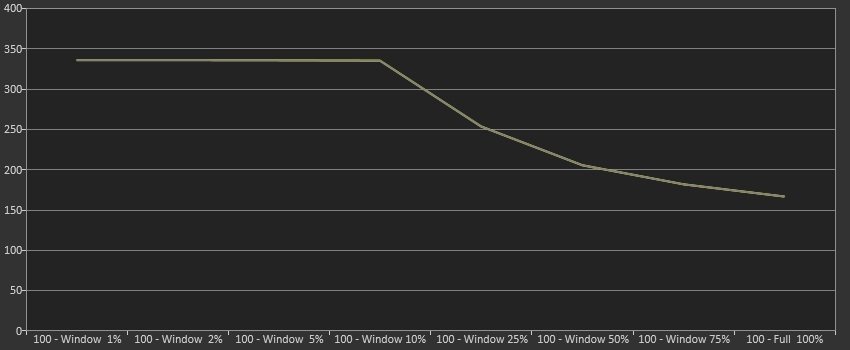
The maximum brightness reaches around 341 cd/m² on measurement windows spanning 1 to 10% of the screen area. It then gradually decreases as the lighted area grows, reaching about 250 cd/m² at 25%, and 200 cd/m² at 50%.

On a fully white image, we measured 168.8 cd/m². Modest values for a HDR-capable panel, which limit the intensity of highlights and the screen’s ability to render the most spectacular light effects.
Test Alienware AW2726DM

HDR color coverage remains strong. The AW2726DM covers 99.46% of DCI-P3 and 80.78% of BT.2020, nearly fully covering the P3 gamut with a notably wide palette that yields rich, saturated colors in compatible content. BT.2020 coverage is also very satisfactory, underscoring the potential of QD-OLED for color reproduction.

The HDR balance remains nuanced overall. Color precision is satisfactory and color-spaces coverage is generous. Above all, the self-emissive OLED pixels offer a major advantage: perfect blacks and per-pixel contrast without the halo effects typical of MiniLED backlights.

HDR measurements follow-up

In HDR, the AW2726DM shows more convincing color accuracy, with notably generous space coverage. Above all, the panel’s self-emissive pixels enable perfect blacks and per-pixel contrast, without halo effects associated with MiniLED backlights.

Test Alienware AW2726DM

Côté colorimétrie, we measured an average Delta E 2000 of 2.07, with a maximum of 3.99. The result is considerably better than in SDR. Some shades still show visible differences from their reference, but the rendering remains overall precise and coherent in HDR content.

The maximum brightness reaches about 341 cd/m² across measurement windows spanning 1 to 10% of the screen area. It then gradually decreases as the illuminated area increases, reaching about 250 cd/m² at 25%, and 200 cd/m² at 50%.

On a completely white image, we recorded 168.8 cd/m². Modest values for a HDR-capable panel, which limit the intensity of bright highlights and the screen’s ability to deliver the most spectacular lighting effects.
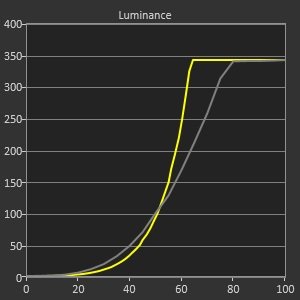
Test Alienware AW2726DM

Test Alienware AW2726DM

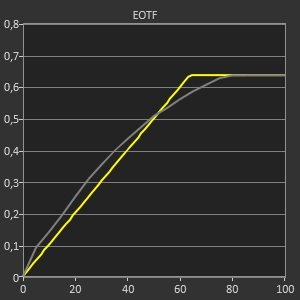
The EOTF curve tracking also lacks regularity. The measured luminance sits slightly above the reference in the shadows, then falls below the target in the mid-tones and highlights.
Test Alienware AW2726DM

UHDA-P3

The HDR balance remains mixed. Color accuracy is satisfactory and space coverage is generous. Above all, the panel’s OLED black levels and near-infinite contrast offer a major advantage, but the HDR brightness does not reach the same heights as higher-end HDR displays, limiting some peak-light effects.

BT.2020

BT.2020

HDR results, however, remain mixed. The color accuracy is acceptable and the coverage of color spaces is generous. The panel’s self-emissive pixels continue to offer blacks and per-pixel contrast without halo issues, but the brightness limitations temper the HDR impact.

The rest of our HDR measurements

In HDR, the AW2726DM shows a more convincing color accuracy and generous coverage of color spaces, but the brightness limitations temper the perceived impact of HDR, particularly in bright scenes.

The monitor also supports adaptive sync, with VESA AdaptiveSync and AMD FreeSync Premium. The goal is to minimize tearing when the refresh rate varies according to PC performance.

Like any OLED monitor, the AW2726DM requires precautions against image retention risk from prolonged static content. Dell includes a pixel refresh feature that triggers automatically when the monitor goes into sleep or after four hours of cumulative use. The operation lasts about six to eight minutes and can also be launched manually from the OSD. The manufacturer accompanies these protections with a three-year warranty covering OLED retention, a reassuring point for users exploring this technology.

Daily experience

Audio

Alienware omits built-in speakers with the AW2726DM. This is quite common in the gaming monitor field and means you’ll need a speaker setup or a headset for audio playback.

However, the screen does offer a 3.5 mm audio jack for connecting an external audio device.

Interface and features

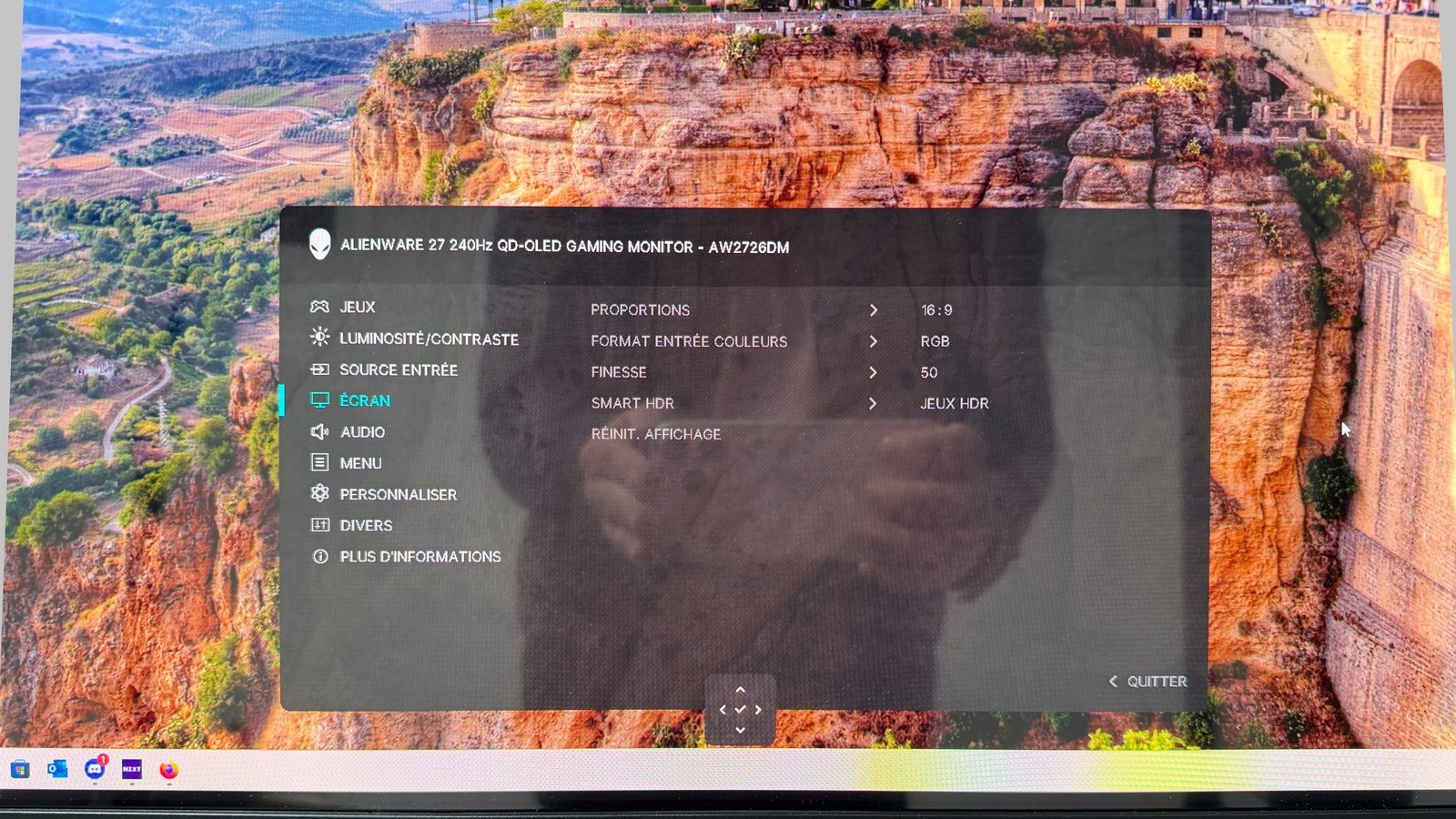
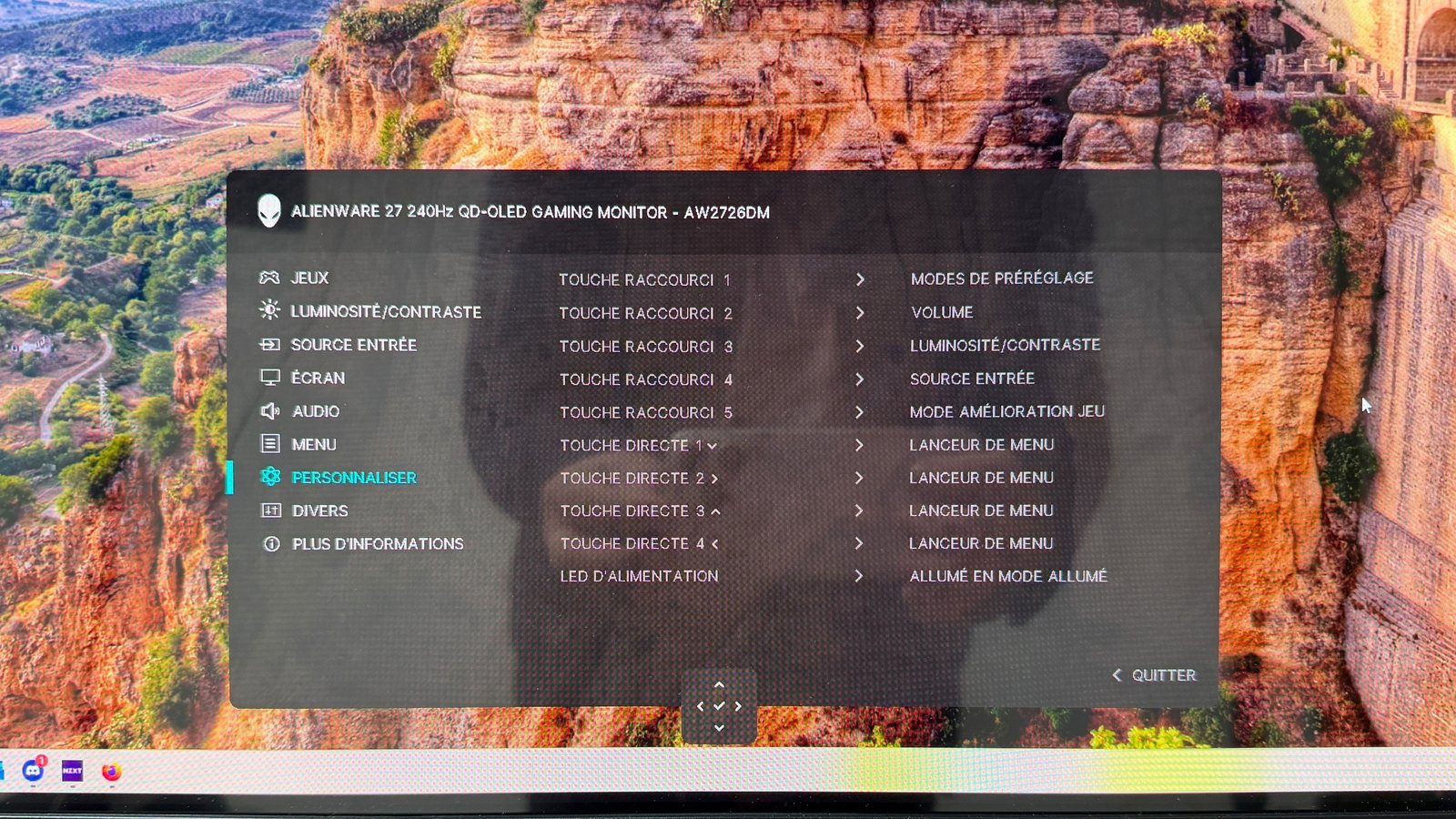
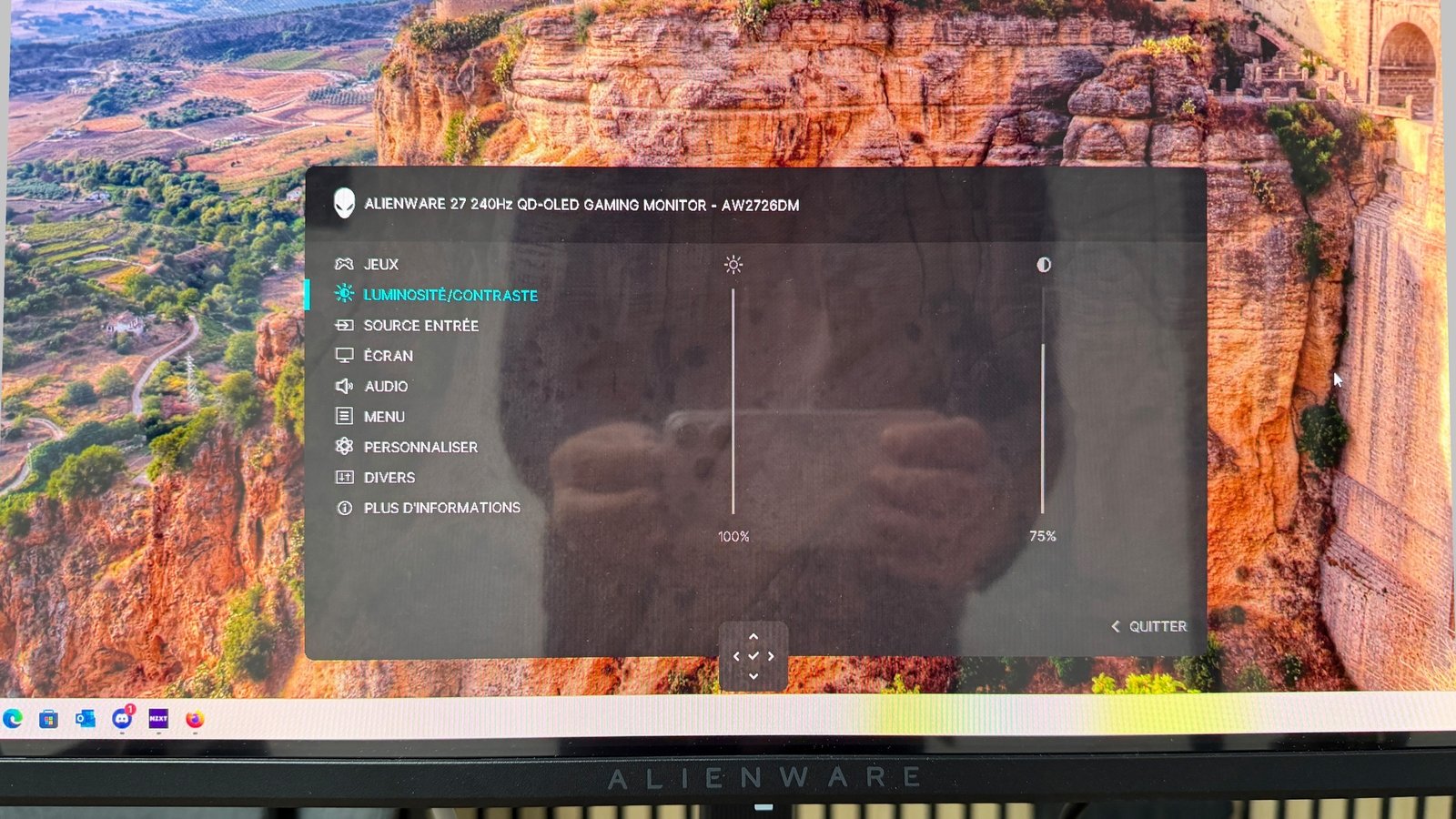
The OSD gathers the main game adjustments, several image profiles and a few extra tools, such as a frame rate counter or a screen-alignment feature for multi-monitor configurations. The menu also allows you to adjust contrast, brightness and HDR settings.
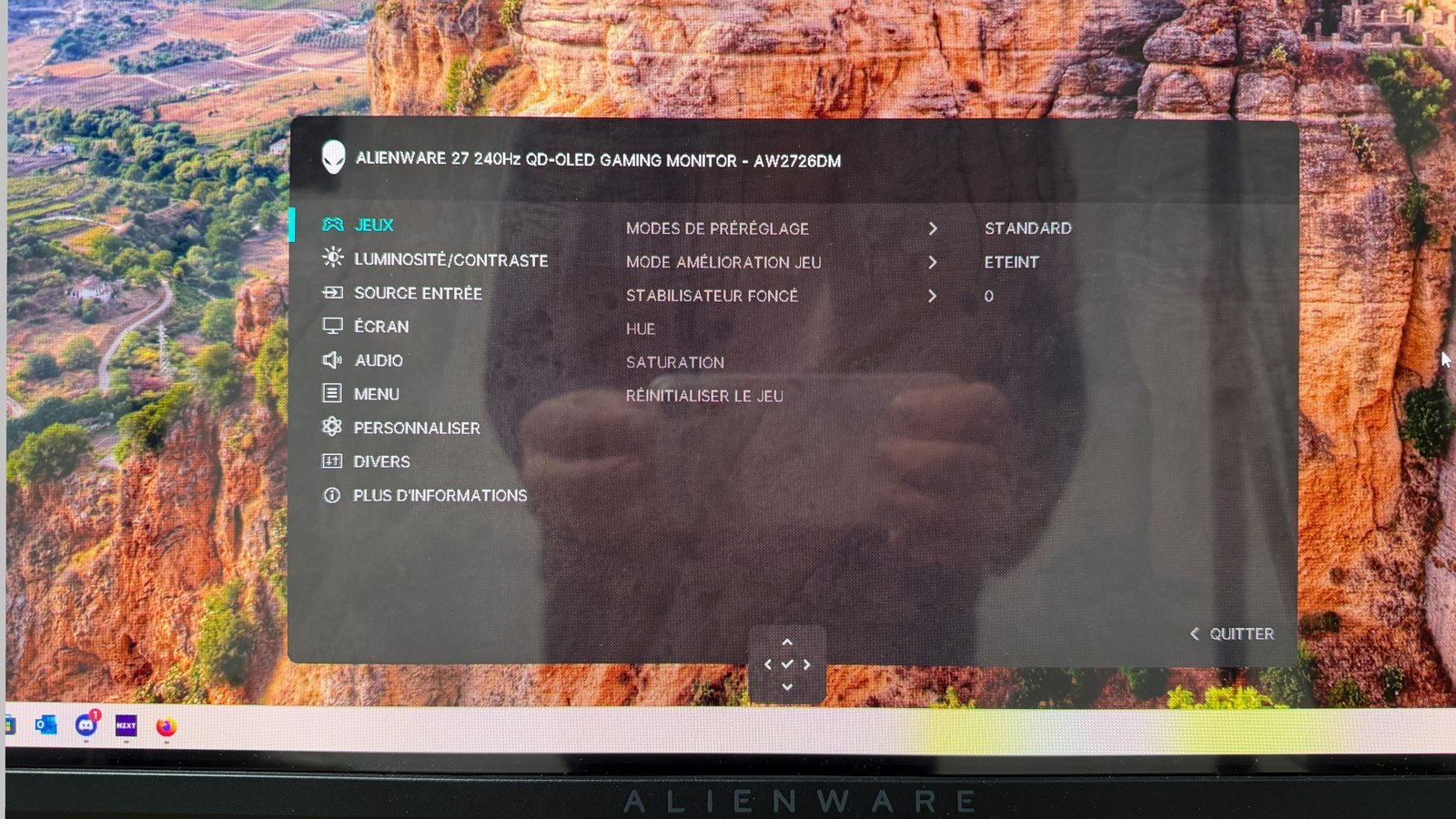
Certain translations could use a review. ©Charles Gouin-Peyrot for Clubic

Certain translations could use a review. ©Charles Gouin-Peyrot for Clubic

The second part is much simpler and includes only brightness and contrast settings.
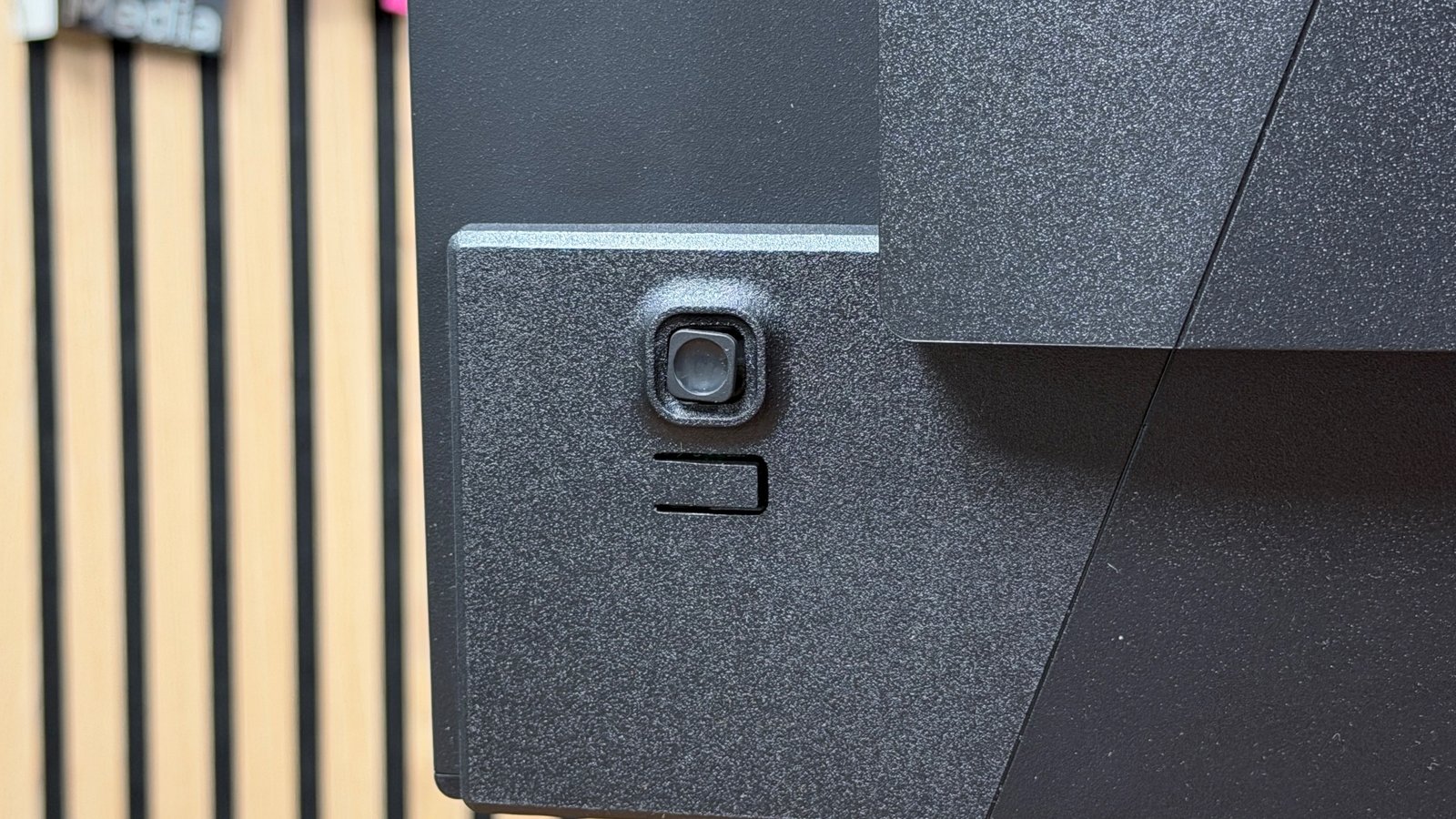
The joystick is accompanied by an ON/OFF button. ©Charles Gouin-Peyrot for Clubic

The joystick is accompanied by an ON/OFF button. ©Charles Gouin-Peyrot for Clubic

In addition, where most screens mount to their stands, this Alienware uses four mounting screws. Again, not a major flaw, but for a device at this price point, a bit more practicality would have been welcome. It can, however, be mounted on a VESA 100 x 100 mm stand.

The side bezels are fairly slim, but you’ll notice the stand has no cable passthrough. If that’s not a major defect, a simple hole in the stand would have been appreciated.
The stand allows for 13 cm of height adjustment, tilting the panel from -5° to +21°, and rotating 90° in either direction for portrait use. It also offers 360° horizontal rotation. However, the latter seems erratic and tends to lock up.

The joystick is accompanied by an ON/OFF button. ©Charles Gouin-Peyrot for Clubic

The joystick is accompanied by an ON/OFF button. ©Charles Gouin-Peyrot for Clubic

In addition, the stand uses four screws for mounting, rather than a simpler clip-in approach, which is a minor inconvenience at this price point. It can, however, be mounted on a VESA 100 x 100 mm stand if desired.

The stand’s base design is simple, and it remains perfectly flat.

The stand bottom looks clean and flat. ©Charles Gouin-Peyrot for Clubic

The stand bottom looks clean and flat. ©Charles Gouin-Peyrot for Clubic

The side bezels are slim enough, but the stand lacks a cable passthrough. If not a major flaw, a small hole in the column would have been appreciated.

The base enables height adjustment up to 13 cm, tilting the panel from -5 to +21 degrees and rotating the display 90° in both directions for portrait use. Additionally, it offers a 360° horizontal swivel. However, the swivel can be temperamental and tends to lock up.

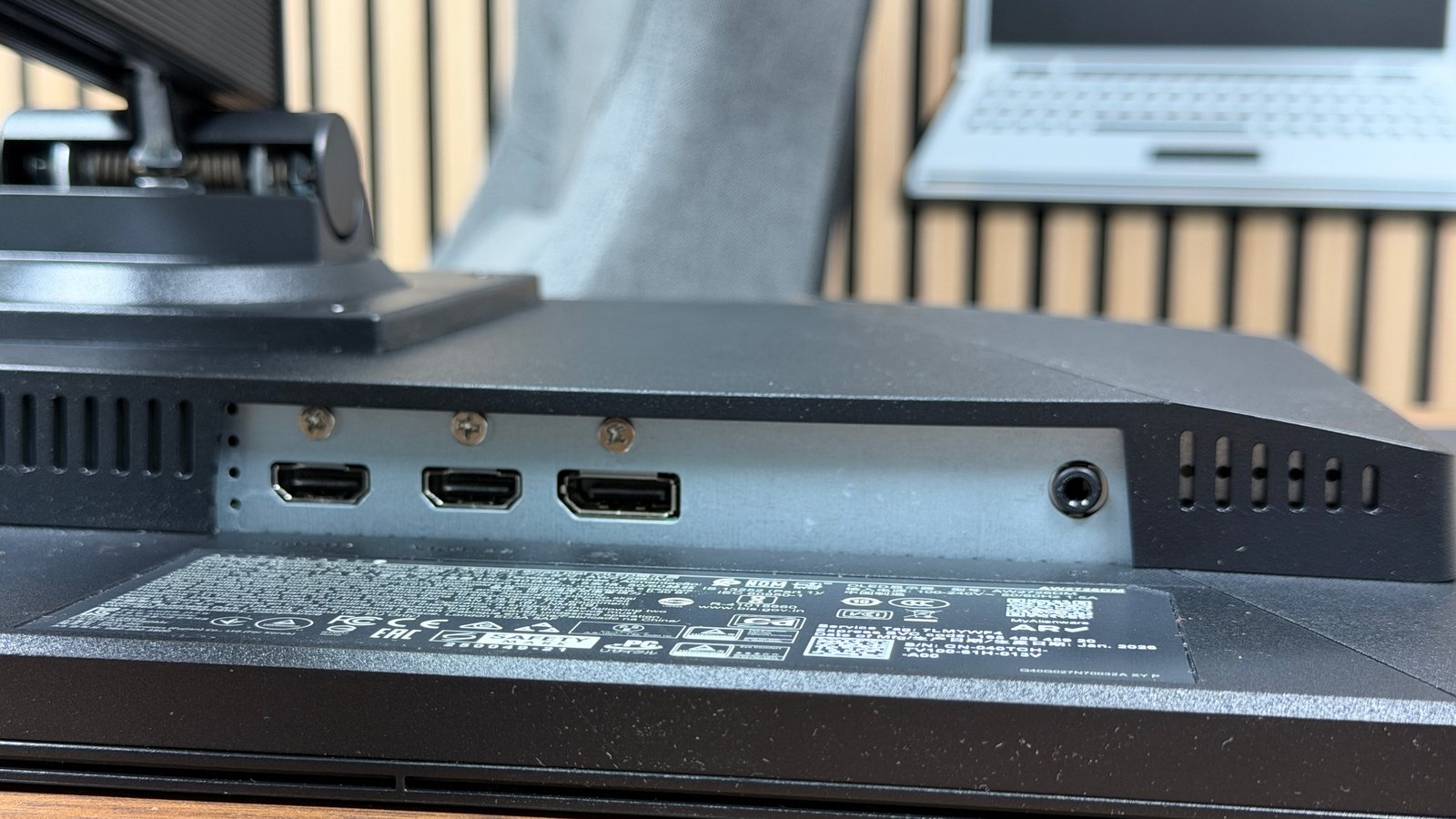
The connectivity is kept to a bare minimum. There is a DisplayPort 1.4 and two HDMI 2.1 ports, plus a 3.5 mm audio output. The HDMI TMDS ports offer QHD at 120 Hz only. For full performance on PC, you need to connect via DisplayPort.

Compared to the earlier tested AOC Q27G4ZD, which is more aggressively priced, the Alienware AW2726DM makes several compromises. Its competitor includes a four-port USB hub that this Alienware lacks.

Test Alienware AW2726DM: Clubic’s verdict

Conclusion
General note
7 / 10

The Alienware AW2726DM stands as an interesting entry door into the world of QD-OLED gaming monitors. With its 27-inch 240 Hz QHD panel, it offers excellent responsiveness, deep blacks and a particularly wide color coverage. Priced around €429, it makes the benefits of this technology more accessible, even if a number of compromises are required when facing increasingly aggressive competition.

In games, the AW2726DM impresses with its rapid transitions, low input lag at 240 Hz and the richness of its colors. Dark scenes benefit fully from OLED contrast, while fast movements retain excellent legibility. In HDR, however, brightness is lacking, with a maximum brightness limited to around 341 cd/m² in our measurements. The coating’s high reflectivity, SDR color accuracy that is not spot-on out of the box and the limited connectivity are also trade-offs to consider.

Thus, the AW2726DM is primarily aimed at PC gamers who want to explore the advantages of QD-OLED without investing in a higher-end, pricier model. It makes sense for competitive gaming and contrast-rich solo titles, provided it is used in a not-too-bright environment. Users seeking spectacular HDR, versatile connectivity or a display suitable for very bright rooms will likely prefer other references.

The Alienware AW2726DM is thus a compelling entry point into the realm of QD-OLED gaming displays. With its 27-inch, 240 Hz, QHD panel, it delivers excellent responsiveness, strong blacks and an especially wide color gamut. Priced around €429, it makes the strengths of this technology more accessible, though it comes with several compromises when faced with a growingly aggressive lineup.

In gameplay, the AW2726DM convinces with its speed of transitions, its 240 Hz low input lag and the richness of its colors. Dark scenes fully exploit OLED contrast, while rapid movements stay highly readable. In HDR, brightness is more limited, with a peak around 341 cd/m² in our tests. The coating’s susceptibility to reflections, SDR color accuracy out of the box, and the limited connectivity are also important considerations.

Hence the AW2726DM targets PC gamers who want to experience the advantages of QD-OLED without opting for a more expensive model. It remains relevant for competitive titles and richly contrasted single-player games, provided it’s used in a relatively dim environment. Those seeking spectacular HDR, versatile connectivity, or a monitor ideal for bright rooms will find more suitable options elsewhere.

Les plus

  • Excellent 240 Hz responsiveness
  • Noirs profonds et contraste de l’OLED
  • Excellente couverture DCI-P3
  • Bonne fluidité en jeu
  • Tariff accessible pour du QD-OLED
Les moins
  • Limited SDR brightness
  • Impact HDR peu convaincant
  • Dalle très brillante
  • Connectique limitée
Notes
Design and ergonomics

7

Versatility

7

Performance

9

Image quality

7

Connectivity and features

5

Best prices

amazon.fr

€388.00

View offer
€388.00

Dell

€429.00

View offer
€429.00

PC Components

€440.74

View offer
€440.74

All measurements in this test were performed with the CalMAN Ultimate software, a Calibrite DisplayPlus HL probe, and a NVIDIA LDAT v2 lag measurement device.

Specification sheet Alienware AW2726DM

Summary

Screen size 26.5 inches
Resolution 2560 x 1440 px
Display format 16/9
Panel type QD-OLED
Display technology AMD FreeSync Premium, Adaptive-Sync
HDR VESA AdaptiveSync Display 240
Refresh rate 240 Hz
Response time 0.03 ms
Display type OLED

Display

Screen size 26.5 inches
Resolution 2560 x 1440 px
Display format 16/9
Panel type QD-OLED
Matte anti-glare panel Yes
Display technology AMD FreeSync Premium, Adaptive-Sync
HDR VESA AdaptiveSync Display 240
Brightness 200 cd/m² (typical)
Contrast 1,500,000:1 (typical)
Refresh rate 240 Hz
Response time 0.03 ms

Color

Display type OLED
Wide display Yes
Curved screen No
3D display No
Touchscreen No

Ergonomie

Forward tilt angle -5°
Backward tilt angle +21°
Pivot Yes
Height-adjustable stand Yes
Stand removable Yes
VESA mount 100 x 100 mm

Connetivity

Video inputs DisplayPort 1.4, HDMI 2.1 x2
Audio outputs 3.5 mm headphone jack

Power

Power class E
Power consumption 84.6 W/m² at 150 cd/m²
Power in standby 0.5 W
Internal power Yes

The AW2726DM is, therefore, a credible entry point into the world of QD-OLED gaming displays. With its 27-inch, 240 Hz, QHD panel, it delivers excellent responsiveness, deep blacks and an unusually broad color coverage. Priced around €429, it makes the benefits of this technology more accessible, even if several compromises are necessary, given the increasingly aggressive competition.

In-game, the AW2726DM impresses with the speed of its transitions, its 240 Hz low input lag and the richness of its colors. The dark scenes fully benefit from OLED contrast, while fast movements remain highly readable. In HDR, brightness lacks impact, with a peak around 341 cd/m² in our measurements. The glare-prone coating, SDR color accuracy out of the box, and the limited connectivity are also factors to consider.

Hence, the AW2726DM is primarily aimed at PC gamers who want to experience the advantages of QD-OLED without investing in a pricier model. It remains relevant for competitive gaming and color-rich single-player titles, provided it is used in a not-too-bright environment. Those seeking spectacular HDR, versatile connectivity, or an monitor suited to very bright rooms will find better options elsewhere.

Daily Experience

The AW2726DM leans on the strengths of its QD-OLED panel to appeal to gamers, with a 27-inch diagonal and a 16:9 aspect ratio. This panel can reach 240 Hz, providing smoothness, but also deep blacks.

The 27-inch QHD resolution offers a good balance between image sharpness and the hardware requirements of gaming at high frame rates. A GPU such as the GeForce RTX 5070 or the Radeon RX 9070 XT can handle 1440p in good conditions, although achieving 240 FPS in the most demanding titles usually requires some graphic settings concessions.

La profondeur des couleurs est très appréciable. ©Charles Gouin-Peyrot pour Clubic

Color depth is highly appreciable. ©Charles Gouin-Peyrot for Clubic

The main difference with a traditional IPS panel lies in dark scenes. We could play Alan Wake II or Cyberpunk 2077, games with many dim environments, with very high contrast, giving more relief to image details.

Sur Cyberpunk 2077, les effets de lumières profitent pleinement de la dalle QD-OLED. ©Charles Gouin-Peyrot pour Clubic

On Cyberpunk 2077, light effects fully benefit from the QD-OLED panel. ©Charles Gouin-Peyrot for Clubic

HDR is more nuanced. If OLED’s exceptional contrast helps highlight dark scenes and subtle bright elements on dark backgrounds, the highlights lack intensity. Large light areas don’t benefit from the same brightness as on higher-end HDR displays like the MSI MPG 341 CQR QD OLED X36 previously tested.

The AW2726DM also supports adaptive sync with VESA AdaptiveSync and AMD FreeSync Premium, aiming to minimize tearing when the frame rate fluctuates with PC performance.

As with all OLED monitors, the AW2726DM requires precautions against burn-in risk from prolonged static images. Dell includes a pixel refresh routine that is triggered automatically when the monitor enters sleep or after four hours of cumulative use. The operation lasts about six to eight minutes and can also be started manually from the OSD. The manufacturer backs these protections with a three-year warranty covering OLED burn-in, a reassuring argument for users exploring this technology.

Everyday experience

Audio

Alienware leaves out built-in speakers on the AW2726DM. This is fairly common in gaming monitors, and you’ll need a speaker kit or a headset to enjoy audio.

The monitor does feature a 3.5 mm audio output for connecting an external audio device.

Interface and features

The OSD brings together the main gaming adjustments, multiple picture profiles and a few extra tools, such as a frame-rate counter or a alignment tool for multi-monitor setups. The menu also allows adjustments to contrast, brightness and HDR settings.

Certain translations could use a review. ©Charles Gouin-Peyrot for Clubic

Certain translations could use a review. ©Charles Gouin-Peyrot for Clubic

The second section is much simpler, containing only brightness and contrast controls.

The connectivity is pared down to its bare minimum. ©Charles Gouin-Peyrot for Clubic

The connectivity is pared down to its bare minimum. ©Charles Gouin-Peyrot for Clubic

©Charles Gouin-Peyrot pour Clubic

©Charles Gouin-Peyrot pour Clubic

Another section suggests adjusting the aspect ratio, color input format, sharpness and Smart HDR mode.

Shortcuts are handy on paper but not essential. ©Charles Gouin-Peyrot for Clubic

Shortcuts are handy on paper, but not essential. ©Charles Gouin-Peyrot for Clubic

The OSD also offers several customizable shortcuts that allow quick access to the most-used settings without traversing all menus. Their usefulness depends on personal preferences, but they can facilitate source or image profile changes.

Electrical consumption

We recorded a power consumption of 84.6 W/m² at 150 cd/m². That’s lower than the MSI MPG 341CQR QD-OLED X36. This display is frugal thanks to QD-OLED technology, placing it among the more energy-efficient in its class. Its impact on monthly electricity bills remains moderate.

Design and connectivity

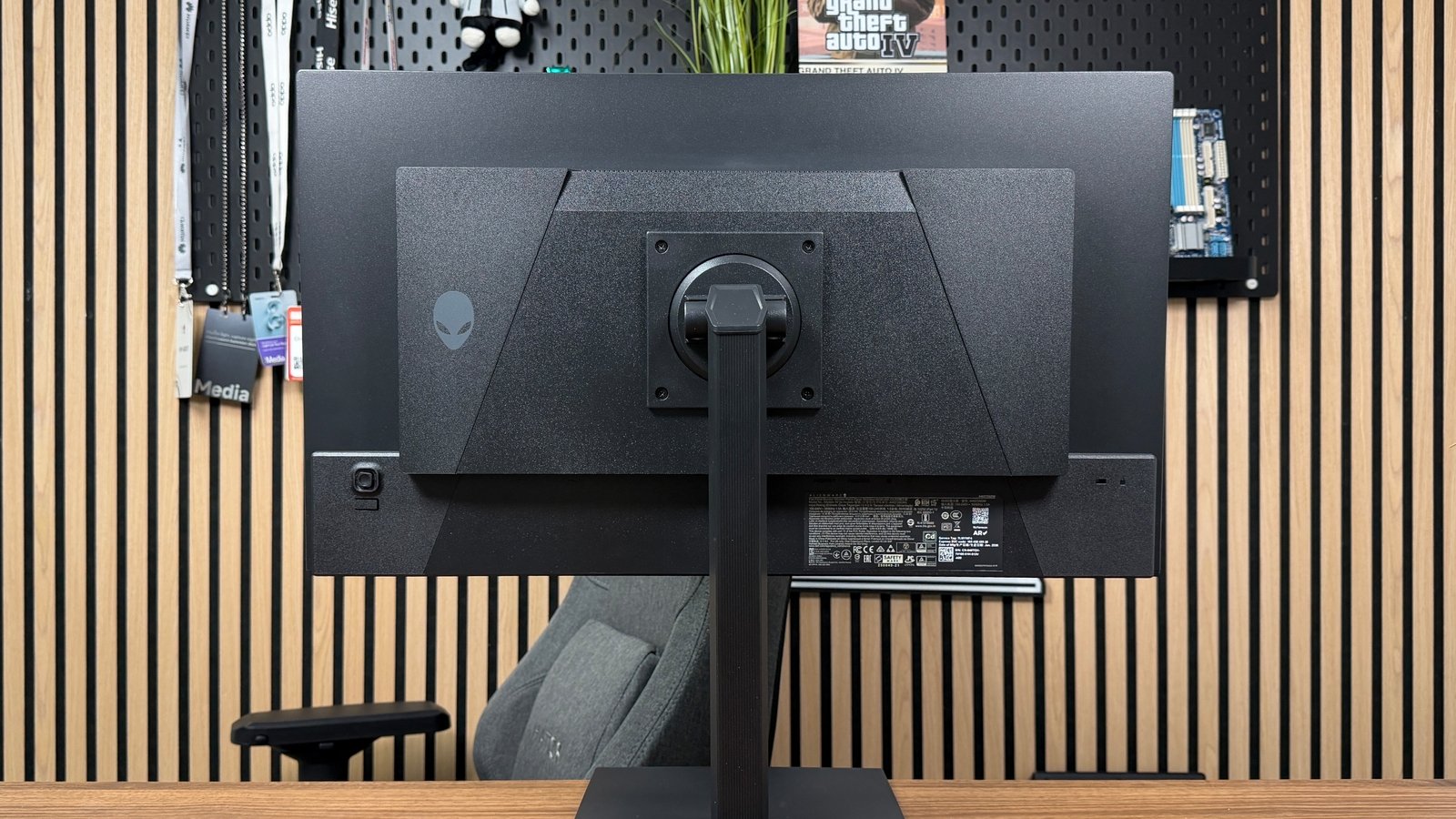
Alienware opts for a fairly understated design for the AW2726DM. The back of the monitor does not feature RGB lighting or prominent decorative elements; this choice avoids superfluous features. Only a small logo is displayed on the rear.

Back, simplicity reigns. ©Charles Gouin-Peyrot for Clubic

Back, simplicity reigns. ©Charles Gouin-Peyrot for Clubic

The side bezels are fairly slim, but the stand lacks a cable pass-through. If not a major flaw, a simple hole in the stand would have been appreciated.
The base enables height adjustment of 13 cm, tilts from -5 to +21 degrees, and can rotate 90° in either direction for portrait use. Additionally, it offers a 360° horizontal rotation. However, the swivel can be quirky and tends to seize up.

Connectivity is pared down to the bare minimum. There is a DisplayPort 1.4 and two HDMI 2.1 ports accompanied by a 3.5 mm jack. The HDMI ports in TMDS mode offer QHD at 120 Hz only. To fully utilize this screen on a PC, you must use DisplayPort.

Compared to the AOC Q27G4ZD tested earlier, which is more aggressively priced, the Alienware AW2726DM makes several concessions. Its rival includes a four-port USB hub, which this Alienware lacks.

Clubic’s verdict on the Alienware AW2726DM

Conclusion
General note
7 / 10

The Alienware AW2726DM is a compelling entry point into the world of QD-OLED gaming monitors. With its 27-inch 240 Hz QHD panel, it delivers excellent responsiveness, deep blacks and a particularly broad color coverage. Priced around €429, it makes the strengths of this technology more accessible, even if several compromises are necessary in the face of increasingly aggressive competition.

In gameplay, the AW2726DM convinces with the speed of its transitions, its 240 Hz low input lag and the richness of its colors. The dark scenes fully benefit from OLED contrast, while fast movements maintain excellent readability. In HDR, brightness lacks impact, with a maximum around 341 cd/m² in our measurements. The glare-prone coating, SDR color accuracy out of the box and the limited connectivity are also trade-offs to consider.

Therefore, the AW2726DM is primarily aimed at PC gamers who want to discover the benefits of QD-OLED without investing in a more expensive model. It remains relevant for competitive games and richly contrasted single-player titles, provided it is used in a not-too-bright environment. Those seeking spectacular HDR, versatile connectivity or a monitor suitable for very bright rooms will be better off looking at other references.

Best picks and prices

Daniel Brooks

I cover everyday products with a practical eye, from kitchen tools and home essentials to smart gadgets and consumer trends. My goal is to help readers understand what is genuinely useful, what is worth the price, and what deserves a second look before buying.