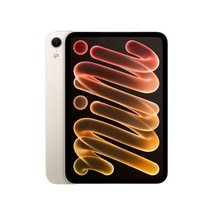
iPad mini (2026) Review: Could This Be the Pocket iPad Pro?

November 27, 2026
Tech

Slimmer, lighter, more powerful and finally equipped with an OLED display, the iPad mini 2026 has serious arguments to win you over. Has Apple transformed its smallest tablet into a genuine pocket iPad Pro?

Toujours aussi mignon, mais encore plus puissant ©Mathieu Grumiaux
Apple iPad mini (2026)

9  / 10

Apple iPad mini (2026)

Best Prices

amazon.fr

929,00 €

Cdiscount

919,00 €

PC Componentes

919,00 €

RDC

929,00 €

View more prices

The Pros
  • OLED screen finally up to the task
  • Even thinner and lighter
  • The nano-textured glass option
  • The power of the A20 Pro
  • Remarkable on-device AI performance
  • Almost 12 hours of battery life
  • Fast charging
The Cons
  • Noticeable heat during heavy calculations
  • Less generous baselines
  • Dull color options
Read the conclusion

I have always had a soft spot for the iPad mini. A tiny tablet that’s almost too cute, one that you slip into every bag and instinctively pick up to read, watch a video, or browse the web from the couch. In short, an iPad that doesn’t necessarily aim to replace a computer, and that’s part of why I love it. The previous generation left me wanting more, Apple had offered only a few technical improvements without truly evolving the formula.

This time, Apple seems to have listened to our complaints. The iPad mini 2026 is slimmer, lighter, packs an A20 Pro chip and, most importantly, finally adopts an OLED display. Ambitions are higher, as is the price, with this little tablet now starting at 759 euros.

A question has accompanied me throughout this test: is the iPad mini still the compact consumer tablet we know, or has Apple created a true pocket iPad Pro?

Test conducted on a model loaned by the manufacturer.

Design and Build: a Few Grams That Change Everything

At first glance, it’s hard to tell this new iPad mini apart from its predecessor. Apple keeps the aluminum build, the same rounded edges and the silhouette that’s instantly recognizable. No aesthetic revolution, and even a small disappointment in the color options. The purple hue that brought a touch of whimsy to the lineup disappears in favor of a dull silver and black duo. Apple has shown more inspiration elsewhere.

You have to hold the tablet in your hands to discover the real changes. The iPad mini loses 34 grams and gets one millimeter thinner than the previous generation. On paper, that’s not enough to raise an eyebrow, yet the difference is felt immediately.
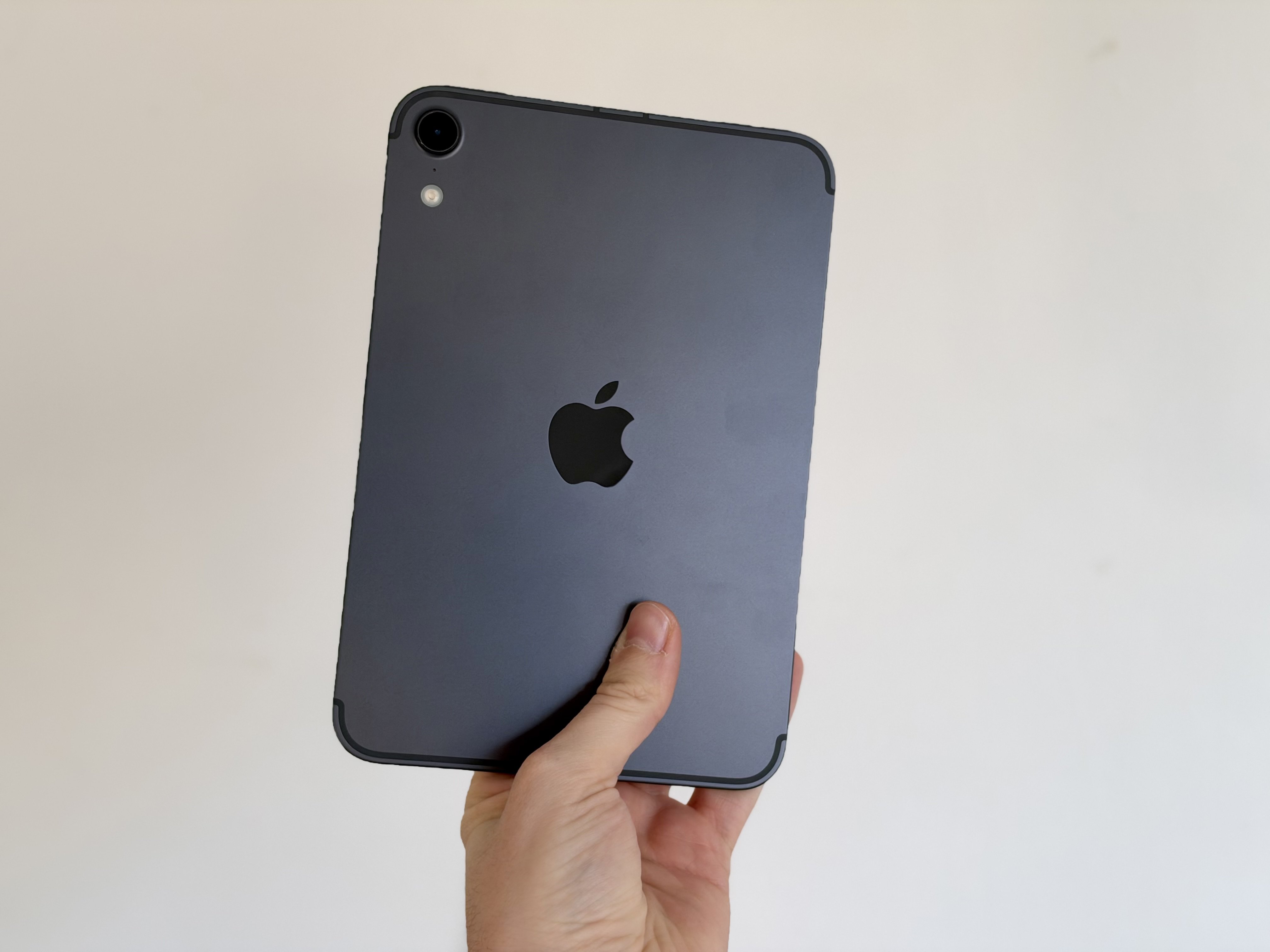
Minuit ou Lumière stellaire : des coloris habituels et pas très inspirés©Mathieu Grumiaux

Minuit ou Lumière stellaire : des coloris habituels et pas très inspirés©Mathieu Grumiaux

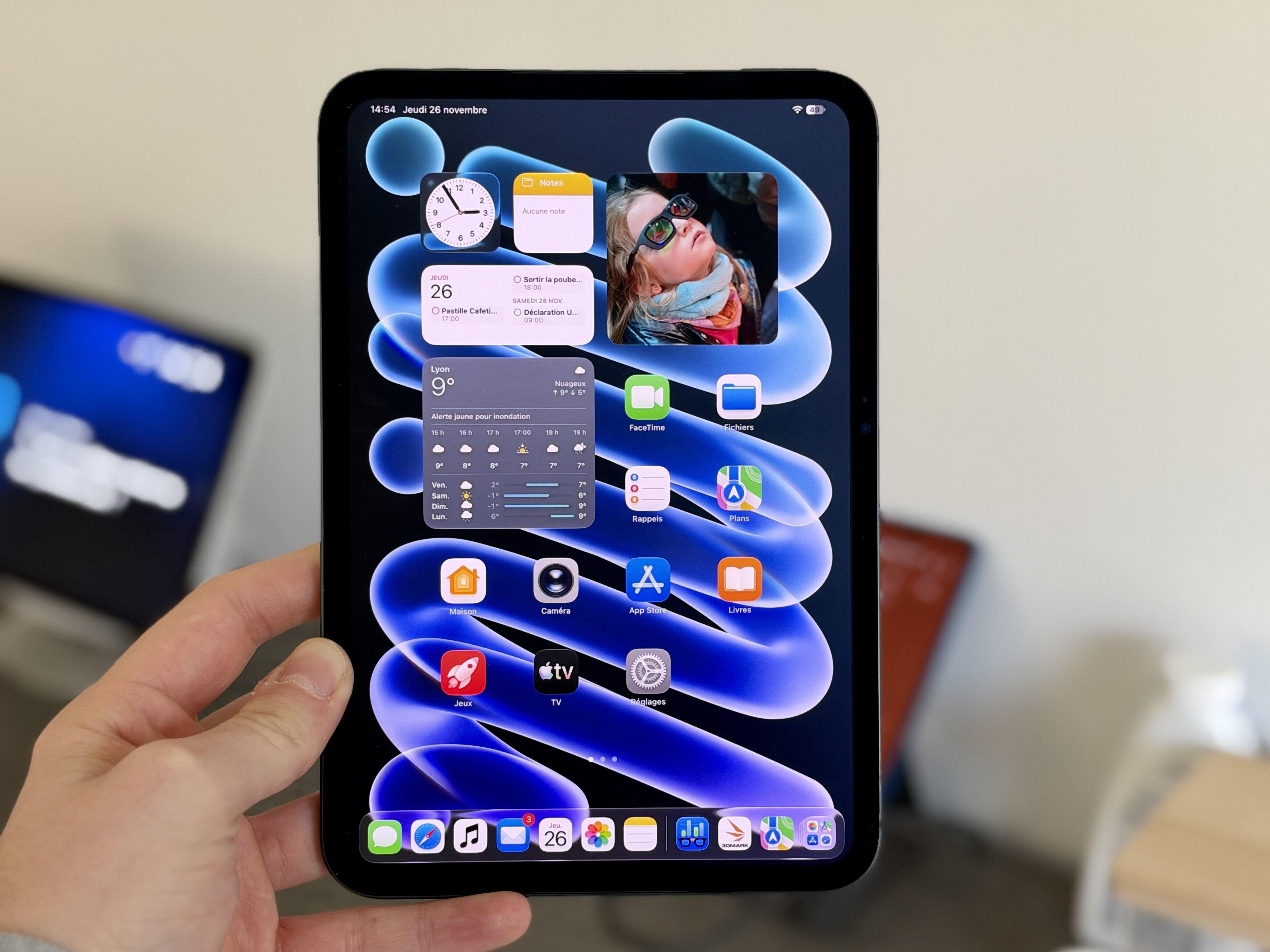
The new iPad mini is even more pleasant to handle. Its featherweight makes it easy to hold with one hand for extended reading or browsing sessions. Its slim profile reinforces the impression of an ultra-compact screen you can carry everywhere—from the living room to the bedroom or on the move.

I also noticed during evenings that my iPhone stayed mostly on the coffee table. Without deliberately changing my habits, I found myself using the iPad mini almost exclusively once I was settled on the couch. A shift in usage that probably says more about the success of this format than the few grams saved on the scale.
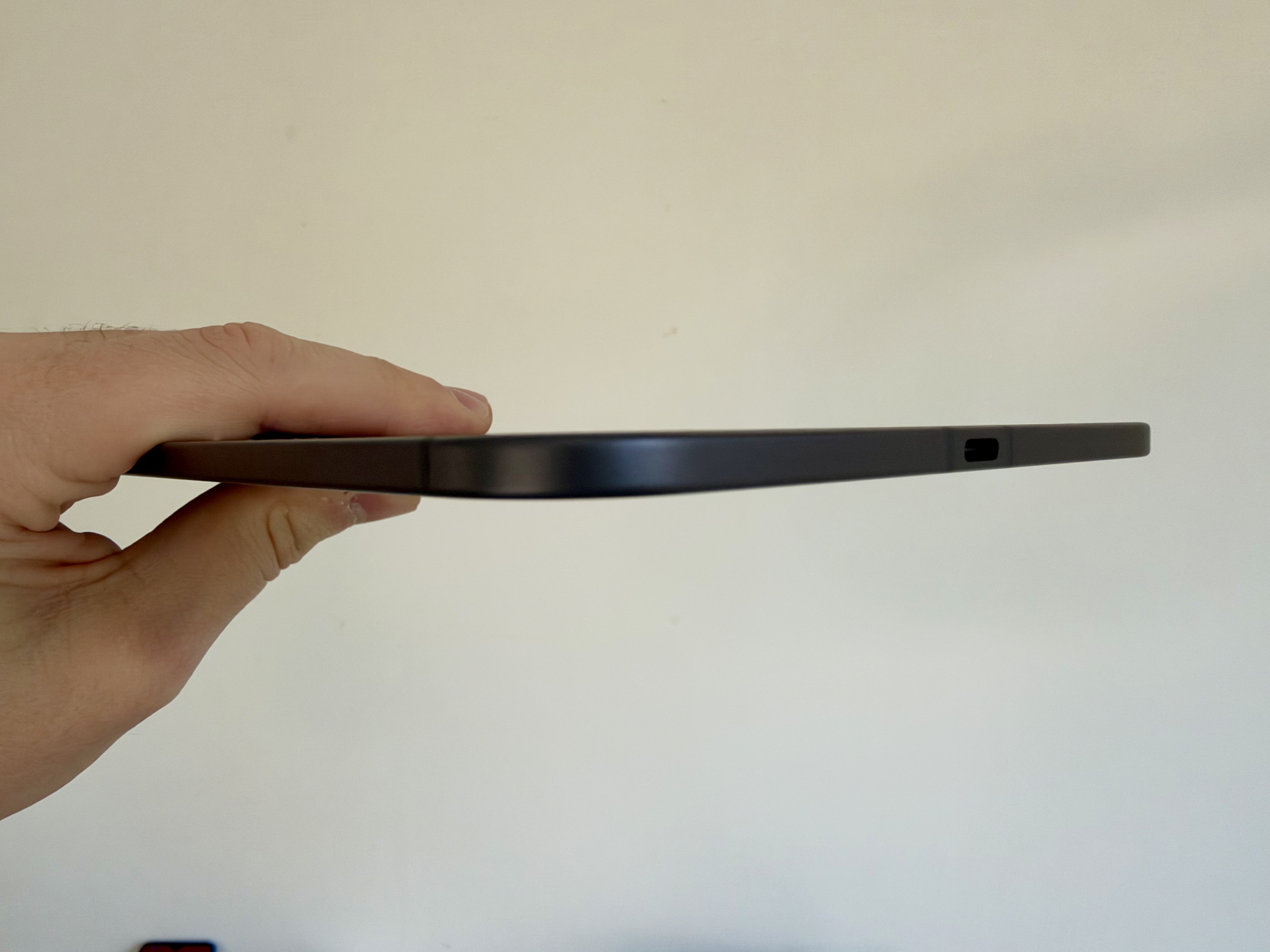
L'iPad mini s'offre une cure de minceur impressionnante une fois la tablette en main ©Mathieu Grumiaux

L’iPad mini s’offre une cure de minceur impressionnante une fois la tablette en main ©Mathieu Grumiaux

Another, more discreet but especially welcome, novelty for this size: the iPad mini is now IP67-certified, meaning it is water and dust resistant. That helps a bit of peace of mind when taking the tablet to the beach or leaving it on the kitchen counter.

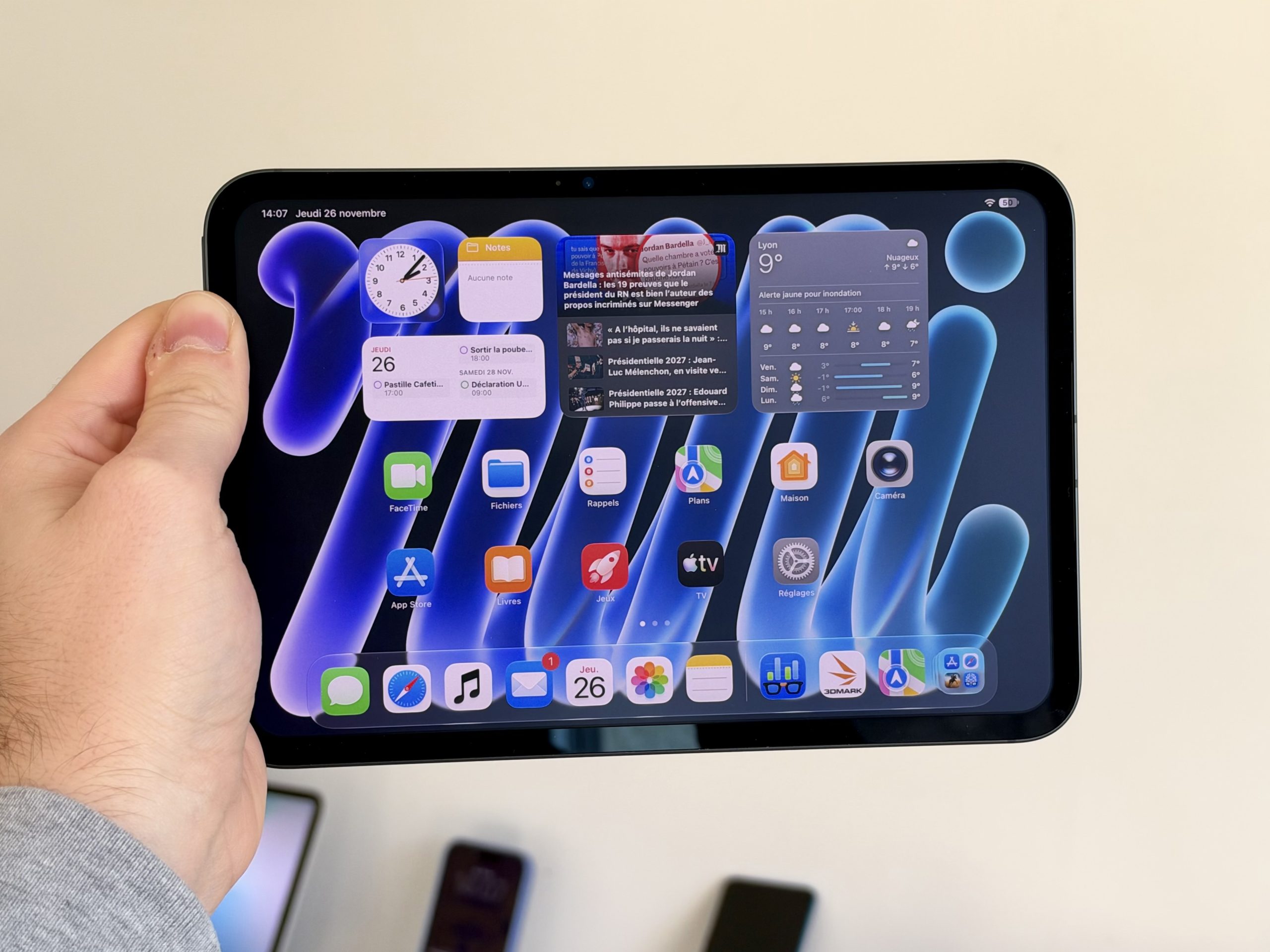
Last novelty: the front camera moves and is now centered when you hold the iPad mini in landscape. The small format was the last iPad to adopt this position. The 12-megapixel sensor remains identical to previous generations.
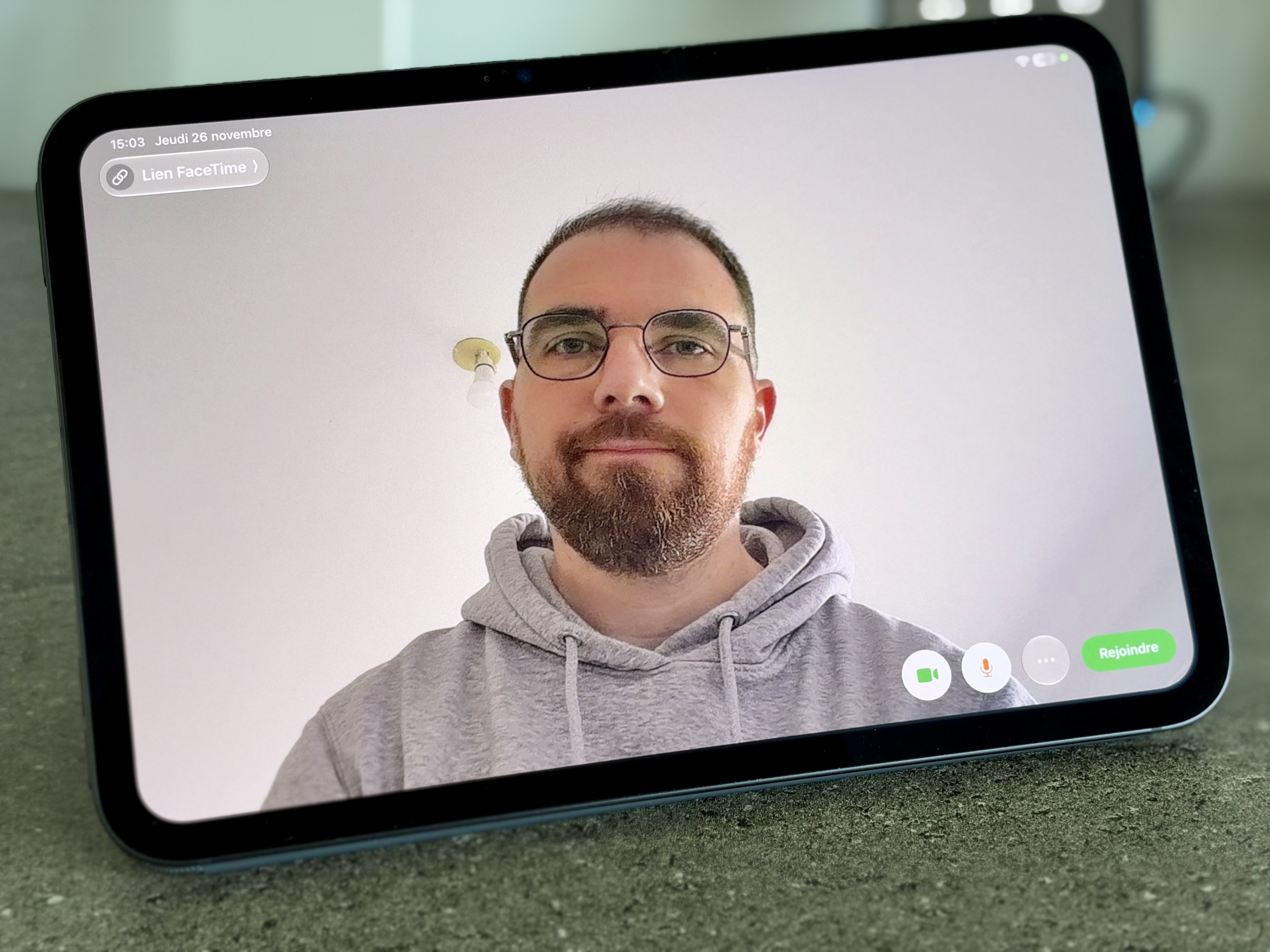
Cette fois c'est la bonne : la caméra est centrée en mode Paysage. Il était temps ! ©Mathieu Grumiaux

Cette fois c’est la bonne : la caméra est centrée en mode Paysage. Il était temps ! ©Mathieu Grumiaux

Display: OLED, at last!

Apple resisted OLED for years, keeping the Pro tablet as the OLED domain, while all other tablets—regardless of price—settled for a LCD panel that was well-calibrated but increasingly showing its age compared to the best screens on the market. With the iPad mini, Apple finally shifts its stance.

Let’s be clear: the iPad mini 2026 is a real leap forward on the display side. The small model doesn’t use the Pro’s dual-layer OLED Tandem technology to maximize brightness, but it handles things very well. Apple quotes a maximum brightness of 600 nits, up from 500 nits in the previous generation, with peaks up to 1,200 nits on HDR content. That brings more pop to the brightest moments in a film. The panel supports HDR10 and Dolby Vision, and the colors are vivid without being overly saturated. If you watch movies or edit photos, the iPad mini offers display quality that is simply excellent.
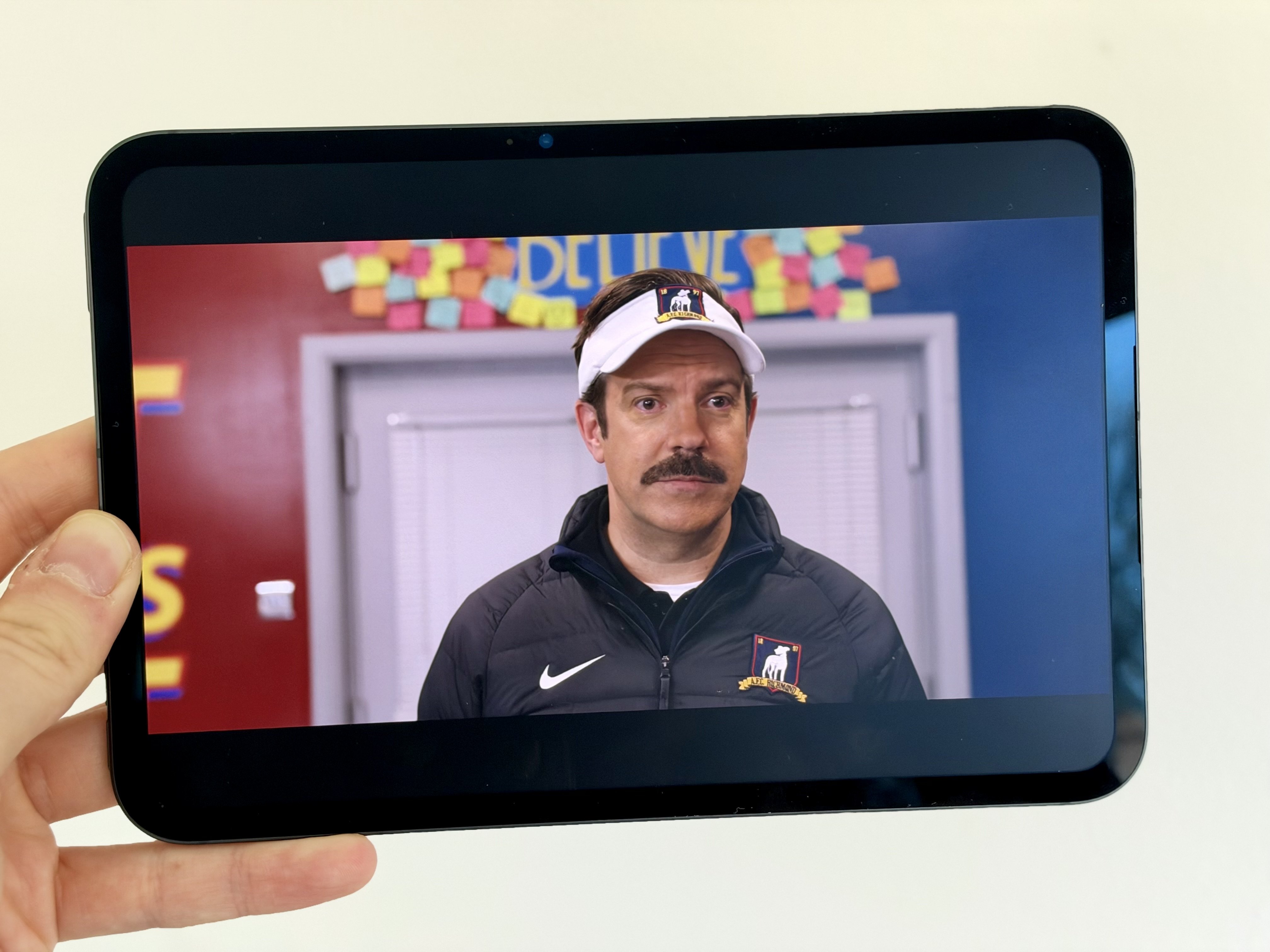
Comme sur l'iPad Pro, Apple maitrise son calibrage ©Mathieu Grumiaux

Comme sur l’iPad Pro, Apple maitrise son calibrage ©Mathieu Grumiaux

There is, however, one big disappointment: Apple sticks to a 60 Hz refresh rate. With 120 Hz now common on smartphones, it’s hard to understand why ProMotion remains exclusive to the iPad Pro. It’s especially frustrating on such a powerful tablet that you use a lot for scrolling web pages or articles. Apple finally brought OLED to the iPad mini, but stopped short of fully committing to it.

Apple sent me an iPad mini equipped with a nano-textured glass. This option, already available on the iPad Pro, etches the glass at a nanometric scale to scatter ambient light and reduce reflections. For reading magazines, browsing the web, or simply using the tablet during the day, the result is quite stunning, with reflections nearly disappearing in my usage. It’s especially pleasant under bright light or near a window.
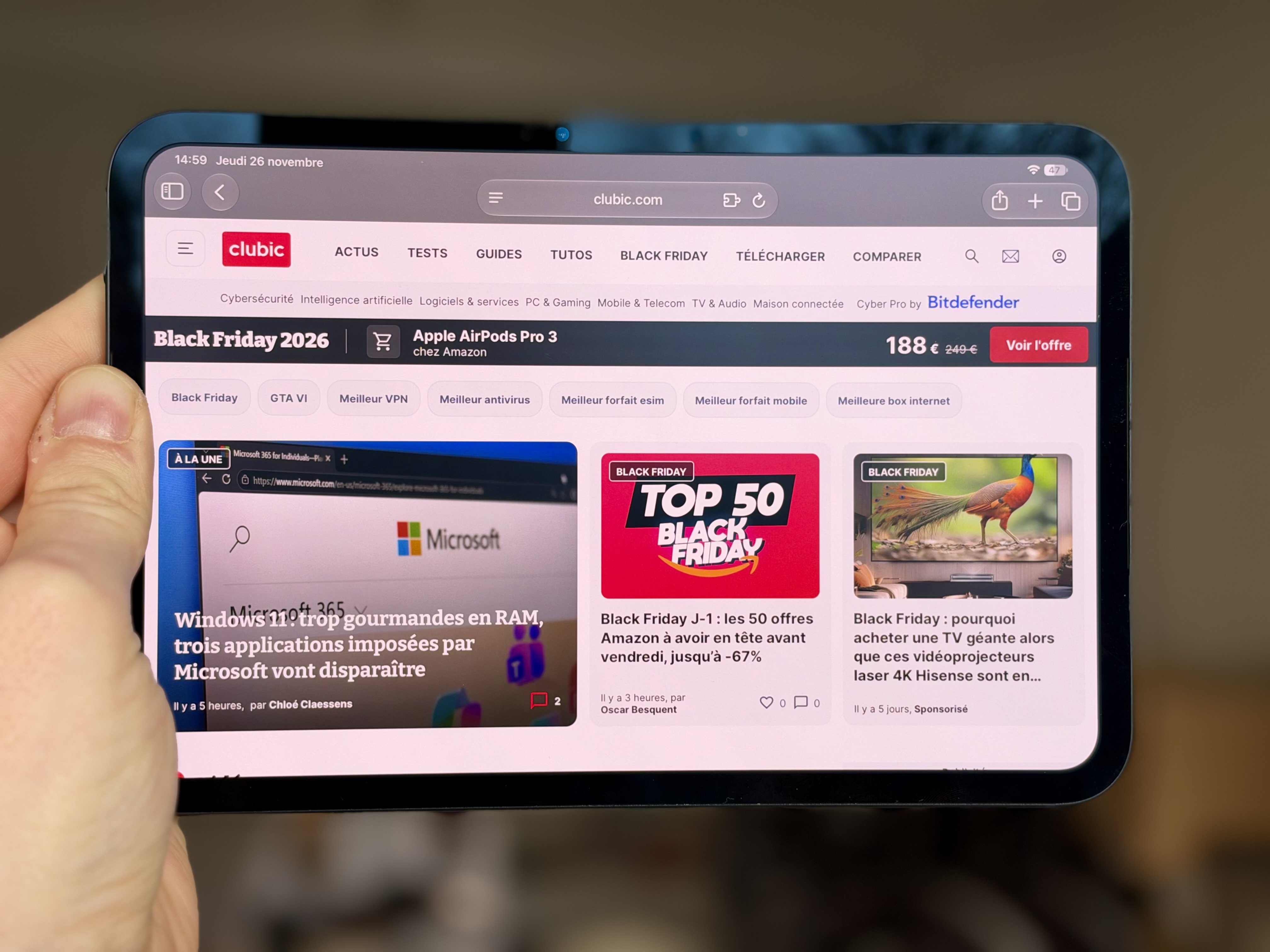
L'option nano-texturé, pour les allergiques aux reflets ©Mathieu Grumiaux

L’option nano-texturé, pour les allergiques aux reflets ©Mathieu Grumiaux

When it comes to watching a movie or editing photos, I’m a bit more mixed. The matte finish tames part of OLED’s “wow” effect, notably the depth of blacks and perceived contrast. The nano-textured glass is excellent for what it offers, but may not suit everyone. If you’re buying this iPad mini primarily to enjoy its new OLED screen for films and series, I’d recommend the standard version instead.

Audio: Hello Acoustic Display, goodbye to generous bass

To save space and further slim down the iPad mini, Apple redesigned the speaker system with a new technology called Acoustic Display. Sound now projects forward rather than outward, and the company promises a more immersive listening experience with the sound directed toward the user.
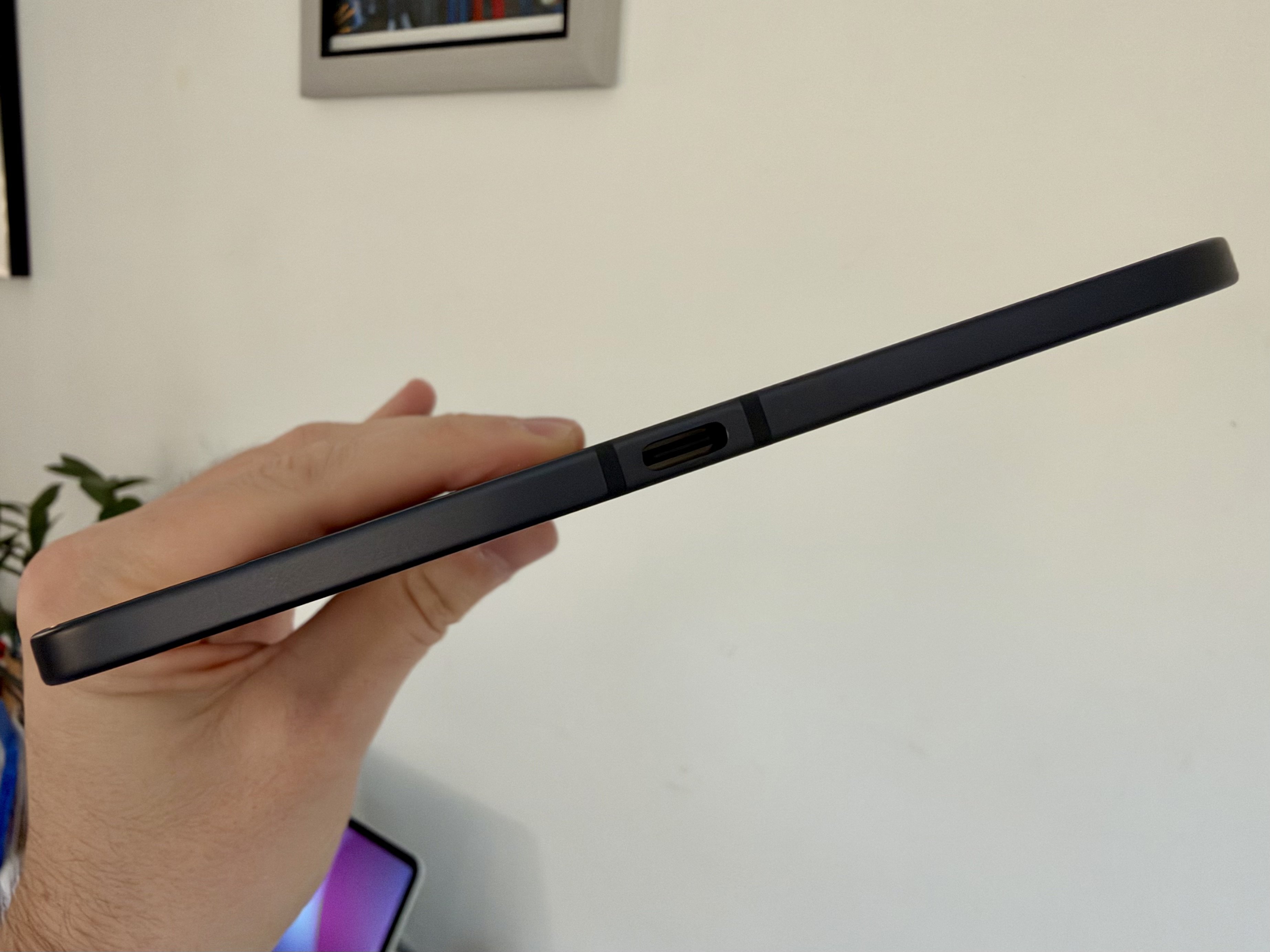
Pas de trous pour les haut-parleurs : c'est l'écran qui se charge du son ©Mathieu Grumiaux

Pas de trous pour les haut-parleurs : c’est l’écran qui se charge du son ©Mathieu Grumiaux

In practice, I’m somewhat less enthusiastic. The iPad mini sounds good, whether you’re listening to music or watching a video on a streaming service. Mids are solid, but I do miss punchier and a touch livelier bass across all the content I tested.

Performance: a workstation that slips into your pocket

During the 2021 redesign, Apple shifted the iPad mini from a pure consumption device to a production machine. A similar move happens again with the iPad mini 2026, equipped with an A20 Pro chip, from the same family as the iPhone 18 Pro. However, our 512 GB unit is the best equipped, with a six-core CPU and two 16-core Neural Engines, compared to five CPU cores and a single Neural Engine on the 128 GB and 256 GB versions. All models, however, come with a seven-core GPU. Our unit also features 12 GB of RAM.

Let’s start with the traditional benchmarks to gauge Apple’s progress over two years. On Geekbench 7, the A20 Pro makes a substantial leap compared to the A17 Pro in the previous iPad mini, both in single-core computations and when the processor is fully taxed. Even more surprising, the small tablet manages to beat the iPad Pro M4 in single-core performance, though the Pro still holds an edge when all cores are utilized. We’re beginning to understand Apple’s ambitions with this new iPad mini.
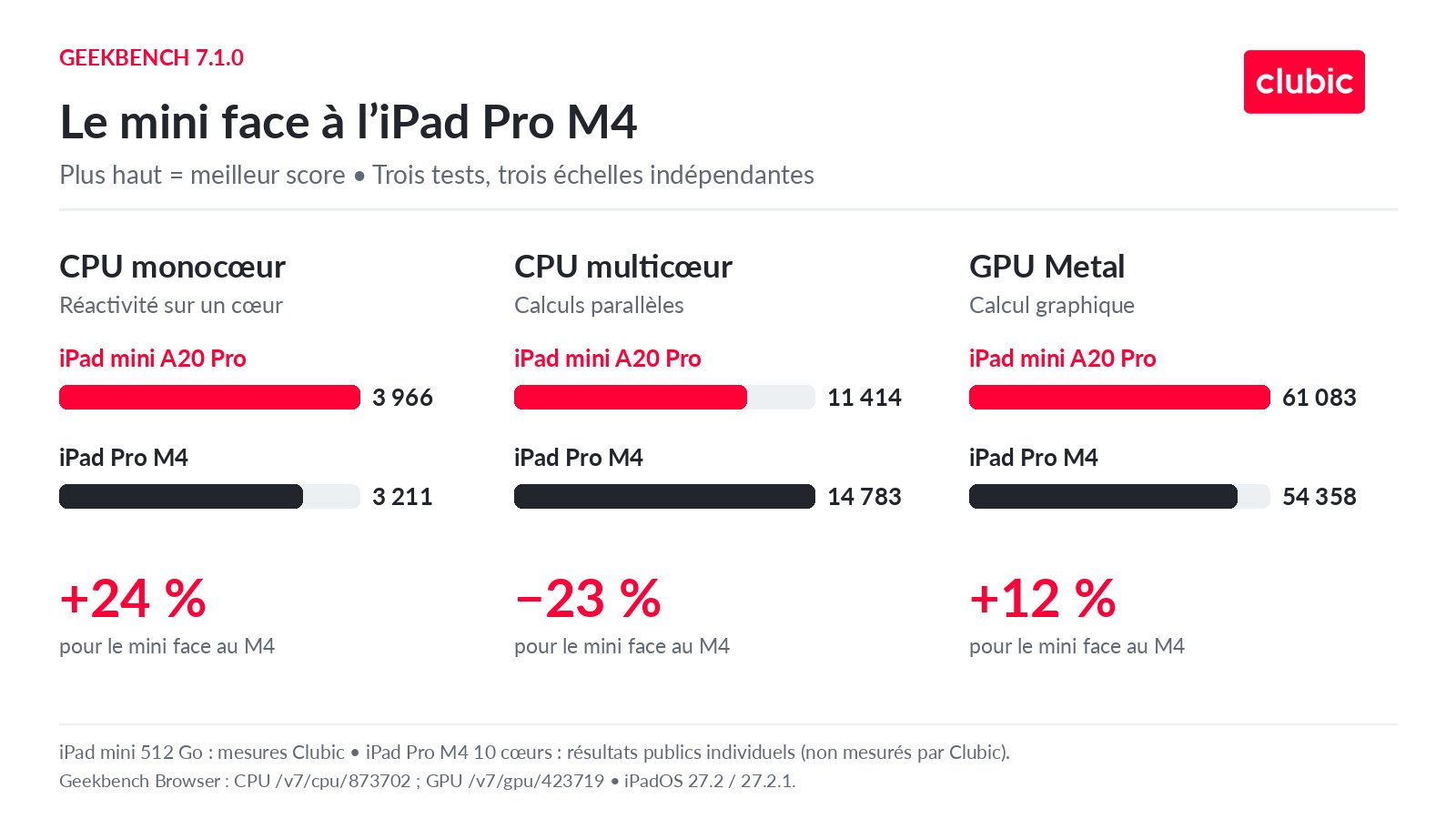
La puce A20 Pro tient le choc vis-à-vis d'un processeur M4 ©Mathieu Grumiaux / Clubic

La puce A20 Pro tient le choc vis-à-vis d’un processeur M4 ©Mathieu Grumiaux / Clubic

The graphics are not left out. In 3DMark, which simulates demanding gaming scenes, the iPad mini averages 39.2 frames per second in Solar Bay, a test that uses ray tracing to recreate lighting effects. In both Solar Bay and Steel Nomad Light, our unit scores above 87% of results in the 3DMark database. Not bad for a tablet of this size!
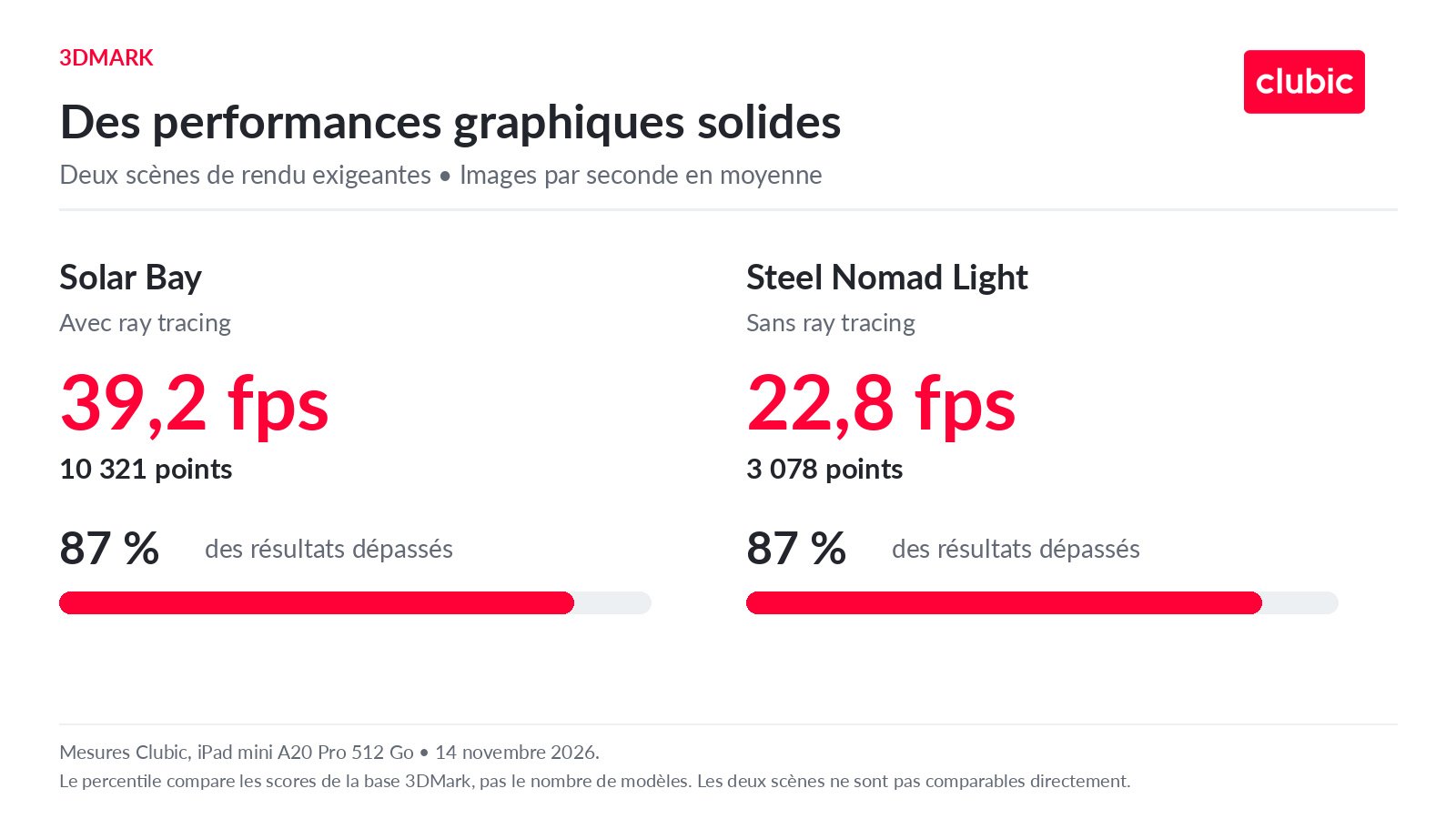
Côté GPU, c'est tout aussi bon pour tous les usages ©Mathieu Grumiaux / Clubic

Côté GPU, c’est tout aussi bon pour tous les usages ©Mathieu Grumiaux / Clubic

In practice, it’s hard to fault the iPad mini, even in demanding apps. I spent a bit of time on Genshin Impact, which runs at 60 FPS with only occasional frame drops. The mini’s form factor lends itself particularly well to gaming.

I also installed DaVinci Resolve for video editing and Affinity for graphic design, two programs you’d more commonly use on an iPad Pro. Here again, the A20 Pro delivers, with excellent responsiveness in both apps. The main limitation, in my view, remains the screen size, not the computing power. It is perfectly feasible to work on an iPad mini, although I wouldn’t swap my 11-inch iPad Pro for this smaller tablet when it comes to long video editing sessions.
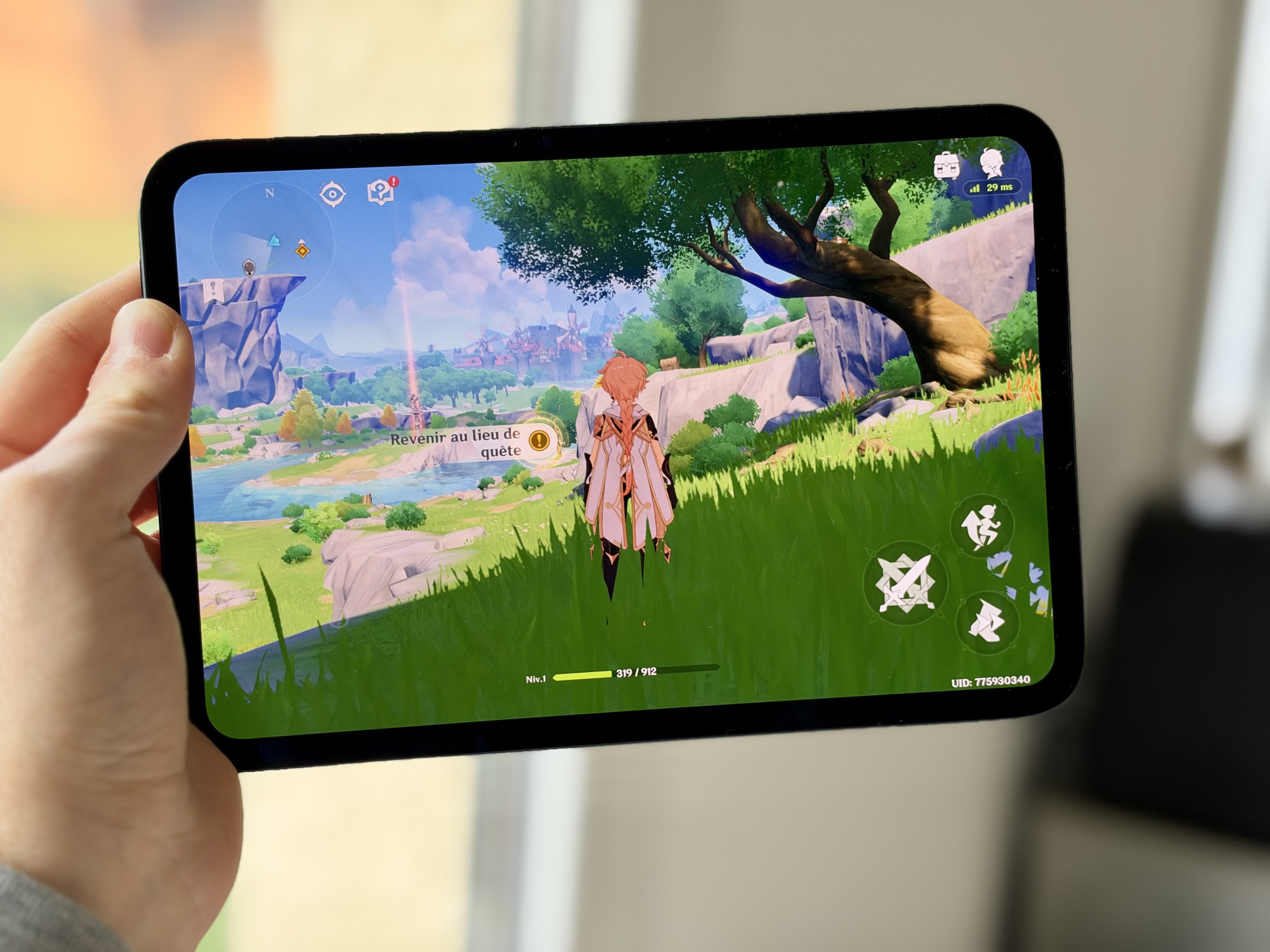
Jeu vidéo, création graphique, montage : l'iPad mini est une vraie débauche de puissance au format poche ©Mathieu Grumiaux

Jeu vidéo, création graphique, montage : l’iPad mini est une vraie débauche de puissance au format poche ©Mathieu Grumiaux

But Apple has focused on another aspect of its chip this year, and that’s likely what surprised me most during this test.

Artificial Intelligence: when the iPad mini eclipses the iPad Pro

Apple talks a lot about on-device AI in its iPad mini presentation. Rather than spending a few minutes with Apple Intelligence tools, I wanted to see what this small tablet could really do by running generative AI models locally, without calling a remote server.

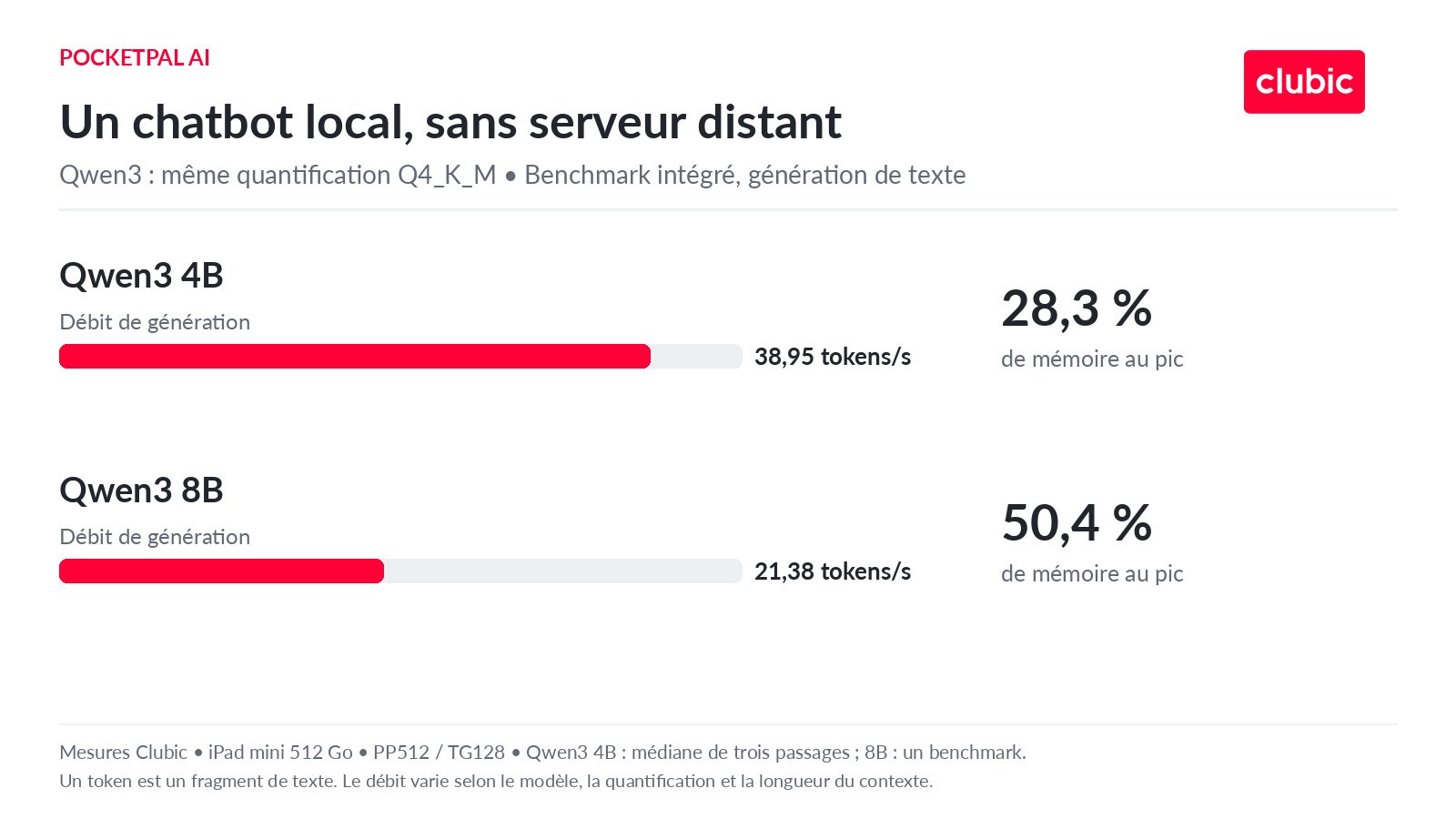
I started with PocketPal AI, an app that lets you download and use different language models. With Qwen3 and Gemma 3, two four-billion-parameter models in quantized versions, the iPad mini generates 37 and 43 tokens per second on average across several queries respectively.

For those less familiar with these tools, a token is a fragment of text. At that speed, responses stream across the screen without waiting between words. Useful note: the two models don’t use the same level of quantization, i.e., compression, so these figures cannot be directly compared.
L'iPad mini peut encaisser différents modèles d'IA locale sans broncher ©Mathieu Grumiaux / Clubic

L’iPad mini peut encaisser différents modèles d’IA locale sans broncher ©Mathieu Grumiaux / Clubic

L'iPad mini peut encaisser différents modèles d'IA locale sans broncher ©Mathieu Grumiaux / Clubic

L’iPad mini peut encaisser différents modèles d’IA locale sans broncher ©Mathieu Grumiaux / Clubic

I then pushed further with Qwen3 8B, an eight-billion-parameter model weighing over 5 GB by itself. The iPad mini loads without hesitation and reaches 21.4 tokens per second in PocketPal’s built-in benchmark, versus nearly 39 with the 4B version. The heaviest model uses roughly half of the tablet’s RAM.

The limits show up with longer calculations. Asking Qwen3 4B to write a long science-fiction story caused the pace to drop to 22 tokens per second, and the back of the iPad mini heated up quite noticeably. It isn’t dangerous, but you can feel the A20 Pro is at work. Still, it’s hard to pin the slow-down solely on heat; the length of the generated text can also affect performance.

Moving on to image generation with Draw Things. Stable Diffusion 1.5 takes only five seconds to produce a 512 × 512 image in 25 steps. With more demanding models, it gets trickier. Stable Diffusion XL managed a 1,024 × 1,024 image in 55 seconds, but the app crashed twice. I had more success with FLUX.2 klein 4B, which produced a 1,024 × 1,024 image in four steps in 1 minute 38 seconds — with noticeable chassis heating as well.
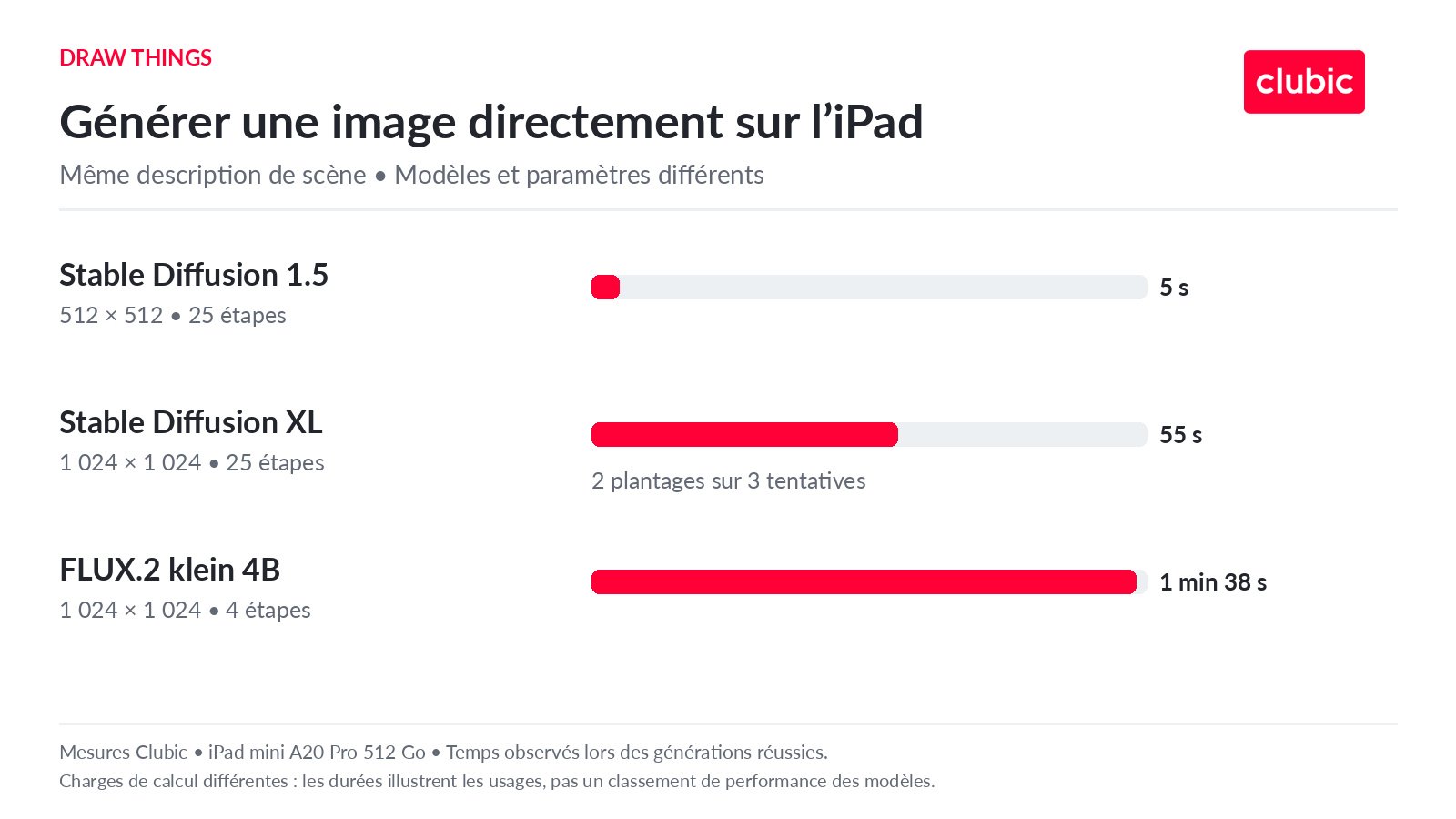
Même chose pour la création d'image, mais au prix d'une autonomie qui fond autant que le dos de l'iPad chauffe ©Mathieu Grumiaux / Clubic

Même chose pour la création d’image, mais au prix d’une autonomie qui fond autant que le dos de l’iPad chauffe ©Mathieu Grumiaux / Clubic

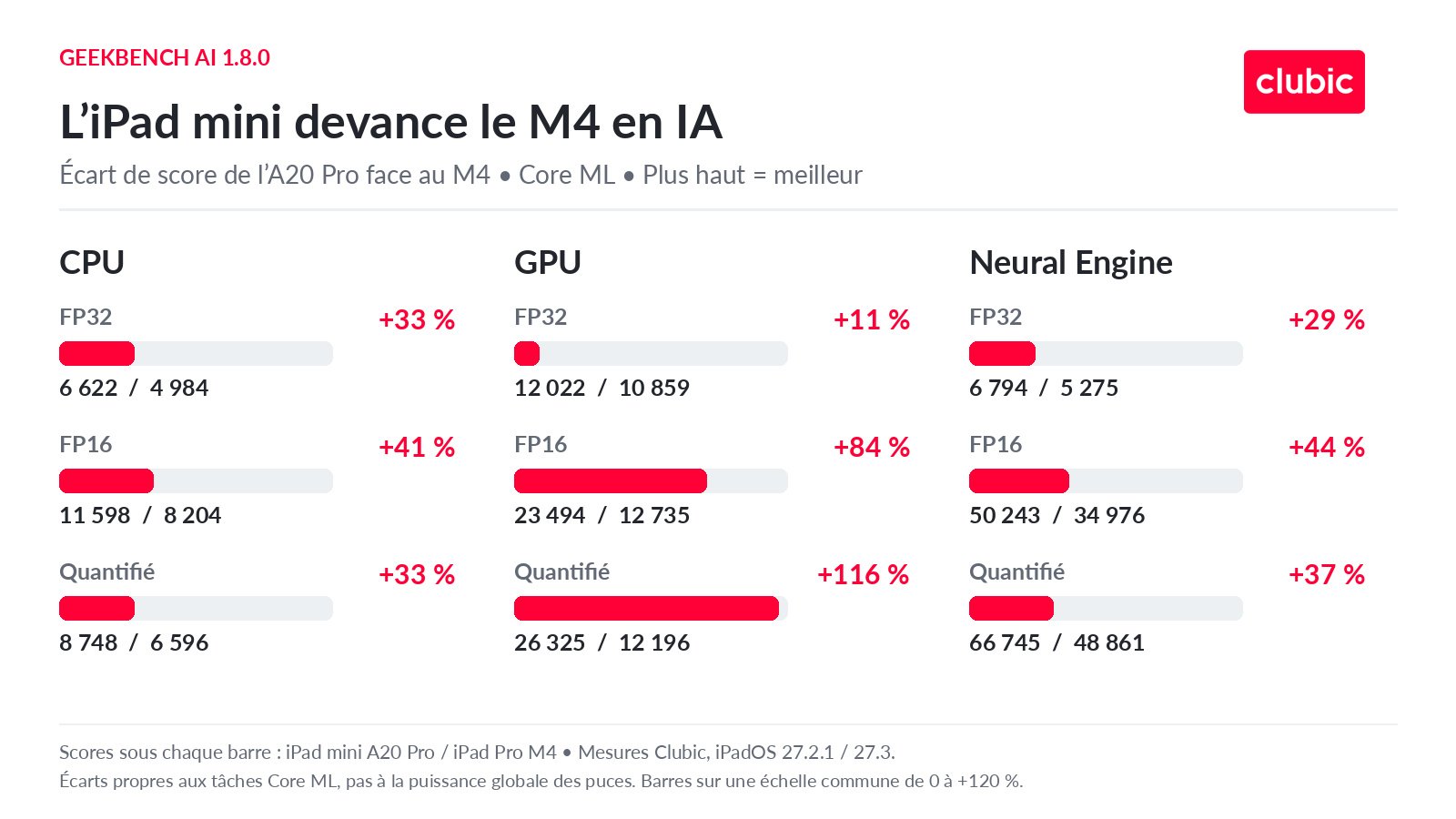
Finally, I wanted to compare the A20 Pro’s performance to my iPad Pro M4 using Geekbench AI. And there’s a small surprise: the iPad mini outperforms its big brother on all nine scores. In quantified calculations, the benchmark run with the A20 Pro’s Neural Engine shows 66,745 points, versus 48,861 for the M4, a nearly 37% advantage. Even more surprisingly, for the same type of computations performed with the GPU, the iPad mini’s score is more than twice that of the iPad Pro.

Of course, this doesn’t mean the A20 Pro is stronger than the M4 in every domain. These benchmarks focus on AI-specific workloads, and our iPad mini has two 16‑core Neural Engines. But running a chatbot or generating an image offline on a tablet this small and achieving these results is quite impressive.

Notre version possède un double Neural Engine ©Mathieu Grumiaux / Clubic

Notre version possède un double Neural Engine ©Mathieu Grumiaux / Clubic

Software: iPadOS 27 barely moving forward

The iPad mini 2026 arrives with iPadOS 27, a version that doesn’t upend our habits. Apple focused this year mainly on performance, some multitasking improvements and a deeper integration of Apple Intelligence. However, the main highlight, Siri AI, remains unavailable in the European Union.

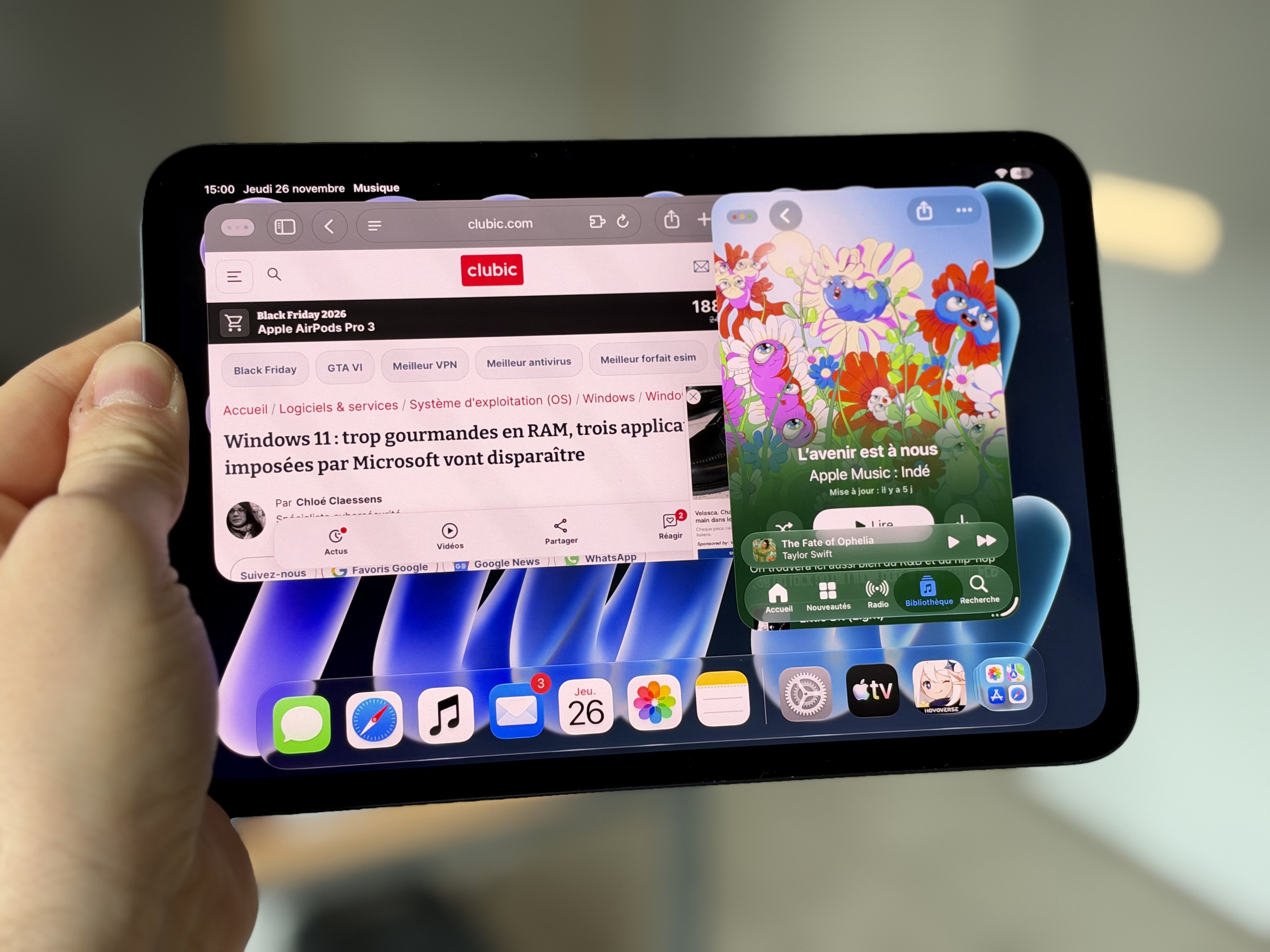
The system remains perfectly suited for browsing content, reading, and everyday apps. For work, it’s another story. The window manager allows juggling between multiple apps, but on an 8.5-inch display, space quickly becomes tight. Aside from two or three situations, I almost always disable the feature.

iPadOS permet le multifenêtrage, mais sur un écran de 8 pouces, ça montre vite ses limites ©Mathieu Grumiaux

iPadOS permet le multifenêtrage, mais sur un écran de 8 pouces, ça montre vite ses limites ©Mathieu Grumiaux

iPadOS permet le multifenêtrage, mais sur un écran de 8 pouces, ça montre vite ses limites ©Mathieu Grumiaux

iPadOS permet le multifenêtrage, mais sur un écran de 8 pouces, ça montre vite ses limites ©Mathieu Grumiaux

Nevertheless, Apple added an interesting feature with iPadOS 27.2: connect the iPad mini to an external monitor to enjoy an extended desktop. A way to push beyond the limits of the small screen, though you’d hardly imagine most buyers setting up a workstation on a desk full-time for work all day.

Battery life: endurance that’s pleasant

Apple claims up to 10 hours of web browsing over Wi‑Fi or video playback for the new iPad mini, a conservative estimate in light of my testing. In my use, which mixed web browsing, reading, videos, everyday apps and a few more demanding sessions, the tablet lasted nearly 12 hours before needing a charger. An excellent result for a device this compact.

Of course, the most power-hungry apps, like on-device AI or gaming, drain the battery much faster. But in more typical use, the iPad mini is particularly long-lasting, and you could probably carry it with you all day without worrying about recharging.

Près de 12H d'utilisation en le poussant un peu ©Mathieu Grumiaux

Près de 12H d’utilisation en le poussant un peu ©Mathieu Grumiaux

Recharging is also pleasantly quick. It takes about 1 hour and 30 minutes to reach a full charge, and around 30 minutes to reach 50%. That’s a quick comeback before heading out again. Apple thus achieves a nice balance between thinness, lightness, and endurance.

iPad mini (2026): Clubic’s Verdict

Conclusion
Overall note
9 / 10

The iPad mini needed a proper refresh, and Apple didn’t hold back. OLED arrival, a lighter and slimmer body, excellent endurance, and the option of nano-textured glass all contribute to making this generation a tablet you’ll barely want to put down once you’re home.

The real surprise, however, lies in the A20 Pro. We didn’t expect to run such demanding AI models on a tiny device, nor to see the iPad mini outpace the iPad Pro M4 in our AI benchmarks. Heat during prolonged calculations still reminds us of the physical limits of this small tablet.

So, a pocket-sized iPad Pro? In some respects, yes. You can edit videos, retouch photos or generate images offline, but the 8.5-inch display remains less than ideal for long stretches of work. It’s also nice that Apple offers its excellent nano-textured glass on this compact model, though you’ll still choose the screen type to fit your habits.

Ultimately, despite all this power, the iPad mini remains beloved for the same reasons: it’s a tablet you pick up without thinking, you take everywhere, and you enjoy using for quick tasks or casual browsing. Apple hasn’t corrupted its most endearing iPad, and that might be its greatest achievement this year.

The Pros
  • A true OLED display
  • Thinner and lighter
  • The nano-textured glass option
  • The A20 Pro power
  • Impressive local AI performance
  • Close to 12 hours of battery life
  • Fast recharge

Note

Design and Build: a Few Grams That Change Everything

At first glance, it’s hard to distinguish this new iPad mini from its predecessor. Apple keeps the aluminum construction, the same rounded corners, and the silhouette that’s instantly recognizable. No aesthetic upheaval, and even a slight disappointment on color options. The purple hue, which added a touch of whimsy to the lineup, disappears in favor of a dull silver and black duo. Apple has shown more inspiration elsewhere.

You have to pick up the tablet to discover the real changes. The iPad mini loses 34 grams and becomes one millimeter thinner than the previous generation. On paper, that’s not remarkable, yet the difference is felt immediately.

Minuit ou Lumière stellaire : des coloris habituels et pas très inspirés©Mathieu Grumiaux

Minuit ou Lumière stellaire : des coloris habituels et pas très inspirés©Mathieu Grumiaux

The new iPad mini is even more pleasant to handle. Its featherweight design makes it comfortable to hold with one hand for long reading or browsing sessions. Its slim profile reinforces the sense of having a small screen you can take anywhere—living room, bedroom, or on the move.

During evenings, I realized my iPhone stayed on the coffee table more and more. Without altering my habits, I found myself almost exclusively using the iPad mini once it was in the couch setup. A usage shift that probably says more about the format’s success than the few grams shaved off the scale.

L'iPad mini s'offre une cure de minceur impressionnante une fois la tablette en main ©Mathieu Grumiaux

L’iPad mini s’offre une cure de minceur impressionnante une fois la tablette en main ©Mathieu Grumiaux

Another, more discreet but notably welcome change: the iPad mini is now IP67 certified, making it water and dust resistant. That’s a bit more peace of mind when taking the tablet to the beach or placing it on the kitchen counter.

Another novelty: the front camera has moved and is now centered when you hold the iPad mini in landscape. The 12‑MP sensor is the same as in previous generations.

Cette fois c'est la bonne : la caméra est centrée en mode Paysage. Il était temps ! ©Mathieu Grumiaux

Cette fois c’est la bonne : la caméra est centrée en mode Paysage. Il était temps ! ©Mathieu Grumiaux

Display: OLED, finally!

Apple resisted the call of OLED for years. OLED technology remained the domain of the iPad Pro, and all other tablets, regardless of price, settled for a LCD panel—calibrated well, but aging compared to the best displays on the market. With the iPad mini, Apple finally changes tack.

Let’s be explicit: the iPad mini 2026 is a real leap forward in display quality. The small model does not benefit from the iPad Pro’s Tandem OLED (two superimposed OLED layers to maximize brightness), but it performs very well. Apple claims a maximum brightness of 600 nits, up from 500 nits on the previous generation, with HDR content peaks up to 1,200 nits. This adds more pop to the brightest scenes in a film. The panel supports HDR10 and Dolby Vision, and the colors are vivid without being overly saturated. If you watch films and videos or edit photos, the iPad mini’s display quality is simply excellent.

Comme sur l'iPad Pro, Apple maitrise son calibrage ©Mathieu Grumiaux

Comme sur l’iPad Pro, Apple maitrise son calibrage ©Mathieu Grumiaux

There remains a major disappointment: Apple sticks to a 60 Hz refresh rate. At a time when 120 Hz has become common, it’s hard to understand why ProMotion remains exclusive to the iPad Pro. It’s especially frustrating on such a powerful tablet that is used a lot for scrolling web pages and articles. Apple finally brought OLED to the iPad mini, but stopped short of going all the way.

Apple also shipped an iPad mini with nano-textured glass. It’s a feature already available on the iPad Pro, designed to etch the glass at the nanoscale to scatter ambient light and cut reflections. For reading magazines, web pages, or simply using the tablet in daylight, the result is quite striking, with reflections nearly vanishing in use. It’s especially pleasant under bright light or near a window.

L'option nano-texturé, pour les allergiques aux reflets ©Mathieu Grumiaux

L’option nano-texturé, pour les allergiques aux reflets ©Mathieu Grumiaux

For watching movies or editing photos, though, I’m a bit more mixed. The matte finish dulls some of OLED’s “wow” factor, notably the depth of blacks and perceived contrast. The nano-textured glass is excellent for what it offers, but may not be for everyone. If you’re buying the iPad mini primarily to enjoy its new OLED screen for films and series, I’d recommend the standard version.

Audio: Hello Acoustic Display, goodbye to generous bass

To save space and further slim down the iPad mini, Apple revised the speaker system with a new technology called Acoustic Display. The sound is no longer spread in the same way and now benefits from forward-facing restitution. The manufacturer promises a more immersive experience, with sound directed toward the user.

Pas de trous pour les haut-parleurs : c'est l'écran qui se charge du son ©Mathieu Grumiaux

Pas de trous pour les haut-parleurs : c’est l’écran qui se charge du son ©Mathieu Grumiaux

In practice, I’m slightly less enthusiastic. The iPad mini sounds good whether you’re listening to music or watching a video on a streaming service. Mid frequencies are solid, but I miss punchier, a bit livelier bass across all tested content.

Performance: a workstation that slips into the pocket

During the iPad mini redesign in 2021, Apple shifted its tablet’s positioning, turning it from a pure consumption device into a production machine. The same move happens again with the iPad mini 2026, equipped with an A20 Pro chip, from the same family as the iPhone 18 Pro. Note, however, that our 512 GB model is the best equipped, with a six-core CPU and two 16-core Neural Engines, versus five CPU cores and a single Neural Engine on the 128 GB and 256 GB versions. All devices, however, include a seven-core GPU. Our unit also features 12 GB of RAM.

Let’s begin with the usual benchmarks to gauge how far Apple has come in two years. On Geekbench 7, the A20 Pro makes a substantial leap over the A17 Pro of the previous iPad mini, both in single-core calculations and when the entire processor is stressed. Even more surprising, the small tablet manages to surpass the iPad Pro M4 in single-core, though the Pro still holds the advantage when using all cores. We’re starting to grasp Apple’s ambitions with this new iPad mini.

La puce A20 Pro tient le choc vis-à-vis d'un processeur M4 ©Mathieu Grumiaux / Clubic

La puce A20 Pro tient le choc vis-à-vis d’un processeur M4 ©Mathieu Grumiaux / Clubic

The graphics performance isn’t left out. In 3DMark’s Solar Bay, which simulates heavy game scenes with ray-tracing lighting, the iPad mini averages 39.2 FPS. In Solar Bay and Steel Nomad Light, our unit scores above 87% of results in the 3DMark database. Not bad for a tablet this size!

Côté GPU, c'est tout aussi bon pour tous les usages ©Mathieu Grumiaux / Clubic

Côté GPU, c’est tout aussi bon pour tous les usages ©Mathieu Grumiaux / Clubic

In practice, it’s hard to fault the iPad mini, even in demanding apps. I spent some time on Genshin Impact, which runs at 60 FPS with rare frame drops. The mini’s compact format is particularly well-suited to gaming.

I also installed DaVinci Resolve for video editing and Affinity for graphic design, two apps you’d more likely use on an iPad Pro. Again, the A20 Pro delivers, with excellent responsiveness in both apps. The main limitation, in my view, remains the screen size rather than the raw power. You could work on an iPad mini, but I’d still swap my 11-inch iPad Pro for long video editing sessions.

Jeu vidéo, création graphique, montage : l'iPad mini est une vraie débauche de puissance au format poche ©Mathieu Grumiaux

Jeu vidéo, création graphique, montage : l’iPad mini est une vraie débauche de puissance au format poche ©Mathieu Grumiaux

But Apple focused on another aspect of its chip this year, and it’s probably what surprised me most during this test.

Artificial Intelligence: when the iPad mini eclipses the iPad Pro

Apple emphasizes on-device AI in its iPad mini presentation. Rather than spending a few minutes with Apple Intelligence tools, I wanted to see what this small tablet could actually do by running local generative AI models, without remote servers.

I started with PocketPal AI, an app that lets you download and use different language models. With Qwen3 and Gemma 3, two four-billion-parameter models in quantized versions, the iPad mini generates 37 and 43 tokens per second respectively on average over several queries.

For those less familiar with these tools, a token is a fragment of text. At that speed, the responses scroll across the screen without waiting between words. A useful caveat: the two models do not use the same level of quantization, i.e., compression, so these numbers cannot be directly compared.

L'iPad mini peut encaisser différents modèles d'IA locale sans broncher ©Mathieu Grumiaux / Clubic

L’iPad mini peut encaisser différents modèles d’IA locale sans broncher ©Mathieu Grumiaux / Clubic

L'iPad mini peut encaisser différents modèles d'IA locale sans broncher ©Mathieu Grumiaux / Clubic

L’iPad mini peut encaisser différents modèles d’IA locale sans broncher ©Mathieu Grumiaux / Clubic

I then doubled down with Qwen3 8B, a model of eight billion parameters weighing over 5 GB. The iPad mini doesn’t blink during loading and reaches 21.4 tokens per second in PocketPal’s built-in benchmark, versus about 39 with the 4B version. The heavier model uses roughly half of the tablet’s RAM.

Longer calculations reveal the limits, though. Asking Qwen3 4B to write a long science-fiction story caused the speed to drop to 22 tokens per second, and the iPad mini’s back got fairly warm. It’s not dangerous, but you can feel the A20 Pro at work. Still, it’s hard to attribute the slowdown solely to heat; the length of the generated text can also affect performance.

Moving on to image generation with Draw Things. Stable Diffusion 1.5 only takes five seconds to produce a 512 × 512 image in 25 steps. With more demanding models, it gets tougher. Stable Diffusion XL managed a 1,024 × 1,024 image in 55 seconds, but the app also crashed twice. I had more success with FLUX.2 klein 4B, which produced a 1,024 × 1,024 image in four steps, in 1 minute and 38 seconds, again with noticeable chassis heating.

Même chose pour la création d'image, mais au prix d'une autonomie qui fond autant que le dos de l'iPad chauffe ©Mathieu Grumiaux / Clubic

Même chose pour la création d’image, mais au prix d’une autonomie qui fond autant que le dos de l’iPad chauffe ©Mathieu Grumiaux / Clubic

I finally compared the A20 Pro’s performance with my iPad Pro M4 using Geekbench AI. And there’s a small surprise: the iPad mini leads its big brother across all nine scores. In AI-quantified calculations, the benchmark run with the A20 Pro’s Neural Engine shows 66,745 points, versus 48,861 for the M4, a gain of nearly 37%. Even more surprising, for GPU-based calculations with the same type of workloads, the iPad mini’s score is more than twice that of the iPad Pro.

Of course, this doesn’t mean the A20 Pro is stronger than the M4 in every area. These benchmarks target AI-specific tasks, and our iPad mini features two 16‑core Neural Engines. But running a chatbot or generating an image offline on a tablet this small and achieving such results is quite astonishing.

Notre version possède un double Neural Engine ©Mathieu Grumiaux / Clubic

Notre version possède un double Neural Engine ©Mathieu Grumiaux / Clubic

Software: iPadOS 27 Makes Little Headway

The iPad mini arrives with iPadOS 27, a version that doesn’t disrupt our routines. Apple focused this year mainly on performance, some multitasking improvements, and deeper integration of Apple Intelligence. But the main dish, Siri AI, remains unavailable in the EU.

The system remains perfectly suited for content consumption, reading, and everyday apps. For work, it’s another matter. The window manager allows juggling between several apps, but on an 8.5-inch display, space runs out quickly. Aside from two or three situations, I almost always disable the feature.

iPadOS permet le multifenêtrage, mais sur un écran de 8 pouces, ça montre vite ses limites ©Mathieu Grumiaux

iPadOS permet le multifenêtrage, mais sur un écran de 8 pouces, ça montre vite ses limites ©Mathieu Grumiaux

iPadOS permet le multifenêtrage, mais sur un écran de 8 pouces, ça montre vite ses limites ©Mathieu Grumiaux

iPadOS permet le multifenêtrage, mais sur un écran de 8 pouces, ça montre vite ses limites ©Mathieu Grumiaux

Apple did, however, add an interesting feature with iPadOS 27.2: connect the iPad mini to an external monitor to enjoy an extended workspace. A way to exceed the limits of its small screen, even if you don’t imagine most buyers setting up a desk for the entire day.

Autonomy: endurance that’s genuinely pleasing

Apple claims up to 10 hours of web browsing over Wi‑Fi or video playback for the new iPad mini, a conservative figure given my tests. In my use, combining web browsing, reading, videos, everyday apps and a few more demanding sessions, the tablet lasted almost 12 hours before needing a recharge. A superb result for such a compact device.

Naturally, the most demanding apps, such as on-device AI or gaming, drain the battery much faster. But in more typical use, the iPad mini is exceptionally enduring, and you should be able to take it for a full day without worrying about recharging.

Près de 12H d'utilisation en le poussant un peu ©Mathieu Grumiaux

Près de 12H d’utilisation en le poussant un peu ©Mathieu Grumiaux

Charging is also a pleasant surprise. Expect around 1 hour 30 minutes to reach full, and about 30 minutes to hit 50%. A quick boost to get back on the move. Apple thus nails a nice compromise between slim, light, and endurance.

iPad mini (2026): Clubic’s Verdict

Conclusion
General note
9 / 10

The iPad mini needed a strong refresh, and Apple didn’t hold back. OLED arrival, weight and thickness improvements, and excellent endurance make this generation a tablet you’ll struggle to do without once you get home.

The real surprise is the A20 Pro. We didn’t expect to run such demanding AI models on a small device, nor to see the iPad mini outperform the iPad Pro M4 in our AI-focused benchmarks. The heat during extended calculations does remind you of the device’s physical limits.

So, a pocket iPad Pro? In some respects, yes. You can edit videos, retouch photos or generate images without an Internet connection, but the 8.5-inch screen remains less suited to long work sessions. It’s also welcome that Apple offers its excellent nano-textured glass on this compact model, though you’ll choose the display type based on your habits.

Ultimately, despite all this power, it’s still for the same reasons we love the iPad mini: it’s a tablet you grab instinctively, you carry everywhere, and you enjoy using it for a quick task or casual browsing. Apple hasn’t mangled its most endearing iPad, and that might be its greatest achievement this year.

Pros
  • A true OLED display
  • Even thinner and lighter
  • The nano-textured glass option
  • The A20 Pro power
  • AI on-device performance
  • Almost 12 hours of autonomy
  • Fast recharge
Cons
  • Hotspot during intensive calculations
  • Less generous bass response
  • Muted color options
Read the conclusion

Daniel Brooks

I cover everyday products with a practical eye, from kitchen tools and home essentials to smart gadgets and consumer trends. My goal is to help readers understand what is genuinely useful, what is worth the price, and what deserves a second look before buying.