
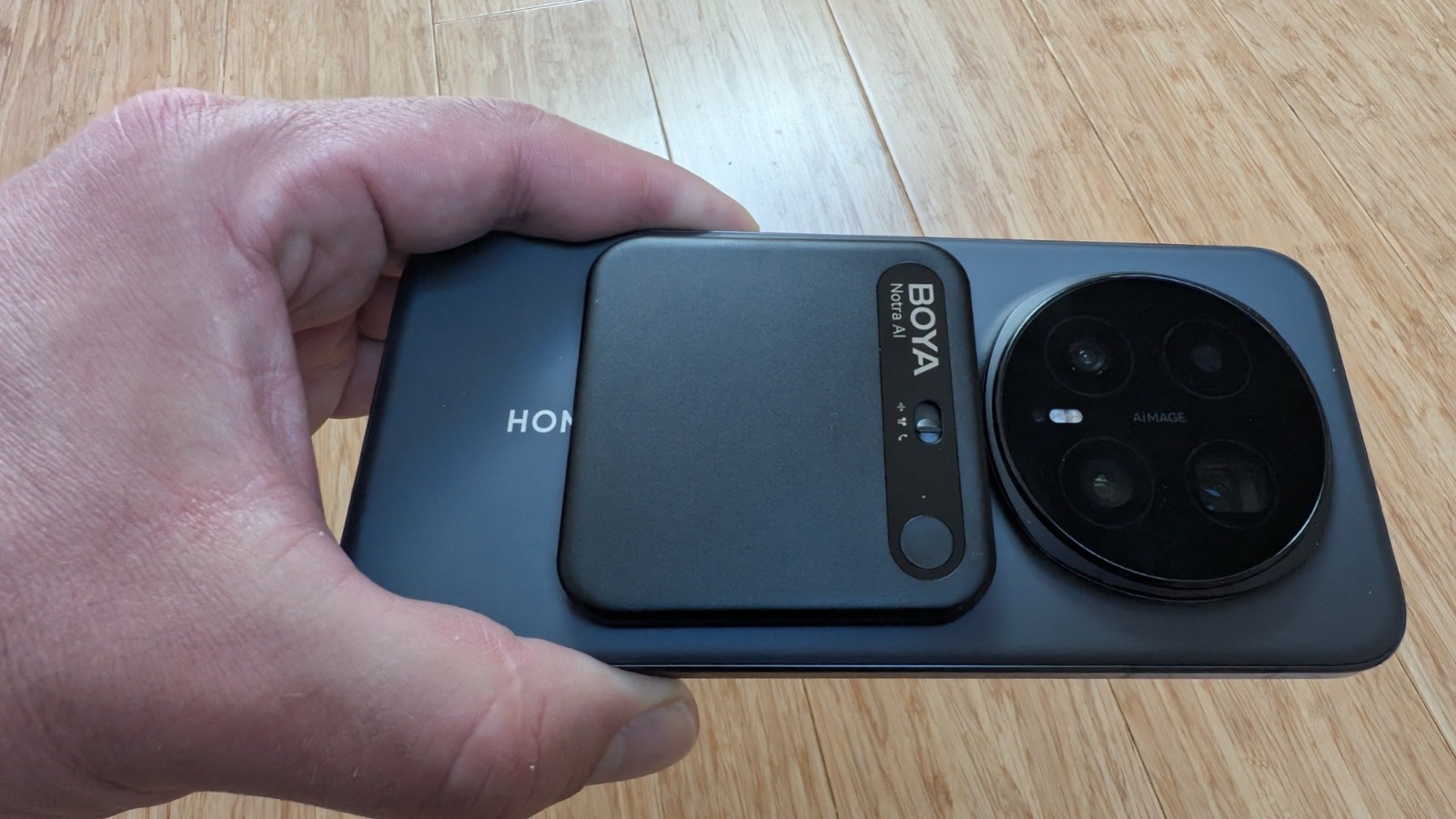
Boya enters the AI recorder market with Notra, a compact magnetic box capable of capturing meetings, calls, and conversations through its built-in microphone or Bluetooth headphones. A fairly effective product paired with an app that is advancing rapidly. But can it really challenge the market leader?
Still another AI recorder? Yes, another one. After Plaud, Soundcore and a few clones—some more inspired than others—Boya also tries to transform our meetings, interviews, and calls into clean notes, actionable summaries, and exportable files. The brand doesn’t come from nowhere: Boya knows audio, microphones, and mobile use. The Notra thus starts with a real capital of trust.
Looking through its technical sheet reveals several compelling assets, such as three recording modes (ambient, phone, and Bluetooth), MagSafe compatibility (magnetic attachment to the back of the phone), a genuine USB-C port that allows direct access to the recorded files (a feature to enable before recording), export of these files to MP3, built-in noise reduction, and promises of stronger privacy.
But a good AI recorder isn’t judged solely on its spec sheet. It must disappear into daily life and deliver reliable transcripts. And that’s precisely where we place our hopes for the Notra.
Unboxing and Setup
The Boya Notra presents itself as a small, compact square—chunkier than a Soundcore Work in its docking station, yet less slim and discreet than a Plaud Note Pro. At first, the form factor is intriguing; it gives the product an identity, something not so common in this market already crowded with pebbles, magnetic cards, and magnetic discs. The finish is solid, the microphone grille inspires confidence, and the light weight means you can forget it quickly in a pocket. A little too much, perhaps: detached from the phone, this gadget can easily end up at the bottom of a bag.
Everyday Use
Among the Boya Notra’s quirks is a physical selector for switching between recording modes. The Notra can thus record ambient conversations, a phone call via its bone-conduction sensor, or a discussion conducted with Bluetooth headphones.
This last point is rare and rather well seen, especially for conference calls when you couldn’t book a meeting room or for calls on the move. However, you’ll need to connect the unit to the smartphone via USB-C and remember to switch to the correct recording mode.
The famous button to select the recording mode
The main button is used to start recording, stop it, and mark important moments. Once again, it’s simple and practical. In an interview, being able to flag a key passage without taking out your phone really changes the game. The stated range reaches up to 10 meters, but in a noisy environment you should plan for roughly 5 meters to retain a fully usable result. That’s not unreasonable: the Notra remains a small, non-directional device, not a plateau-level microphone kit.
As for audio quality, Boya shows off its know-how. Behind its broad side grille, the Notra pairs two MEMS omnidirectional microphones with a VPU sensor, responsible for capturing vibrations transmitted by the smartphone during calls (to be able to record without relying on iOS or Android software restrictions).
Recordings are clean, the built-in noise reduction does its job without overdoing it, and voices stay intelligible even in imperfect conditions. You do sometimes hear a very light hiss when listening to certain files, but it doesn’t ruin the capture or the comprehension by the AI.
Transfer speed, on the other hand, is one of the device’s strong points: it appears faster than the early Plaud and the Soundcore Work, and direct access to audio files via USB-C is a real breath for those who don’t want to depend entirely on an app.
On Privacy and Data Handling
On paper, the Notra takes an interesting approach to privacy. Boya states that recordings stay local by default, transfers use TLS 1.3, stored data are AES-256 encrypted, and files sent for processing are subsequently deleted (except for voluntary cloud backup). However, we could not audit these mechanisms nor independently verify the manufacturer’s compliance claims. No mention of GDPR/HDS compliance is highlighted on the manufacturer’s site.
A voice anonymization feature before sending data to the cloud also makes sense. On a product that captures meetings, interviews, and sometimes health-related calls, that’s welcome even if, as a final user, one can only take the brand at its word.
The Magnetic Mount and Build
The magnetic mounting isn’t entirely convincing. On iPhone or Pixel, the Notra holds fairly well, even quite well. But on some thicker Androids or those with a pronounced camera module like my Honor Magic 8 Pro, it’s more challenging. You really need to aim precisely. If mispositioned, the recorder can slip or detach without warning.
Moreover, the device is quite thick compared to a Plaud Note Pro (6.8 mm versus 2.99 mm); it takes up space on the back of the phone and constantly reminds you that it’s there. A small chink in the promise of an accessory that you clip on and forget.
Daily Use (Continued)
One standout point is the ability to access your recordings via a USB-C cable. Do keep in mind you must enable this function before starting captures.
On paper, Notra adopts an interesting privacy approach: local storage by default, TLS 1.3, AES-256 encryption, and cloud processing with subsequent deletion, unless you opt for cloud backup. We could not audit these processes, and GDPR/HDS compliance is not explicitly claimed on the site. Still, the anonymization feature for voice before cloud processing is a meaningful step for a device aimed at capturing meetings, interviews, and sometimes sensitive calls.
Audio Quality and Transcription Performance
In terms of everyday audio performance, the Notra proves to be quite capable. The dual MEMS mics deliver clear voices with a reasonable amount of detail, and the noise suppression helps keep unwanted background noise in check. The dynamic range is decent, and the transcripts stay legible even when speech is not perfectly clear. Some files reveal a faint hiss, but it seldom derails comprehension by the transcription AI.
Transcription quality improves over time with software updates. In English, the Notra performs well, with coherent summaries and reliable transcripts. In French, initial results were less flattering, but there has been steady improvement from spring to summer. Now the French transcripts are noticeably better, though conversations with rapid or bilingual English-French exchanges can still baffle the AI.
As for overall transcription and summarization, Notra’s outputs are clean and do a good job of compensating less reliable portions with well-formed summaries. Behind Boya OS, the brand claims a blend of AI technologies (ChatGPT, Claude, Gemini, and Grok—this last available to paying users).
On paper, Notra’s approach to privacy and on-device processing is commendable. Its ability to export WAV files and the speed of transfers are practical advantages for users who don’t want to rely solely on a companion app for access to their recordings. The device also offers a straightforward USB-C interface to obtain files quickly when needed.
Battery Life, Endurance, and Durability
Notra promises up to 24 hours of continuous recording and 365 days in standby, enough to cover several days of interviews or meetings without constantly monitoring the battery gauge. A full USB-C recharge takes around 1.5 to 2 hours.
Remaining battery life is visible in the app, while the LED blinks violet for five seconds when the battery drops below 10%. The IP54 rating protects against dust, sweat, and splashes, but it does not guarantee immersion or prolonged use in heavy rain.
Boya Notra: Clubic’s Verdict
The Boya Notra is a paradoxical product. It is well built, clever in several respects, and even outperforms some competitors on concrete details: the USB-C port, access to WAV files, MP3/WAV exports, three physical modes, Bluetooth headset capture, fast transfers, and a “local first” approach to privacy. On sale, it can become noticeably more affordable than a Plaud Note Pro or a Soundcore Work.
But at its official price, the logic becomes more complex. Around €230, it’s worth looking at Plaud, a more mature and reliable option for transcription. Even on sale around €170, or less during occasional promotions, the advantage remains fragile. For professional use with many hours of transcription, you would eventually need a subscription. And in that space Boya doesn’t disrupt the market: prices quickly land in the same range as competitors (about €250 for Plaud with unlimited annual access, the Pro plan at 1,200 minutes per month is roughly the same price per year), without delivering the same level of transcription excellence.
In short, if you don’t exceed the roughly 320 minutes of free recording per month (600 minutes/month in the first year via a Boya site discount) and you mainly attend conferences, courses, consultations, or meetings where participants aren’t constantly talking over one another, the Notra can be a reasonably interesting alternative — provided it is sold at a substantially lower price than Plaud’s recorder.
Pros
- Three recording modes
- True USB-C port for charging and transfer
- Good microphone range
- MagSafe case compatibility
- Recording via Bluetooth headphones
Cons
- Monthly subscription pricing
- Manual switching between ambient, Bluetooth, and phone calls
- Magnetic attachment isn’t universally compatible
- French transcription still lags behind Plaud
- Relatively thick profile
