
Formerly known as Windows Defender, Microsoft Defender is the built-in antivirus that ships with Windows 7, 8, 10, and 11. Although it is free, the service regularly tops the charts of the most capable antivirus programs in the AV-Test and AV-Comparatives reference labs. As a result, Microsoft Defender sits among the best free antivirus options on the market.
- moodNo free trial
- devices1 device
- phishingAnti-phishing included
- local_atmNo anti-ransomware
- groupsParental control included
- Powerful, stealthy, next-generation detection engine
- Integration in Windows 10 and Windows 11
- Firewall
- Parental controls
- Limited to Windows 10 and Windows 11
- Phishing protection compatible only with Edge and Chrome
- May slow down some downloads
Positioned among free antiviruses, Microsoft Defender was launched in 2020 to replace Windows Defender. Compatible with Windows 7, 8, 10, and 11, it runs in the background without impacting PC performance. Built-in and ready to use, the software requires no special configuration. Less comprehensive than a cross-platform security suite, it focuses on protection against a range of threats such as malware, spyware, adware, and more.
Recent AV-Test and AV Comparatives reports are unequivocal: Microsoft Defender shows a malware detection rate of 100% for AV-TEST in April 2023, and 99.8% for AV-Comparatives in March 2023. Results that, if any were needed, confirm that Microsoft Defender provides excellent protection for Windows.
What is Microsoft Defender?
Succeeding Windows Defender and Microsoft Security Essentials in Windows 7, Microsoft Defender began as a free antispyware tool integrated into the OS. It later evolved into a full-fledged antivirus now provided with Windows 8 and 10. To access Microsoft Defender, you can go to the Windows Security Center where it is built-in.
To tackle the latest online threats, Defender has been equipped with robust real-time protection modules and a Cloud-based signature database. It offers on-demand scans, a whitelist management feature, and a dedicated module to guard against ransomware.
It is worth noting that the name Microsoft Defender under Windows 10 and Windows 11 can be used to refer to several security components:
- The Microsoft Defender antivirus that helps counter online threats with real-time protection backed by cloud security intelligence.
- The Microsoft Defender firewall designed to monitor incoming and outgoing connections on public and private networks. It also authorizes connections for legitimate apps and blocks malicious ones.
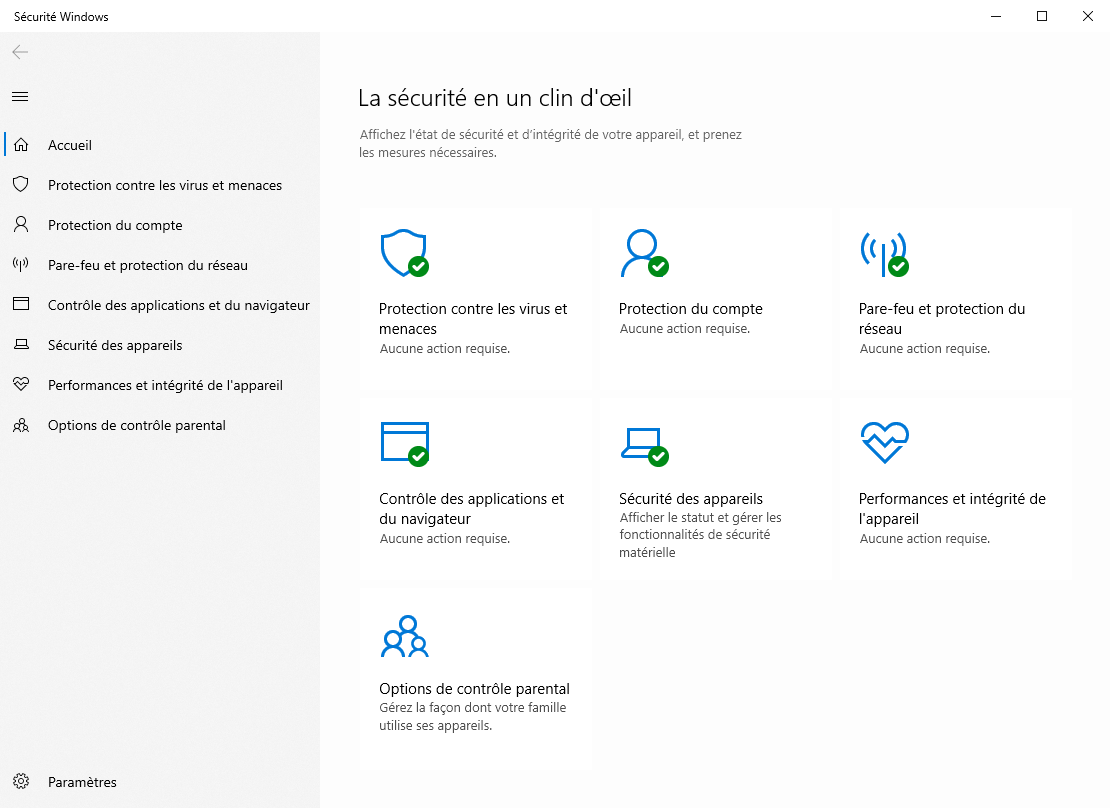
- The Microsoft Defender Security Center providing additional features similar to paid solutions. Windows Security gives access to Defender antivirus, the corresponding firewall, and parental controls. It also offers the SmartScreen feature that protects web browsers Edge and Chrome from malicious websites and downloads via the Microsoft Defender Browser Protection extension.
Note: The antivirus is still maintained on Windows 7 until 2023. It is important to note that Microsoft Defender on Windows 7 can only address spyware; for full protection, a separate antivirus is recommended.
Is Microsoft Defender an effective protection for your PC?
Assessing an antivirus’s effectiveness also means adopting good online habits. In daily use, it’s important to verify the source of each site, download files only from trusted, secure websites, and always complete online payments over a secure connection. Despite best efforts, phishing attempts and some attacks remain hard to avoid.
To evaluate the relevance of Microsoft Defender and its effectiveness against online threats, we chose to compare results from three security labs—AV-TEST, AV-Comparatives, and SE Labs—and analyze the antivirus from three angles:
- Threat detection: After years of competition, Defender has shown solid results across all three tests, matching or exceeding some free antivirus offerings on samples of malicious URLs and malware-infected files. Unsurprisingly, its detection rates remain below those of paid solutions.
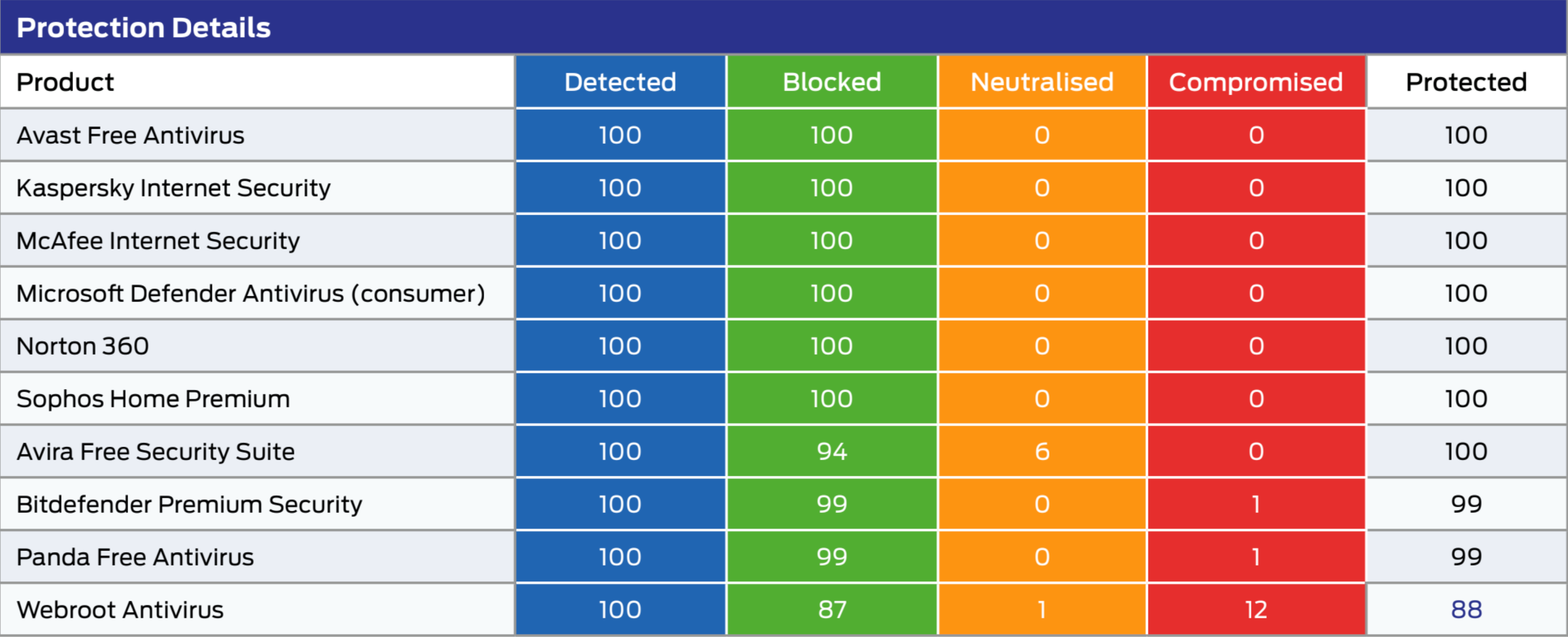
- The false positives rate: Defender registers a slightly higher-than-average number of false positives, warning users that files are malicious when they are not. If the rate is high in some scans, these false alarms affect only a small portion of users.
- Impact on performance: the caveat of Windows Defender remains early 2023. Despite improvements, the antivirus lags behind the average, sometimes ranking last out of 17 in performance tests, and showing noticeable impact during tasks like extracting files or installing programs.
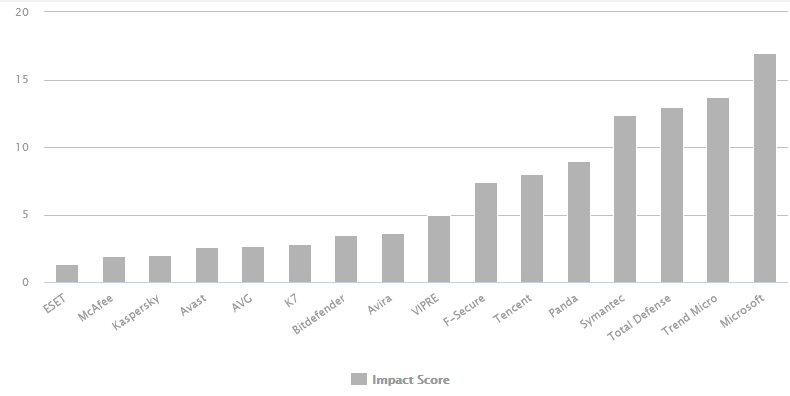
If you want more detailed information about these tests, read our article “Is Microsoft Defender sufficient to protect my PC?”.
How does the Microsoft Defender Security Center work?
To satisfy other antivirus vendors and to please the general public, the built-in Defender antivirus in Windows 10 and 11 has significantly advanced in threat detection. It has also surrounded itself with several protection modules and offers, in addition to its antivirus, many online safety tools, notably via the Microsoft Defender Security Center.
- Real-time protection against viruses and threats is at the core of Defender. It guards against viruses, exploits, ransomware, and all sorts of malware, whether on the web or in emails. When a threat is detected, it is automatically blocked and placed in quarantine by the antivirus.
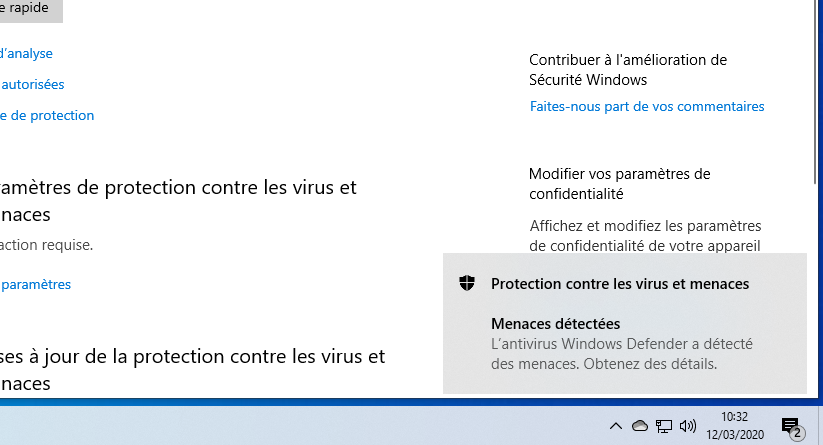
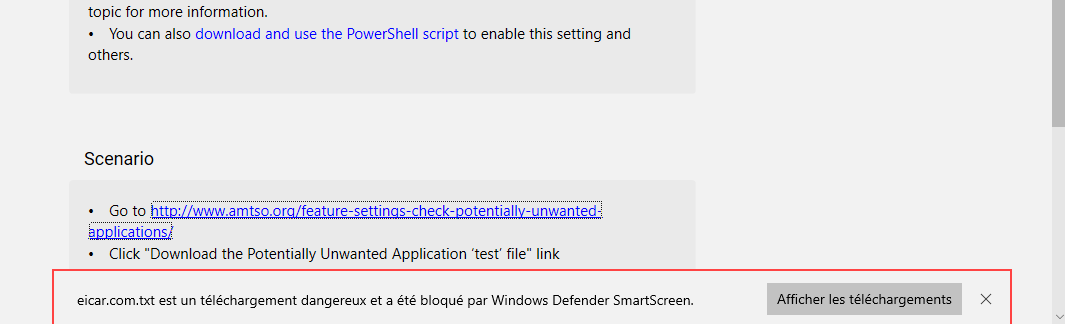
- The SmartScreen phishing protection is enabled by default and analyzes fraudulent websites and downloaded malicious files. When a contaminated file is downloaded, it is blocked and quarantined automatically. A notification provides more details about the threat. However, protection is available only with the Edge browser or via Chrome with the Microsoft Defender Browser Protection extension.
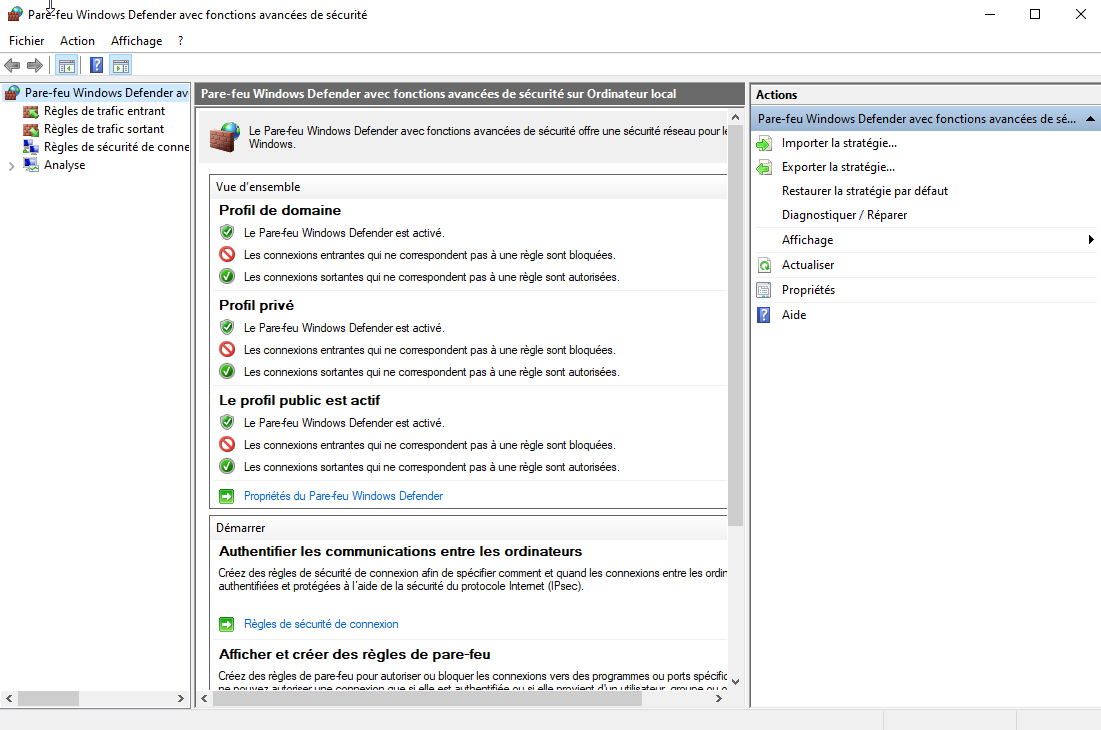
- The built-in firewall is also integrated and enabled by default, helping shield your computer from malicious intrusion attempts on both public and private networks. It monitors inbound and outbound connections and allows trusted applications to connect online.
- A parental control module allows you to create a family group and set web protection for children, by monitoring digital activity and sites visited.
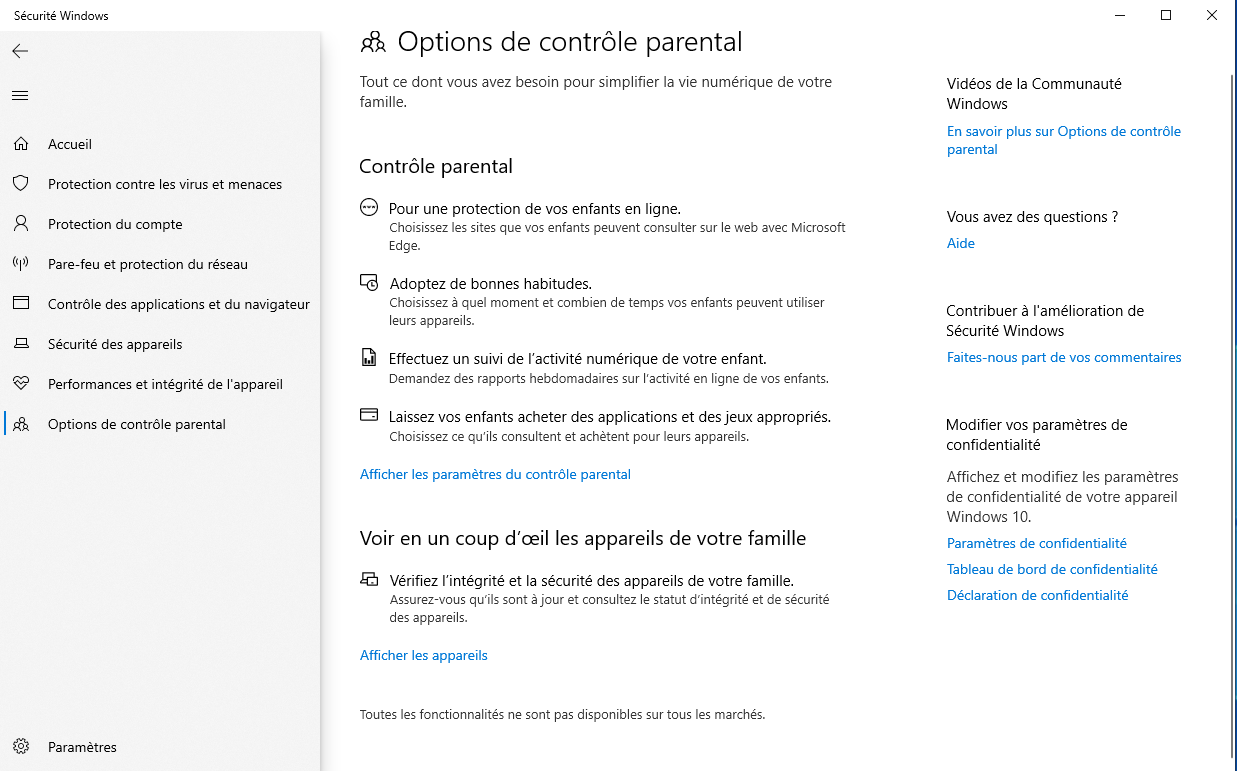
- Additional modules to monitor device integrity and performance or to ensure your Microsoft account remains protected.
What are the features of Microsoft Defender?
Once inside the Microsoft Defender panel in Windows 10 or 11, you can access the various protection features and modules. For more details, read our guide on configuring Microsoft Defender.
Here are the main functions of Microsoft Defender in Windows 10 and 11:
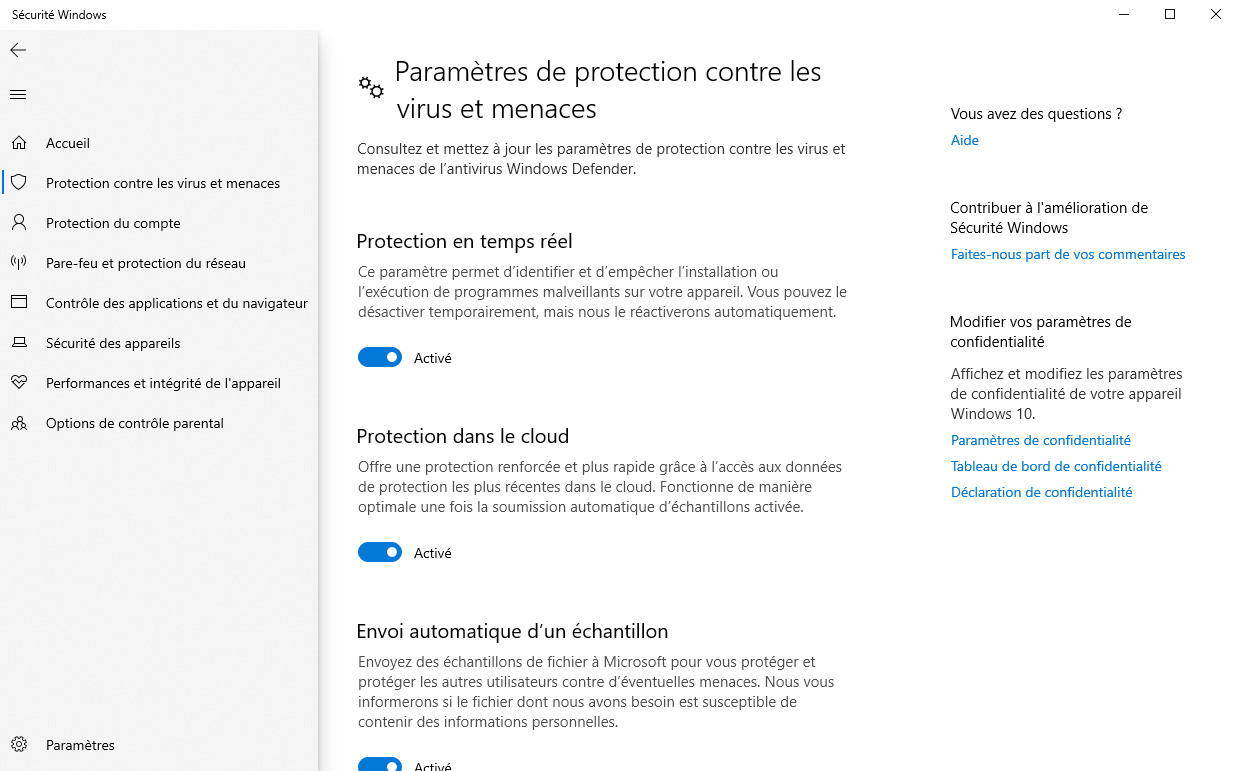
- Defender includes several protection modules (accessible via the Microsoft Defender menu by clicking “Manage settings”) including a real-time protection component, enhanced protection using cloud-based data, and a tool to counter tampering.
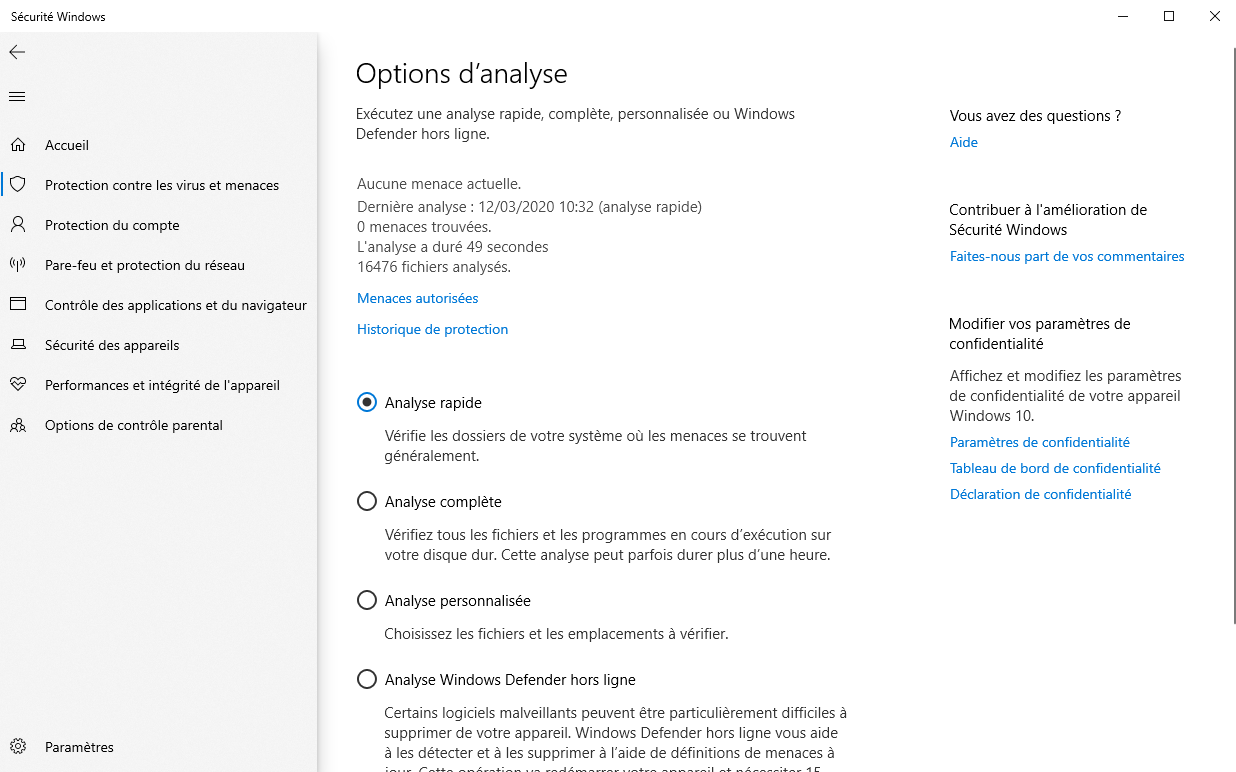
- Various antivirus scans are available: the “quick” scan targets the most vulnerable items, the “full” scan reviews the entire system, the “custom” scan runs according to your needs and drives, and there is also an “offline” scan that checks the PC at startup (restart required).
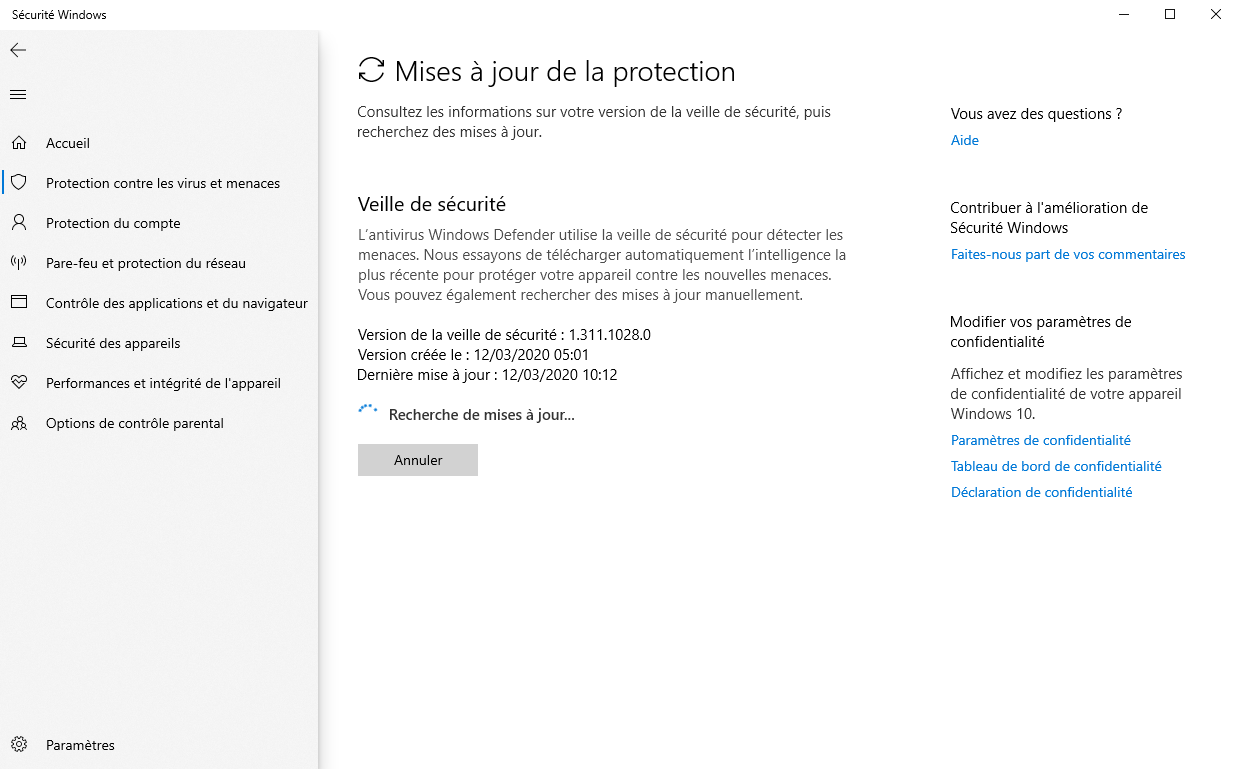
- Security intelligence updates ensure that the Microsoft Defender antivirus benefits from the latest signatures to counter the most recent online threats.
- One of Defender’s standout features is its ransomware-fighting tool. It allows you to designate folders to protect from any malicious modification and to safeguard your files by storing them in your OneDrive cloud storage.
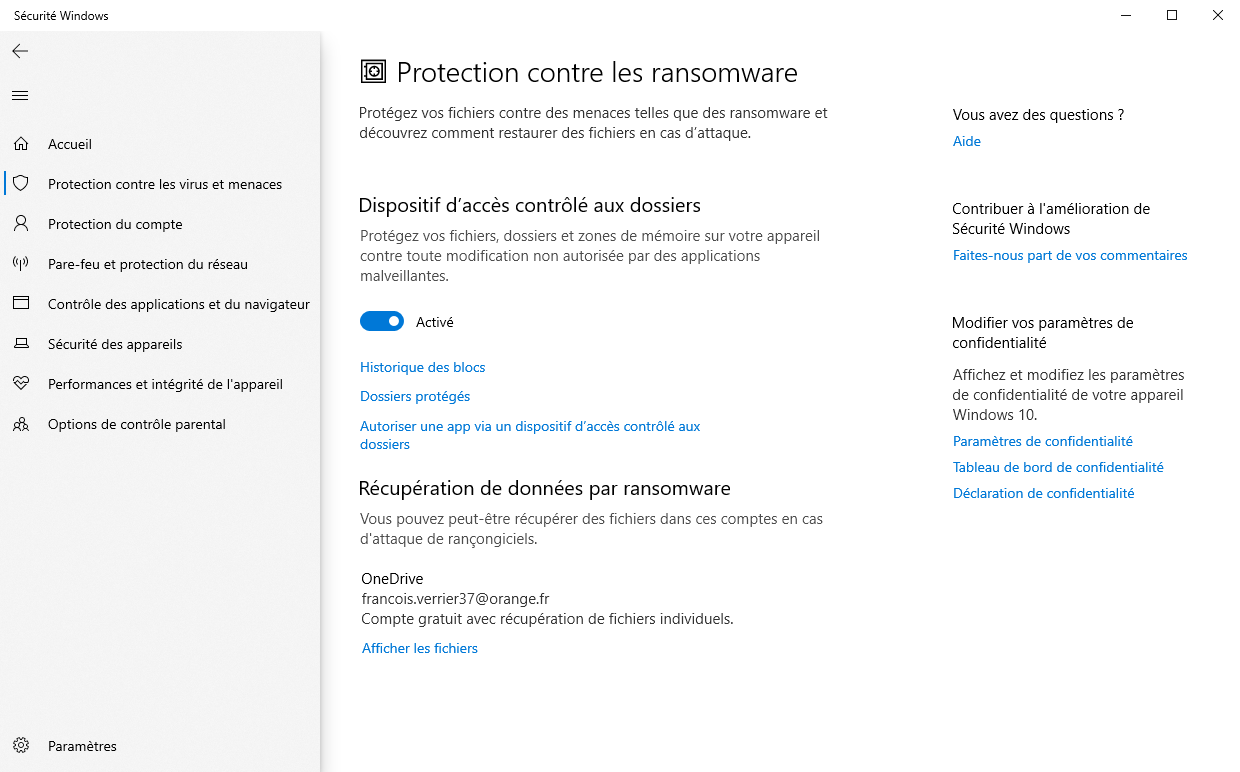
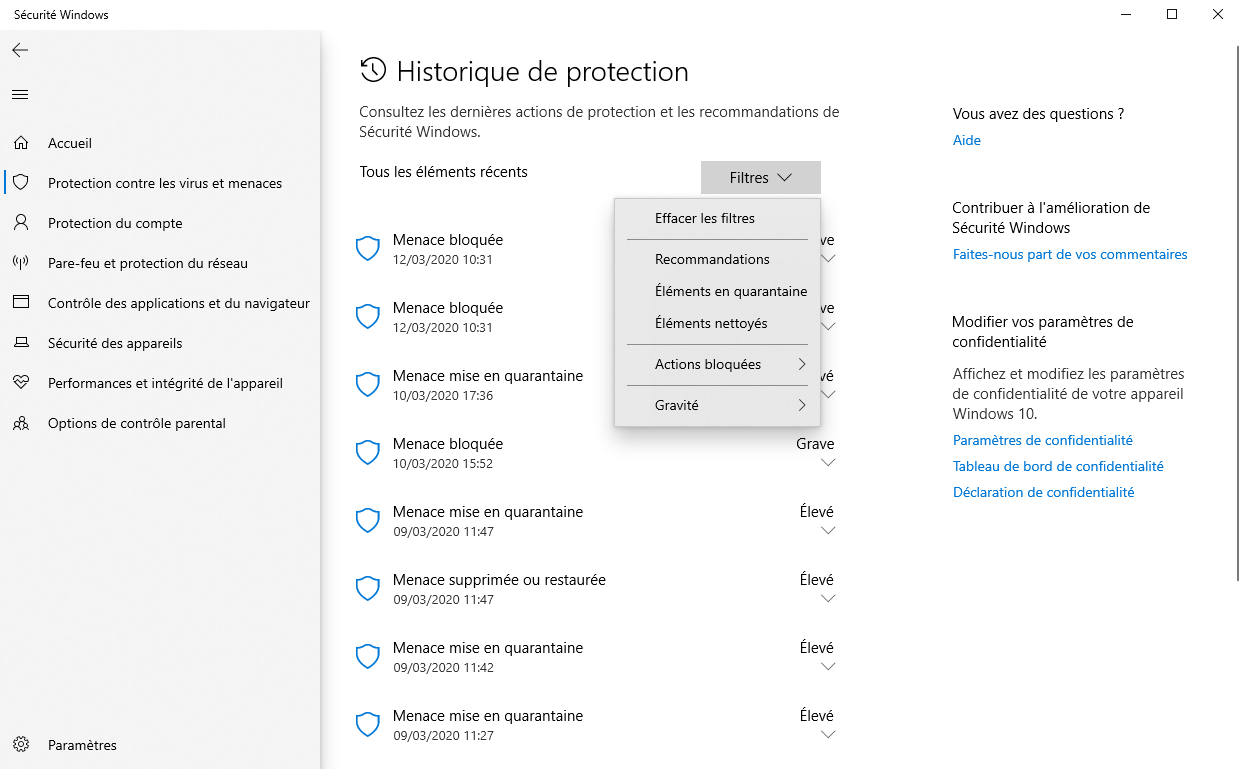
- Defender also provides a complete protection history of previous scans and quarantined or cleaned files. Information about the severity of each threat and safety recommendations are available.
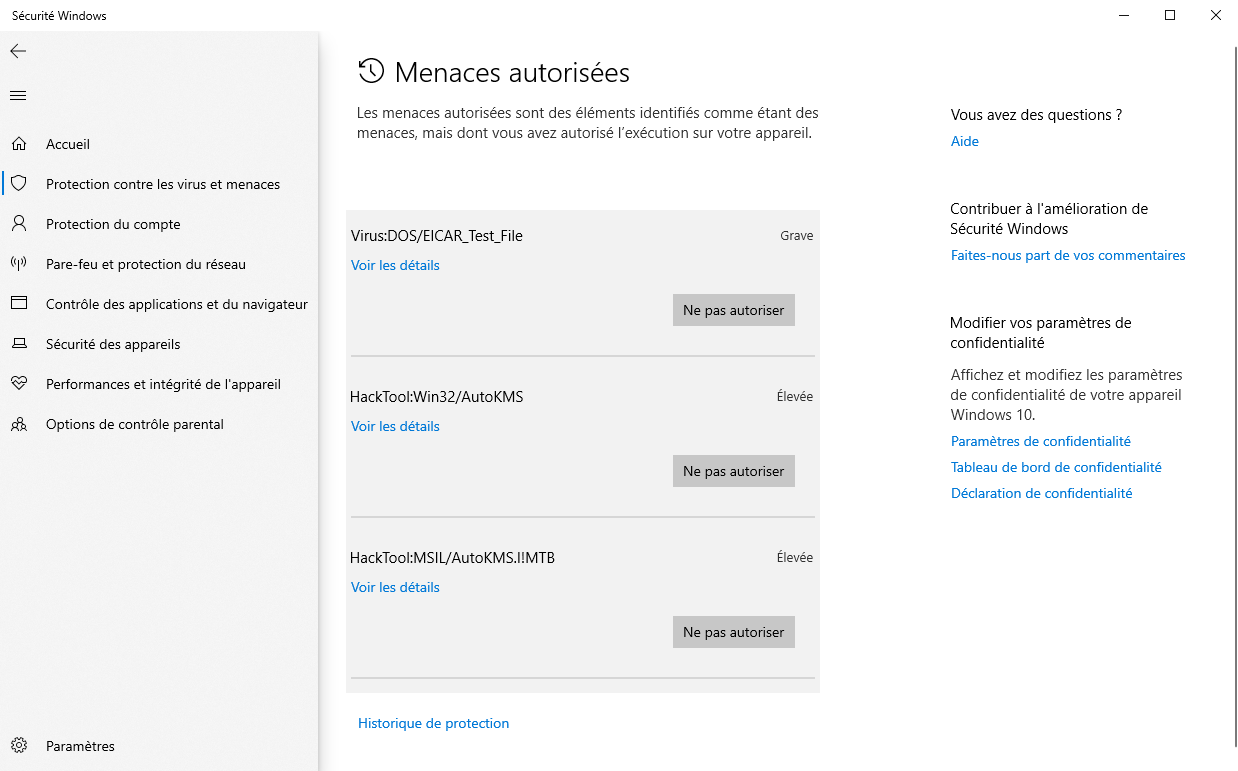
- Defender tends to show a relatively high rate of false positives, which enables you to add exclusions via the “Allowed threats” menu. Items Defender flags as threats can be manually allowed to run on the computer.
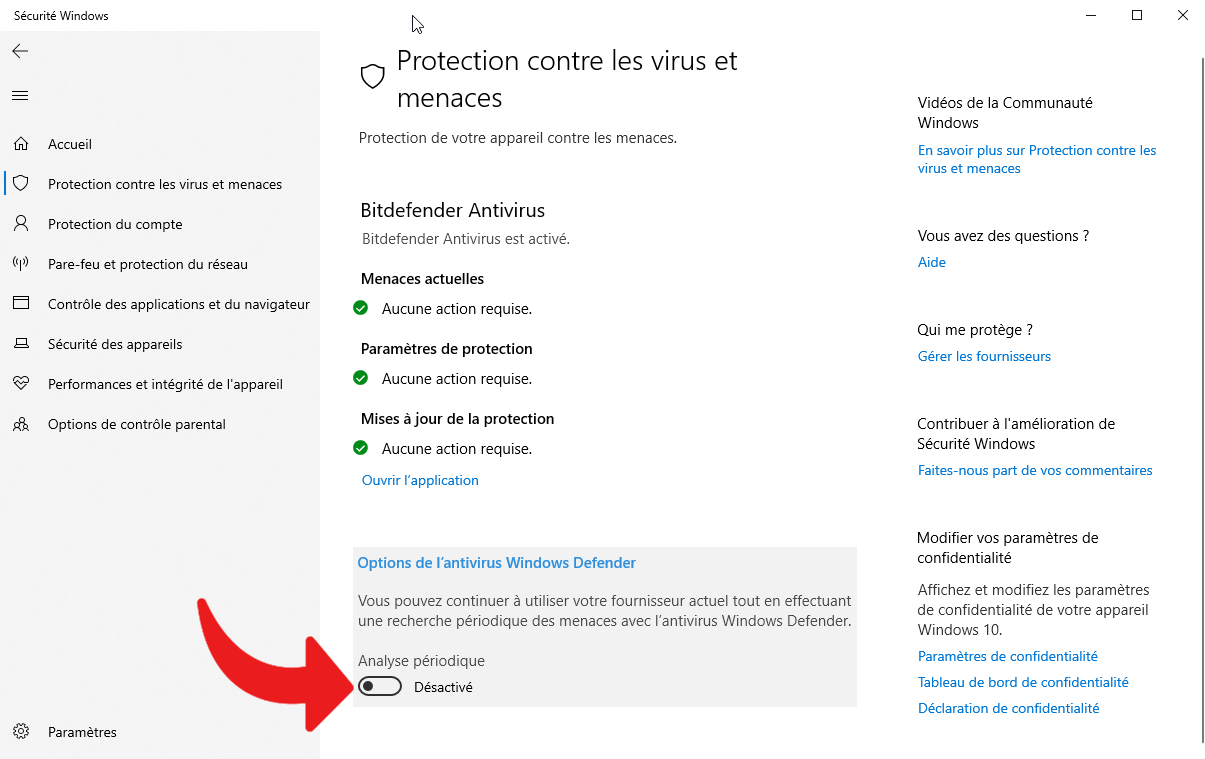
- Microsoft Defender can also be used alongside another antivirus. If it automatically disables when a third-party antivirus is installed, Defender’s protection modules can be activated and run in parallel. This may, however, impact system performance. To do this, open the main Microsoft Defender menu, select “Microsoft Defender Antivirus options” and toggle the switch to enable periodic scanning.
In what context should you deactivate Microsoft Defender?
Depending on the situation, it may be necessary to temporarily or permanently deactivate Microsoft Defender if you no longer want it or if it restricts certain activities too much.
Indeed, temporary deactivation helps avoid potential conflicts between Microsoft’s antivirus and other applications, notably in cases of false positives. It can also be convenient to limit the resource impact on system performance, which is helpful during gaming or work sessions. Temporary deactivation enables certain actions or the execution of a program that is usually blocked by Defender.
In other cases, it may be worth permanently silencing Microsoft Defender. The simplest method is to install another third-party antivirus that takes over Defender by automatically disabling it. Note that Windows Defender can also be activated alongside another antivirus.
However, this procedure is not permanent, and it is easy to re-enable Microsoft Defender to regain real-time protection and Windows security modules.
The antivirus built into Windows 10 and 11 continues to evolve, surprising users with improved defensive capabilities. No download is required; it’s pre-installed! Thanks to a cloud-based, real-time signature database and proactive detection via AI and machine learning, it now stands on par with the best market antivirus options. The Windows Defender app is also available for free to protect mobile devices running Android and iOS.
- Moteur de détection de dernière génération efficace et discret
- Intégration dans Windows 10 et Windows 11
- Pare-feu
- Contrôle parental
- Limited to Windows 10 and Windows 11
- Anti-phishing compatible uniquement avec Edge et Chrome
- Peut ralentir certains téléchargements
No free antivirus is as good in every aspect; Defender remains a solid choice among free options, particularly for Windows users who want built-in protection without extra software. Its all-in-one approach is convenient and reliable for many common threats.
How does Microsoft Defender compare with other protection tools?
Microsoft’s built-in antivirus continues to improve, and there’s no need to download anything extra to use it. It comes pre-installed and, with cloud-based, real-time signature updates and proactive AI-based detection, it now competes with top-rated antiviruses. The Defender app is also freely available to protect Android and iOS devices.
- Efficient, discreet, next-generation detection engine
- Integration with Windows 10 and 11
- Firewall
- Parental control
- Limitée à Windows 10 et Windows 11
- Anti-phishing compatible only with Edge and Chrome
- May slow down some downloads
Other than its cloud-based intelligence, Defender also shines in its native integration, simplifying protection for Windows users without needing extra software. It’s a convenient, reliable option for those who want a seamless, integrated security solution.
Comparing Defender’s performance in AV tests
In testing, Defender’s detection rates have shown strength across AV-TEST and AV-Comparatives, though there are nuances to consider when comparing to paid software. Real-world performance depends on usage patterns and system configuration.
- In case you want more details on these tests, read our article “Is Microsoft Defender enough to protect my PC?”
How does the Microsoft Defender Security Center operate?
Beyond rival antivirus companies, the Defender solution that’s built into Windows 10 and 11 has clearly progressed in its ability to detect online threats. It has also developed several protection modules and offers numerous online safety tools via the Microsoft Defender Security Center.
- Real-time virus and threat protection is the core component of Defender. It protects against viruses, exploits, ransomware, and all forms of malware, whether on the web or in emails. When a threat is detected, it is automatically blocked and placed in quarantine by the antivirus.
- Phishing protection with SmartScreen is enabled by default and analyzes fraudulent websites and downloaded files. If a file is found to be malicious, it is blocked and quarantined automatically. A notification provides more details on the threat. Yet, protection is available only for Edge, or for Chrome via the Microsoft Defender Browser Protection extension.
- The built-in firewall is also integrated and active by default, shielding your device from malicious intrusion attempts on public or private networks. It monitors inbound and outbound connections and allows a trusted application to connect online.
- A parental control module to create a family group and define web protections for children, thanks to activity tracking and visited sites.
- Additional modules to monitor device integrity and performance or to secure a Microsoft account.
What are the features of Microsoft Defender?
Once inside the Microsoft Defender menu in Windows 10 or Windows 11, you can access the various protection tools and modules. For more details, read our guide on configuring Microsoft Defender.
Here are the main Defender functions in Windows 10 and 11:
- Defender includes multiple protection modules (accessible from the Defender menu under “Manage Microsoft Defender settings”) including a real-time protection module, enhanced cloud-based protection, and a tamper-detection tool.
- Different antivirus scans are available: the “quick” scan targets the most vulnerable elements, the “full” scan scrutinizes the entire system, the “custom” scan runs according to needs and drives, and there is also an “offline” scan that checks the PC at startup (requires a reboot).
- Security intelligence updates ensure that the Defender antivirus benefits from the latest signatures to counter the latest online threats.
- One distinctive Defender feature is its ransomware-fighting tool. It allows you to designate folders to protect against tampering and to safeguard your files by storing them in the cloud storage space provided by OneDrive.
- Defender also maintains a complete protection history of past scans and quarantined or cleaned files. It provides information on the severity of each threat and security recommendations.
- Defender tends to recognize a number of false positives, allowing users to add exclusions via the “Allowed threats” menu. Elements Defender marks as threats can be manually permitted to run on the computer.
- Microsoft Defender can also be used alongside another antivirus. If it automatically disables when a third-party antivirus is installed, Defender’s protection modules can be activated and operate in parallel. This might affect system performance. To enable, go to the main Defender menu, select “Microsoft Defender Antivirus options,” and toggle the periodic scanning setting.

Daniel Brooks
I cover everyday products with a practical eye, from kitchen tools and home essentials to smart gadgets and consumer trends. My goal is to help readers understand what is genuinely useful, what is worth the price, and what deserves a second look before buying.