Microsoft OneDrive Review 2026: Windows and Office Integration

October 6, 2026
Tech

Despite mixed opinions, OneDrive remains Microsoft’s well-known service. By integrating the online office tools and Outlook, it fosters collaborative work. But is it still among the leaders of online storage services in 2026?

Microsoft OneDrive
  • mood5 Go of free storage
  • upload250 Go upload limit
  • home_pinServers in Europe
8 / 10

Try Microsoft OneDrive now!

Prise en main, fonctionnalités, infrastructure, sécurité, synchronisation, sauvegarde… retrouvez notre protocole de test détaillé pour les services de stockage en ligne.

In an increasingly competitive market, while OneDrive benefits from major advantages such as its default integration for all Windows users, 5 GB of free online storage, and full integration with the Office 365 suite, OneDrive struggles to rival online storage giants like Google Drive, Dropbox, iCloud, or MEGA.

Being among the market’s most popular and being tied to Microsoft are not enough to dominate as a leader, a lesson OneDrive seems to have learned. The Copilot integration, Microsoft’s AI assistant, has added a new dimension: it becomes possible to search files semantically, generate automatic summaries of documents, or organize photo albums by facial recognition and thematic suggestions. These advances mark OneDrive’s shift, now designed as a digital companion, beyond mere storage.

Microsoft OneDrive - Interface utilisateur - @ Microsoft

Microsoft OneDrive – Interface utilisateur – @ Microsoft

Microsoft OneDrive : Key Points to Remember

  • Preinstalled on Windows 11 and integrated with Word, Excel, OneDrive is already integrated into Windows 11 and with Microsoft 365 applications: it’s therefore a natural choice for users within this ecosystem.
  • The free offer is limited to 5 GB, not enough for a large photo library, with a Vault limited to 3 files.
  • The real value comes from Microsoft 365: 1 TB for €99/year for Personal, or 6 TB for six people at €129/year, with Office included.
  • Copilot adds AI features to summarize, compare, and search within your files.
  • On the privacy side, AES-256 encryption is strong, but Microsoft holds the keys: not zero-knowledge encryption.
  • Finally, watch out for automatic backup of Desktop, Documents and Pictures, which can quickly saturate the 5 GB free limit.

Overview of Microsoft OneDrive

Having successively borne names such as Windows Live Folders, Windows Live SkyDrive, and SkyDrive, Microsoft OneDrive is a cloud storage solution. Launched in 2007, five years ahead of Google Drive, it counts among the pioneers in the field.

OneDrive users can host a wide variety of documents (images, presentations, emails, professional files, etc.). They can also edit (photos) and organize them into folders. This cloud storage supports content sharing, online collaboration, and productivity. It can suit both a business and a personal need.
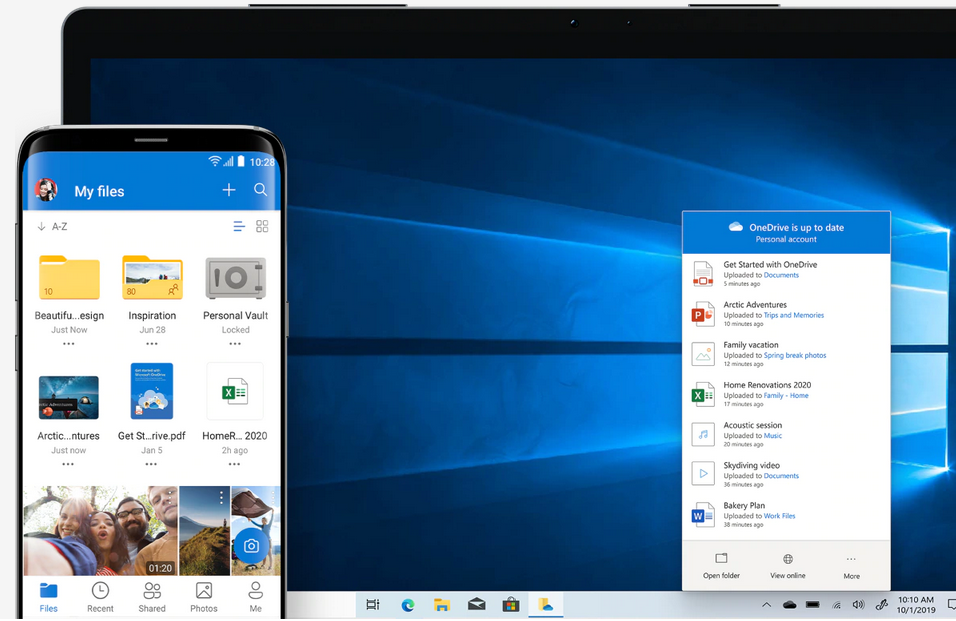
Microsoft OneDrive - Interface pc et mobile - @ Microsoft

Microsoft OneDrive – Interface pc et mobile – @ Microsoft

Natively included in Windows, Microsoft OneDrive has been integrated into the Microsoft 365 office suite and Windows 11. It is also linked to Microsoft Teams. It also connects to Outlook, where attachments can be saved directly.

OneDrive can be accessed in several ways:

  • Directly on your computer’s desktop (Windows, Mac – app to download);
  • Online application;
  • On the dedicated OneDrive app, available for free download, in iOS and Android versions. It is rated 4.6/5 on the App Store and 4.5/5 on Google Play.
  • On Xbox;
  • It is also possible to send OneDrive documents to Kindle.

What are the OneDrive updates?

OneDrive has undergone notable evolutions in recent weeks:

  • A new synchronization engine has been rolled out since late August 2026. Initial sync is faster, the processor is less taxed, and folders appear directly in Finder. Nothing changes for On‑Demand files.
  • Microsoft has removed PC-to-PC migration from Windows Backup, which transferred files and settings over the local network. The focus is now on OneDrive backup. It’s a pity that the free offer tops at 5 GB: it’s quickly limiting.

Who is OneDrive for?

OneDrive adapts to very different profiles, which partly explains its ubiquity. Here is who it best suits.

Windows users and Microsoft 365 subscribers: this is where OneDrive shines the most. Preinstalled on Windows 11, it’s available without any installation or setup. If you use Word, Excel, or PowerPoint daily, OneDrive integrates seamlessly into your work environment.

Families: the Microsoft 365 Family plan lets up to six people have 1 TB of personal storage each, at a very competitive shared monthly price. Each member retains a private space and gains access to all Office applications.

Students and teachers: thanks to the LTI app, OneDrive can be integrated with an LMS. Real-time collaboration on Office documents makes group work, assignment submission, and the review of shared documents easier.

Professionals and SMEs: paired with Microsoft Teams and SharePoint, OneDrive for Business provides centralized team file management, granular access control, and compliance suitable for regulated environments. More than 75% of Fortune 500 companies use it.

However, OneDrive is less suited if you seek end-to-end encryption (see our security section), if you mainly work on Linux (no official app), or if you share few files outside the Microsoft ecosystem and prefer an independent solution like pCloud or Proton Drive.

Is there a free plan for Microsoft OneDrive?

Previously generous, the free offering of Microsoft OneDrive has been significantly reduced to 5 GB of storage space.

Free features and limits

It is indeed possible to access OneDrive for free. To do this, simply sign up for the service. You then get 5 GB of cloud storage, included in the Basic plan to start storing your documents.

Note that this offering has progressively diminished over the years. In 2012, users enjoyed 15 GB of storage and a “Gallery” bonus granting up to 15 GB more for online image storage. In 2015, Microsoft reduced the space to the current 5 GB, despite user protests.
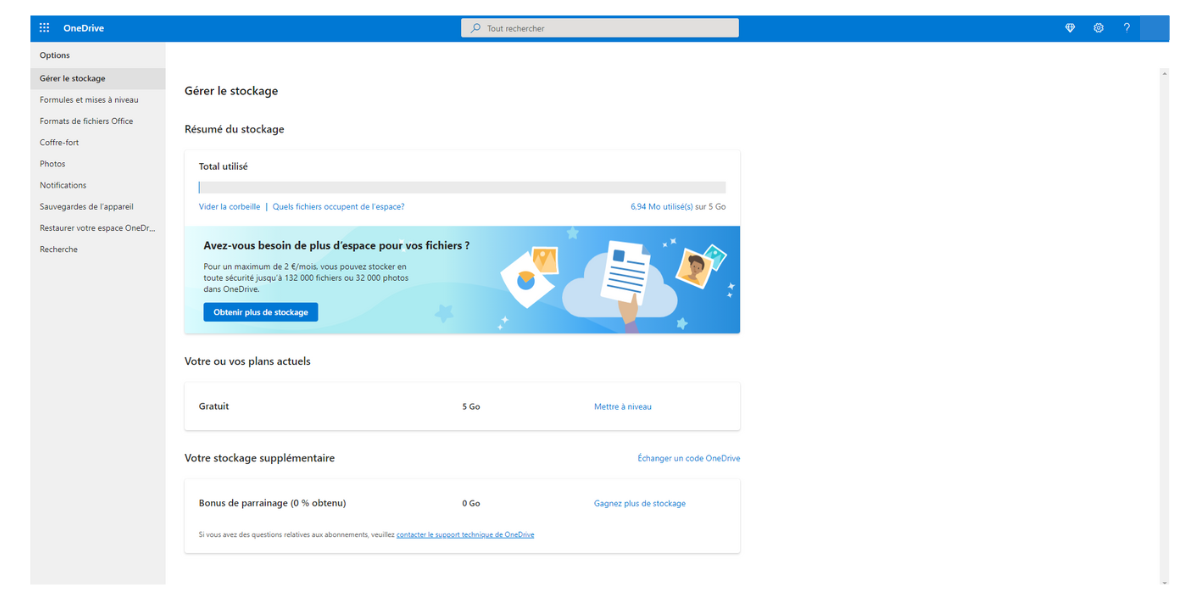
Microsoft OneDrive - Offre 5 Go gratuite - @ Clubic

Microsoft OneDrive – Offer 5 Go free – @ Clubic

A paid OneDrive subscription includes Word, Excel, PowerPoint and Outlook. Opting for the basic version gives access to these tools online only. Features are also limited:

  • Security: the vault can hold only 3 files. You cannot create password-protected links or expiration dates, nor restore older documents. Ransomware protection is reserved for subscribers; free accounts only get an initial alert and a first restore.
  • Productivity: scanning multipage documents has limited sharing capabilities.

Other than that, free options approach those of a paid subscription. Indeed, you can:

  • Sync files between the cloud and a PC or Mac;
  • Use the service via the free iOS or Android app;
  • Search by date or keyword;
  • Share and edit files from anywhere;
  • Collaborate in real-time, etc.

How does the free offer compare to competitors?

The cloud storage market is vast, with new players continually entering with increasingly attractive offers. Still, the three giants remain Microsoft OneDrive, Google Drive, and Dropbox.

Here is what competitors offer for free:

  • 5 to 15 GB with Google Drive;
  • 2 GB for Dropbox.

Other services also offer compelling free tiers. Notably, pCloud offers up to 10 GB, and Mega, though more controversial, provides 20 GB of free storage in its base plan.

Sync and backup: how to stay in control

Data added to OneDrive automatically syncs with the cloud. On Windows, the solution goes further: it can manage the user’s personal folders.

Files On-Demand

Enabled by default, the Files On-Demand feature shows the entire cloud in Explorer without downloading it: a file is stored on the PC only when opened. A right-click lets you choose “Always keep on this device” for offline access, or “Free up space” without deleting from the cloud.

Choosing which folders to sync

Open OneDrive settings, then the Account tab, and choose “Choose folders.” Unselected folders disappear from the computer but remain online. Only complaint: Documents, Desktop, Pictures, and the Vault cannot be unchecked here.

Back up PC folders

OneDrive can redirect Desktop, Documents, Pictures, Music and Videos to the cloud. Convenient, but heavy: these items count toward the quota and quickly fill the free 5 GB. Manage the feature from the Synchronization and backup tab, then Manage backup. Disabling a folder lets you decide whether to keep files only in OneDrive or only on the PC.

Pause or quit OneDrive

Right-click the OneDrive icon to pause synchronization for 2, 8, or 24 hours. To stop it completely, choose “Remove link to this PC” in the Accounts tab, or uninstall the app: files remain accessible on onedrive.com.

The limits are as follows:

  • 250 GB per individual file;
  • Maximum path length of 260 characters.

A deletion applies to all devices: you have 30 days to recover the item from the Recycle Bin (93 days with a business account).

Sharing and collaboration

OneDrive is a solid solution for backing up files and viewing them on other devices (notably mobile). It can be used to share items for viewing or collaboration.

How to share a file? A folder?

Microsoft OneDrive - Partage et collaboration - @ Clubic

Microsoft OneDrive – Partage et collaboration – @ Clubic

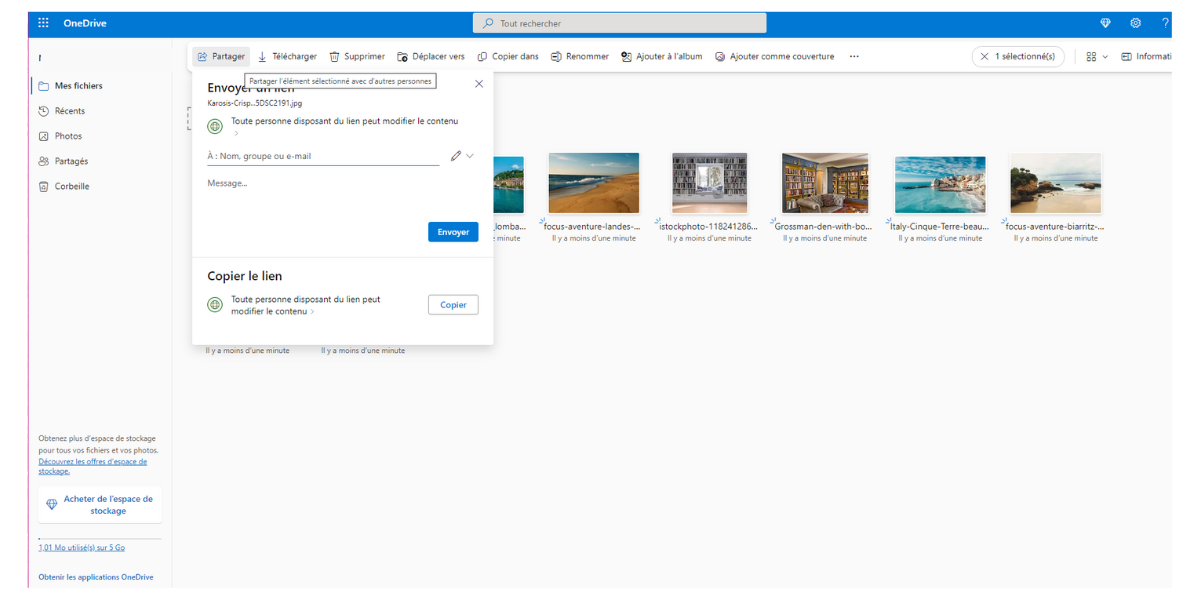
Here is how to share a document/folder on Microsoft OneDrive:

  • Go to your storage space and select the file(s).
  • Choose the “Share” option, available at the top of the screen.
  • If needed, set the sharing parameters by clicking on “Anyone with the link can edit the content.” You can decide whether editing is allowed.
  • Enter the name or email of the people with whom you want to share the file.

You can also copy the link provided by the software and paste it into an email, SMS, etc. Recently OneDrive added the ability to mention people (@mention).

How to make a file public?

Microsoft OneDrive - Comment rendre un fichier public - @ Clubic

Microsoft OneDrive – How to make a file public – @ Clubic

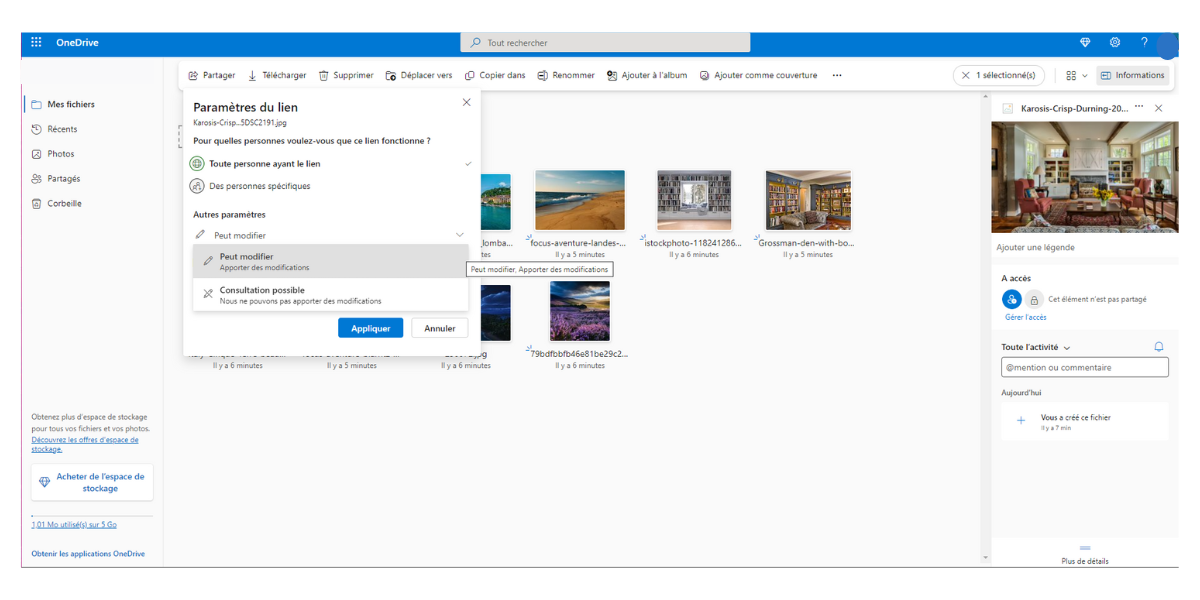
The sharing feature in OneDrive lets you manage access permissions for a file. Just click on “Anyone with the link can edit” to modify these settings. You have several choices:

  • Anyone with the link;
  • Specific people.

By choosing the first option, the document becomes accessible to anyone who has the link.

Note that Microsoft completely overhauled its sharing system in 2025 with the introduction of Hero Link. Marketed as the biggest sharing update in OneDrive in ten years, this single, permanent per-file link replaces the multiplication of time-limited links.

Practically: there is no longer a need to generate a new link to change access permissions. The URL remains the same, and the rights (read, edit, access duration) are managed directly from the sharing pane, at any time. The operation now mirrors Google Docs.

How does Microsoft OneDrive integrate with work tools?

OneDrive suits both personal and professional use. Included in Office 365 and Teams, this solution can very well meet the needs of a teacher or a business. Proof: the software is used by more than three-quarters of Fortune 500 companies. It is therefore possible to:

  • Host files in a OneDrive for Business space;
  • Store them on OneDrive via a SharePoint team site;
  • Integrate OneDrive with an LMS for course needs.

Since October 2025, a new integration is available for Microsoft 365 Copilot license holders: the AI assistant is now accessible directly from Windows File Explorer and the OneDrive Activity Center. Without opening a document, you can ask it for a summary, an automatically generated FAQ, a comparison between two versions of a file, or questions about the content, provided the file is saved in OneDrive.

Media support

The Microsoft OneDrive cloud service supports more than 300 file types and documents (PDF, JPEG, DOCX, etc.). The photo and video management experience is particularly appreciated by users.

Upload of smartphone photos automatically

It is possible to automatically back up photos from a smartphone to OneDrive. To do this, enable the “Camera Upload” option available in the app settings. On iPhone, the upload runs in the background as long as you do not force-quit the app and are not in Low Power Mode.

Over time, Microsoft has refined the synchronization options and allows users to view offline files on their phones, even when there is no network. The app also automatically tags images and groups similar items.

Microsoft OneDrive - Tri intelligent des fichiers similaires - @ Clubic

Microsoft OneDrive – Tri intelligent des fichiers similaires – @ Clubic

Smart features allow sorting and retrieving images by detected people or contexts, and also creating customized albums or slideshows. On mobile, several assisted editing tools (retouching, automatic filters, animated generation) are now available. The new “Moments” tab highlights user memories, following Google Photos’ approach.

Microsoft is currently working on a new OneDrive app for Windows 11 that emphasizes photos and a facial recognition system.

An online gallery for your photos

Within OneDrive’s online interface, stored videos and photos are organized by source. They can be grouped into albums and are displayed as thumbnails. There are many options:

  • You can view images in full screen, scroll through them, and download them.
  • You can view EXIF data and add tags.
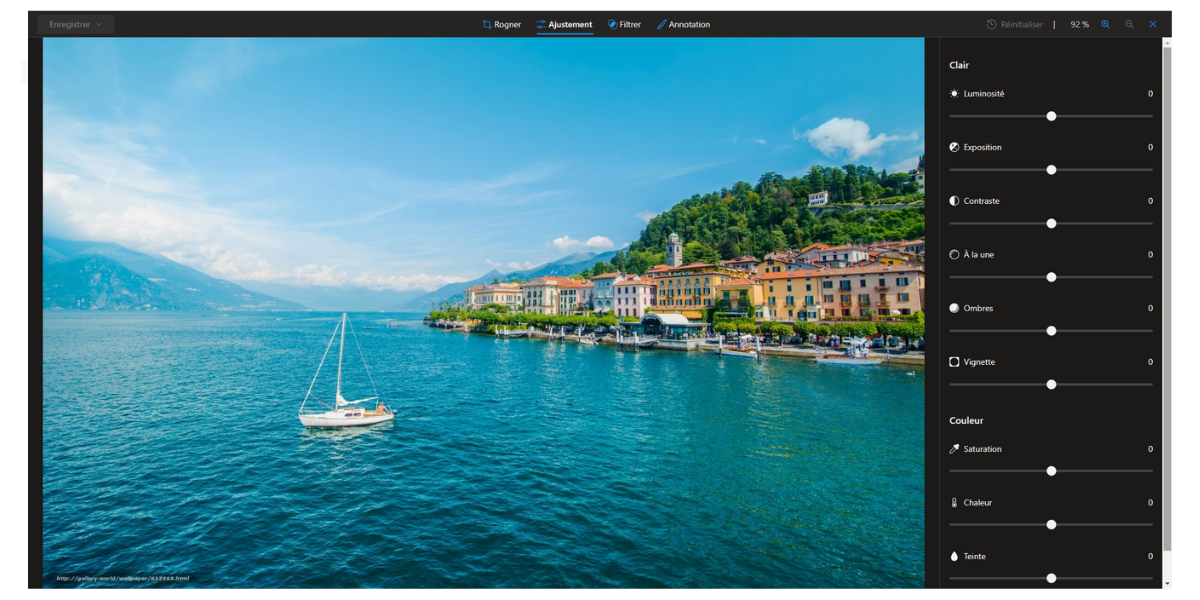
  • Recently, several editing options have been added: you can crop photos, apply filters, adjust brightness or colors, annotate, etc.

Microsoft OneDrive - Outils pour vos photos - @ Clubic

Microsoft OneDrive – Tools for your photos – @ Clubic

Video support

OneDrive supports numerous video formats such as AVI, MP4, MOV, and more. They can be viewed in an integrated player at various resolutions (from 240p to 1080p) or downloaded. You can view them fullscreen or cast to a connected TV.

OneDrive and AI: Copilot at the heart of the cloud

Since early 2025, Microsoft has deeply redirected OneDrive by integrating Copilot, its AI assistant. This shift goes beyond a simple feature add: it repositions OneDrive as an intelligent workspace, not just a folder of files. Here are the main functions:

  • Chat about the contents of files;
  • Semantic search of documents;
  • Analysis and synthesis of content;
  • Suggestions for improvements;
  • Comparisons of two or more files.

The different plans offered by Microsoft OneDrive

OneDrive is preinstalled on all Windows 11 PCs. The paid plans, offered as annual or monthly subscriptions and renewed automatically, start at a reasonable baseline price. While they are in the same ballpark as Google Drive, they struggle against the subscriptions offered by pCloud, Dropbox or MEGA. Here is a look at the different plans available.

Plans for individuals

Free Basic Personal Family Premium
Price incl. tax 0.00€ 20 €/year or 2 €/month 99 €/year or 10 €/month 129 €/year or 13 €/month 219 €/year or 22 €/month
Users 1 1 1 Up to 6 Up to 6
Cloud storage 5 Go 100 Go 1 To 1 To per person 1 To per person
Outlook mailbox 15 Go 100 Go 100 Go 100 Go per person 100 Go per person
Office Apps Web & Mobile Web & Mobile Desktop (5 devices) Desktop (5 devices per person) Desktop (5 devices per person)
Copilot Free version Free version Expanded usage Expanded usage (owner only) Expanded usage (owner only)
Ransomware protection ✗ ✓ ✓ ✓ ✓
Microsoft Defender ✗ ✗ ✓ ✓ ✓
Expandable storage ✗ ✗ Up to 10 To Up to 10 To Up to 10 To

Paid subscriptions unlock sharing links protected by password or expiration dates, as well as offline folders. Without a Personal or Family plan, the vault is limited to three files. Microsoft 365 Basic adds an ad-free mailbox and around‑the‑clock technical support.

In Family and Premium plans, Copilot features are reserved for the plan holder. Premium adds exclusive advanced features and agents capable of performing complex tasks, such as research reports. Finally, additional storage benefits only apply to the account that purchases it.

Additional storage

Microsoft 365 Personal, Family, Premium or Pro subscribers can add up to 10 To of storage. Only the main account holder can add storage. Basic and Free accounts are not eligible for this option.

Business plans

Beyond personal use, OneDrive offers a business variant integrated into Microsoft 365 for enterprises. These plans target small to medium-sized businesses up to 300 users. Larger groups fall under Microsoft 365 Enterprise.

  • SharePoint and Teams integration : OneDrive ties in with SharePoint to manage team document libraries, and with Teams to share and co-edit files in real time.
  • Sharing and security : administrators define sharing policies, both internally and externally. Links can be password protected or time-limited. Data is encrypted in transit and at rest, and deleted files remain recoverable for 93 days.
  • Storage and pricing : each user gets 1 To of storage. Plans start at €6.07 per user per month for Business Basic (web and mobile apps). Business Standard, which adds desktop apps and Copilot, costs €20.36. Unbundled versions without Teams are offered at reduced prices, from €4.67 per user per month.

Security and data privacy

On paper, OneDrive presents a solid security setup: AES-256 encryption for each stored file, TLS protocol for transfers, advanced physical protection of data centers, and two-factor authentication available via Microsoft Authenticator. But the real question many users ask is: are my data truly private, and where are they hosted?

Server location

If you’re subscribed to Microsoft 365 Personal, Family, or Enterprise, your data follow the Microsoft 365 residency rules by geographic region. France is among the regions eligible for Advanced Data Residency, a program that contractually guarantees certain data stays on national or European soil. Microsoft also commits via a GDPR-compliant Data Processing Addendum (DPA).

However, for free and Basic accounts, Microsoft does not explicitly specify the server location, which leaves room for doubt: this data could be hosted in the United States. Remember, this allows local authorities to access the information.

Two-factor authentication

Two-factor authentication isn’t compulsory for OneDrive. However, the option can be enabled in the user’s account settings.

You can also use the Microsoft Authenticator app for biometric sign-in.

Data encryption

Data transfers are protected by SSL/TLS. You can also protect information with a secret code.

AES-256 encryption is robust and real: each file is broken into blocks, encrypted with its own unique key. But Microsoft holds the master keys. This is not zero-knowledge encryption: technically, if a legal authority requested it, Microsoft could access your files. This is a limitation shared with Google Drive and Dropbox, but keep it in mind if you store highly sensitive documents.

In case of an attack, Microsoft warns paying account users and invites them to change their passwords (within 30 days). They can also restore affected files.

MotW tag

From January 2026, an additional security measure was deployed: email attachments saved to OneDrive from Outlook now automatically receive the MotW (Mark of the Web) security tag. This tag activates Windows Protected Mode on file opening, reducing the risk of executing malicious code from cloud attachments.

Vault

OneDrive offers enhanced security for highly sensitive files: the Personal Vault. It’s a secluded folder within your OneDrive space, accessible only after a secondary authentication. To access the Vault, the user must use 2FA. If inactive, the vault automatically locks after a configurable period.

The main limitation to note: with a free subscription, the Vault can contain only 3 files. For unrestricted use, a Microsoft 365 Personal or Family plan is required.

Help and user support

Microsoft provides extensive resources to help users get the most out of OneDrive and the various apps included in the Microsoft 365 offering.

Is there a FAQ available?

Redmond offers a comprehensive FAQ to help users master its cloud storage solution. Exhaustive, it contains tutorials in text and video and is organized into several subsections:

  • Getting started;
  • Files;
  • Sharing and collaboration;
  • Syncing;
  • Mobile and Mac;
  • Storage and accounts;
  • Troubleshooting.

How to contact user support?

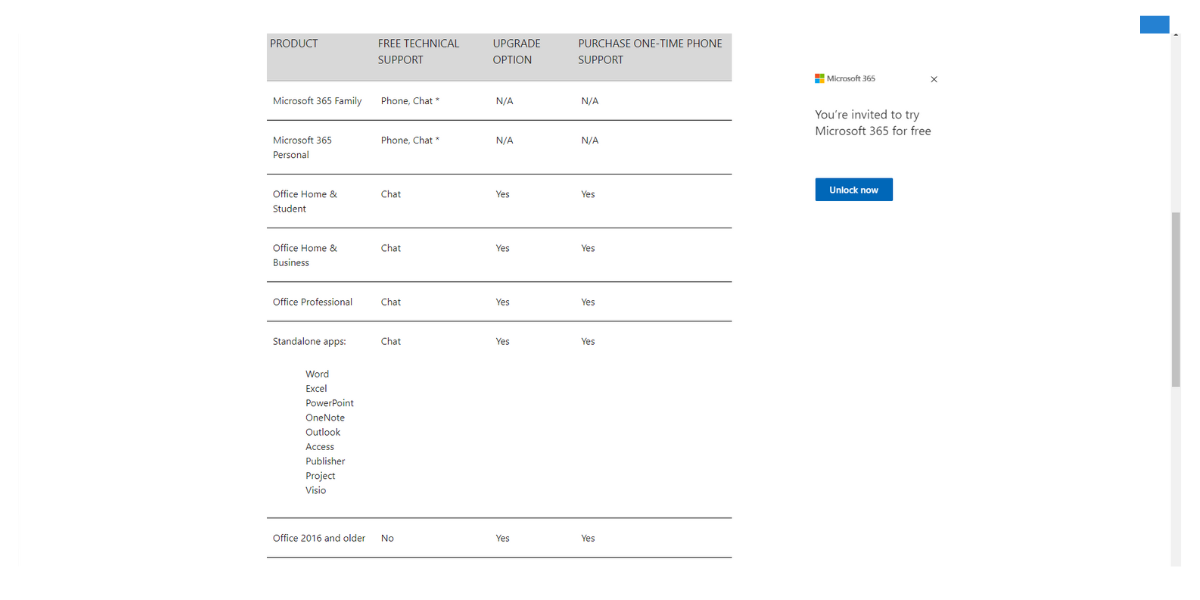
The help page allows you to contact Microsoft support via chat directly in your browser. A form is provided beforehand to specify the problem context. You also have a tool to search articles within the Microsoft site.

Depending on the services used, you don’t access the same type of support. Paying subscribers can, for example, contact the team by phone.

Microsoft OneDrive - Support client - @ Microsoft

Microsoft OneDrive – Support client – @ Microsoft

OneDrive versus the competition

To help you choose the solution best suited to your needs, here is a direct comparison of Microsoft OneDrive with its main competitors (Google Drive, Dropbox, and pCloud) on the most important criteria.

Criterion OneDrive Google Drive Dropbox pCloud
Free storage 5 Go 15 Go 2 Go 10 Go
Price for 1 To / year 99 € (M365) 84.90 € (2 To) ~120 € 99.99 € (2 To)
E2E encryption (zero-knowledge) ✗ ✗ ✗ ✓ (optional)
Native office integration ✓ ✓ ✗ ✗
Lifetime storage available ✗ ✗ ✗ ✓
Native AI integration ✓ Copilot ✓ Gemini Limited ✗
European servers ✓ (M365 payant) ✓ ✓ ✓ (Luxembourg)

Conclusion

The fact that OneDrive is directly integrated into Windows provides a real convenience. This storage solution is intuitive and easy to use, whether online, on a computer, or on a smartphone. Thoughtful and well designed, it encourages collaboration and sharing. Transfer is fast and handling is smooth. It’s also nice to be able to access the office applications.

The major strength of Microsoft OneDrive is that this solution can be used by everyone, individuals as well as professionals. Its free offering is somewhat limited compared to what the competition offers. We also regret the absence of zero-knowledge encryption. Nevertheless, it remains a comprehensive and effective service that will convince many.

Conclusion
General note
8 / 10

OneDrive is one of the best choices for PC users. Its web interface is among the most complete and user-friendly on the market, whether for document management, multimedia content, or file sharing and real-time collaboration. While it also performs well on other platforms with its excellent Mac, Android, and iOS clients, it isn’t as seamless as Dropbox on those platforms. Microsoft has significantly improved its synchronization technologies, but it still lacks file compression for transfers and local network synchronization.

The main drawbacks of OneDrive are the same as many US-based cloud giants: lacking end-to-end encryption (zero‑knowledge). The provider and authorities could access data upon request. Nevertheless, OneDrive has many positives, and its personal plans including the Office suite remain among the market’s most attractive.

Pros
  • Native Windows and Office integration
  • Sharing, collaboration and productivity
  • Web Interface
  • Photo management
  • Prices
Les moins
  • Free storage
  • Imposed backup folders
  • No end-to-end security
  • Privacy
Try Microsoft OneDrive now!

Is OneDrive free?

Yes. OneDrive does offer a free plan that includes 5 GB of online storage. This offer is available to anyone with a Microsoft account. It allows synchronization across all devices (Windows, macOS, iOS, Android) and access to the online Word, Excel, and PowerPoint versions.

Can OneDrive work without a Microsoft 365 subscription?

Yes. OneDrive works independently with any free Microsoft account (Outlook, Hotmail, Live). You then get 5 GB of storage. A Microsoft 365 subscription increases capacity (up to 1 To) and unlocks advanced features.

OneDrive without a subscription?

Yes. OneDrive functions with any free Microsoft account (Outlook, Hotmail, Live). You gain 5 GB of storage. Subscribing to Microsoft 365 expands capacity and unlocks advanced features.

Nos autres avis sur les services de stockage en ligne :

  • Review Dropbox: the cloud services staple
  • Review Microsoft OneDrive: the Windows and Office service
  • Review Google Drive: a very complete solution
  • Review iCloud: the cloud for Mac, iPhone and iPad
  • Review Proton Drive: a secure service that keeps improving
  • Review kDrive: the eco-friendly, secure and collaborative alternative
  • Review Icedrive: a young but promising online service
  • Review Nextcloud: an open-source solution for experts

Daniel Brooks

I cover everyday products with a practical eye, from kitchen tools and home essentials to smart gadgets and consumer trends. My goal is to help readers understand what is genuinely useful, what is worth the price, and what deserves a second look before buying.